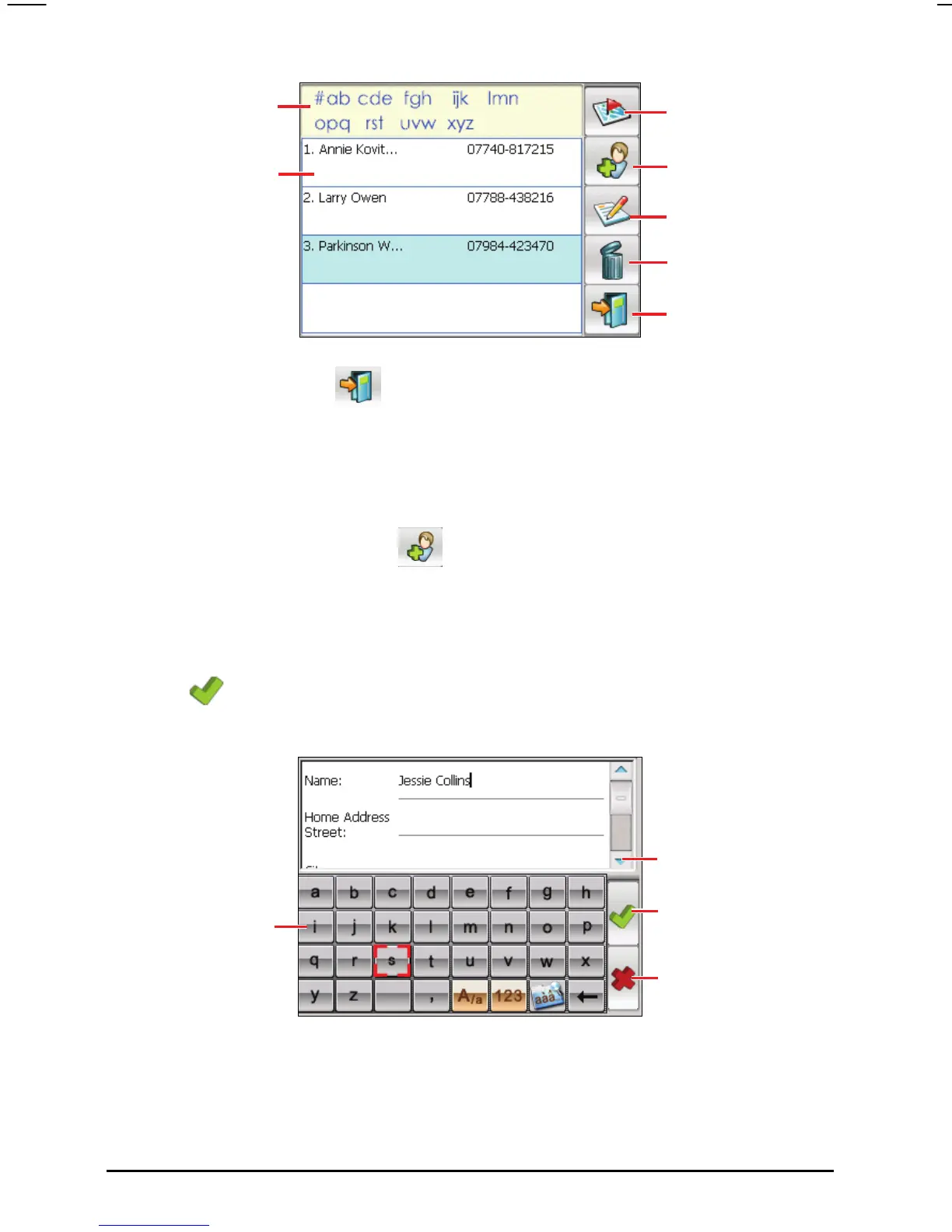
Tap one of the alphabet
sets to quickly find your
Tap to navigate to a
contact address.
contacts.
Tap to create a new
contact.
Tap twice to display a
summary screen of a
contact.
Tap to edit a contact.
Tap to remove a conta
To exit the program, tap
screen.
on the bottom right corner of the contact list
7.2 Creating a Contact
1. After starting Contacts, tap on the right toolbar of the contact list
screen.
2. Use the soft keyboard to enter the name and other contac You
roll down to see all available fields.
3. Tap
t information.
will need to sc
on the editing screen to save the contact and return to the contact
list screen.
Tap to return to the Tools
screen.
ct.
Scroll to see more fields.
Tap to return to the
conact list (the contact is
saved automatically).
Tap the soft keyboard
buttons to enter text and
numbers.
Tap to return to the
contact list without
saving.
58



 To Next Page