4. Then tap the equal sign button to generate the result.
Using Calculator Memory
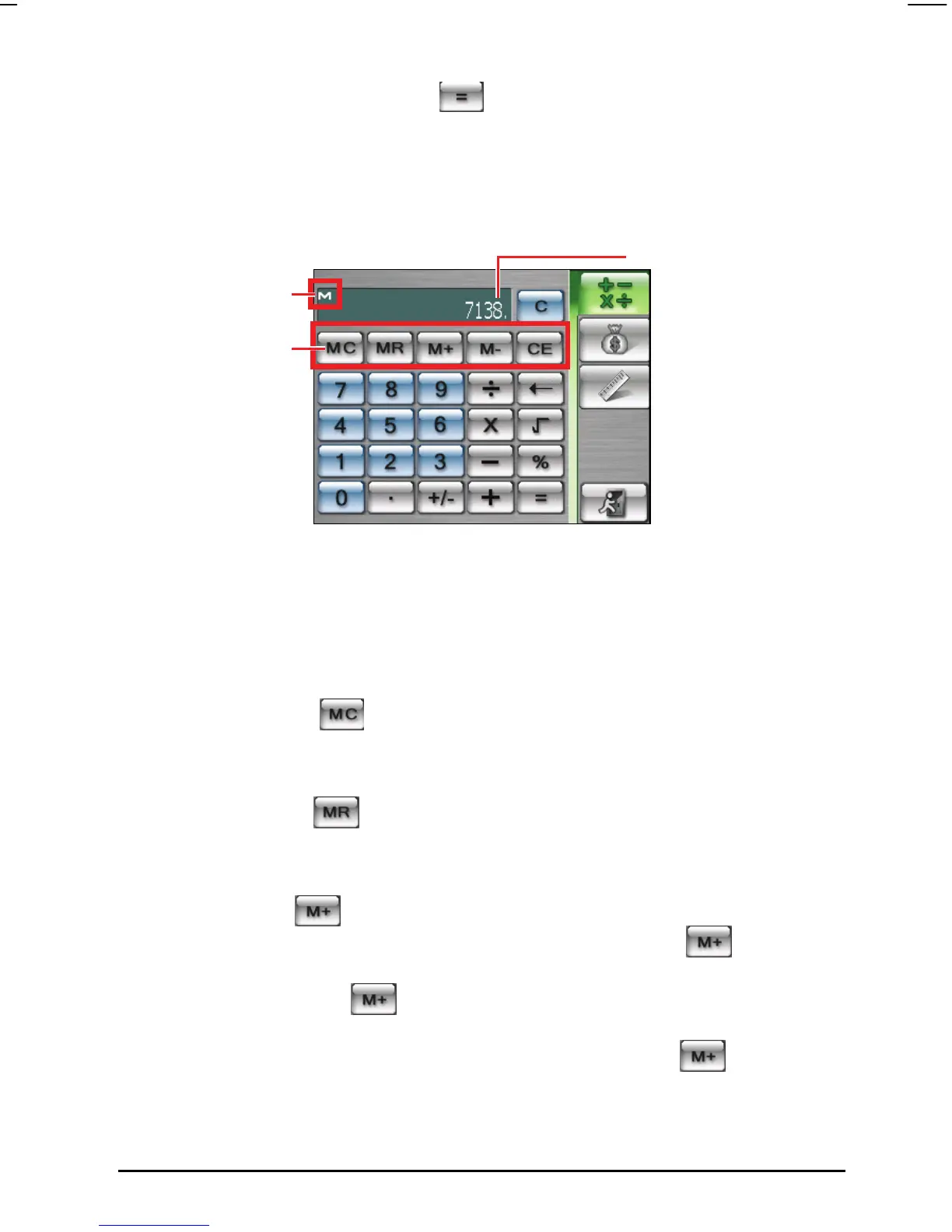
Calculator mode allows you to store a number value in the calculator memory
for later use.
Memory indicato
Memory button
Display field
You can use the memory buttons to store, display or change the value that you
add to the memory. When a value is saved to the calculator memory, the
Memory Indicator (M) will appear in the display field. You can use this saved
value to add or subtract a value to/ from this value in the memory. See the details
below:
Memory Cancel
Clears the memory and removes the Memory Indicator (M) from the display
field.
Memory Recall
Replaces the currently displayed number with the value stored in the
memory.
Memory Plus
If the memory is empty, you can tap Memory Plus button
to add the
currently displayed number as positive (+) to the memory. If you tap the
Memory Plus button
again, the same number will be added again to
the currently stored number. When a number is stored in the memory, you
can also calculate a number and tap Memory Plus button
to add this
number to the number already stored.
63



 To Next Page