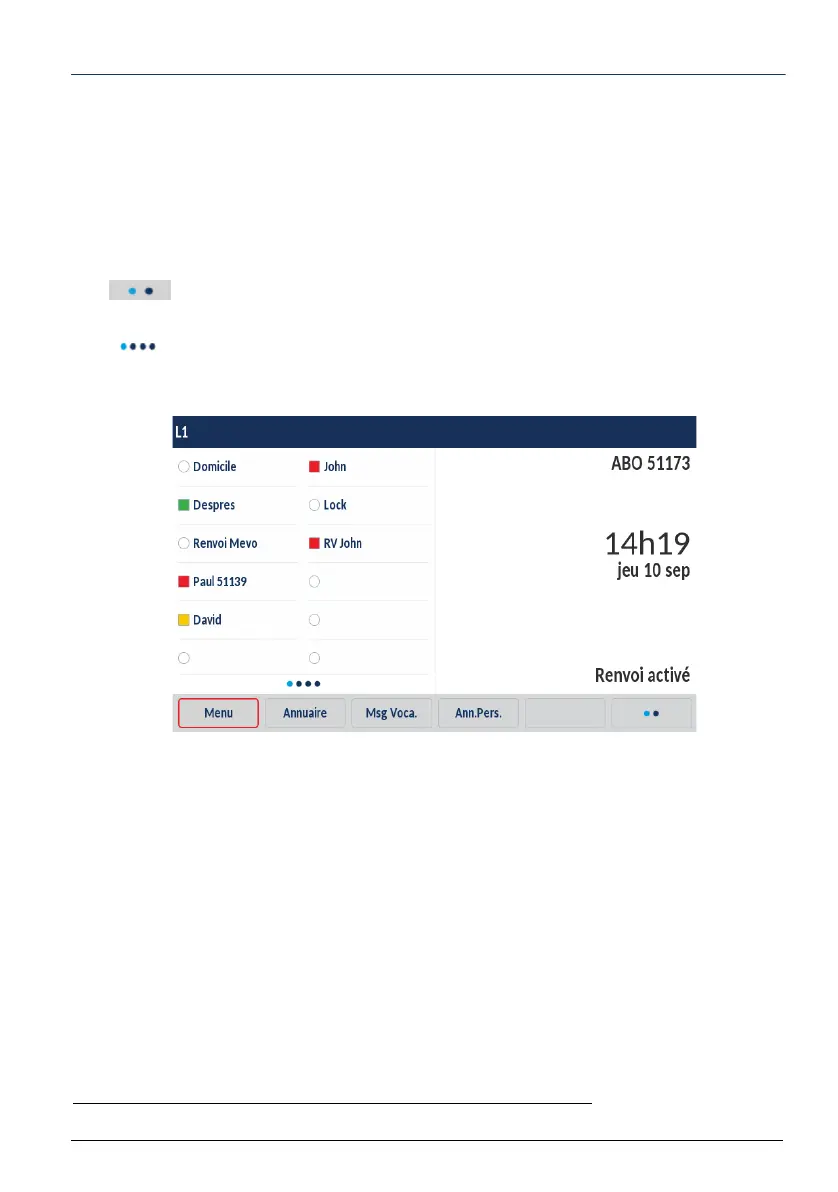
Description of the terminal
4
Touchscreen:
The content of the screen varies according to the terminal and guides you in your searches
by displaying the context-sensitive keys. Follow the instructions.
To navigate through the different pages of the screen, scroll from right to left (and vice ver-
sa) or from top to bottom (and vice versa) with your finger on the area concerned.
To select an item, press it with your finger.
The key may appear in the menu area. Pressing this key will display other func-
tions.
The key also appears on screen, indicating that the other pages may be viewed
by touching the screen with your finger.
In idle mode, the screen indicates:
• The terminal ID
• The name assigned to the programmable keys. These keys can be programmed using
MiVoice 5000 User Portal. Ask your system operator for advice.
• Date and time
• A message line: if several messages concern the terminal status, each message is
displayed alternately. These messages indicate:
• That immediate call forwarding is active
• The calls missed since the last time the log was accessed
• That fallback mode is active (backup)
• That the Do Not Disturb function is active
• A parked call
• A password renewal request *
• A password expiration notification *.
• The label for the context-sensitive keys on the interior panel.
* According to the password policy programmed by the system operator



 To Next Page