Operator user‟s manual
22/78
Sepia and black/white
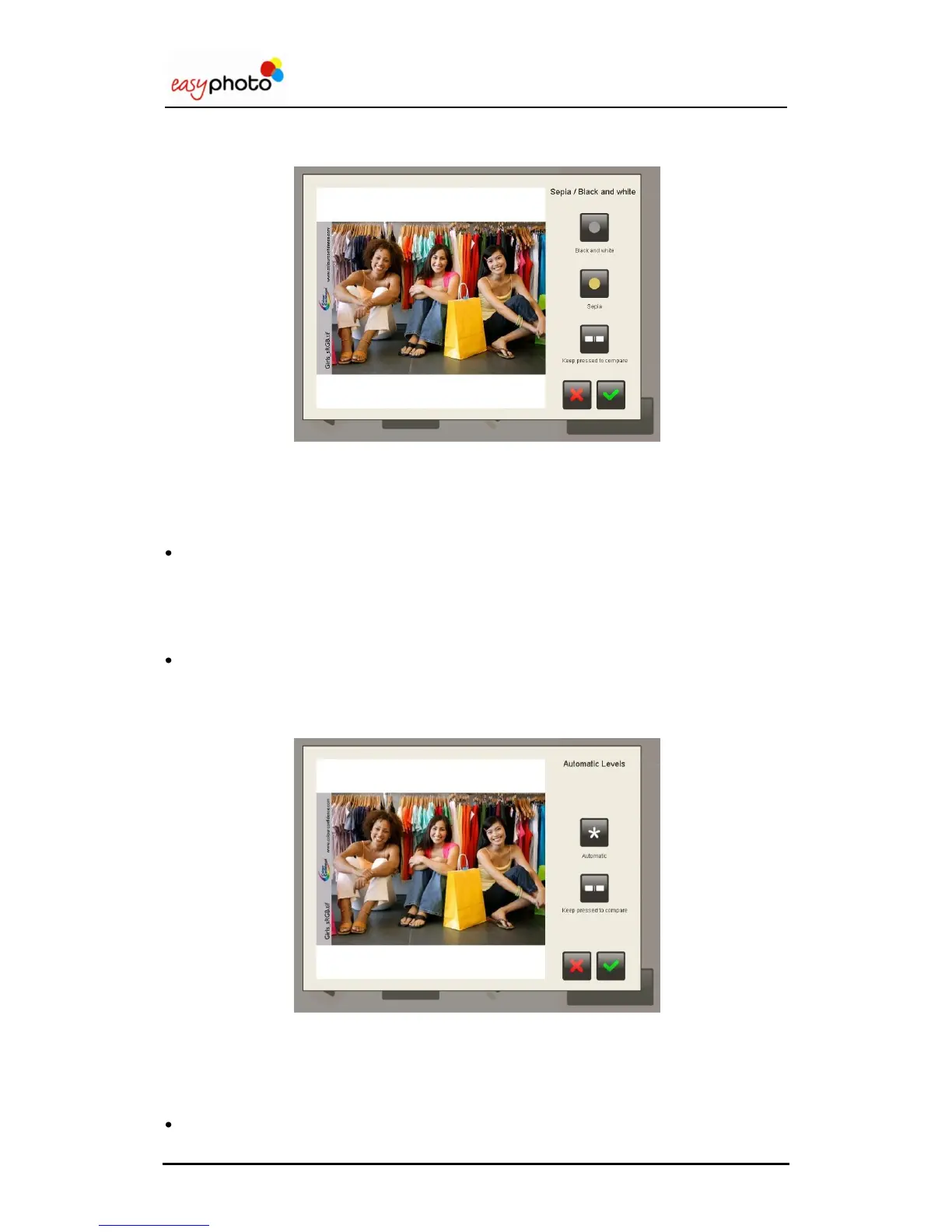
Once the “Sepia, black and white” button is pressed, the following screen is showed:
For changing the image to black and white:
1. Press the “Black and white” button.
Press the “Keep press to compare” button to display the original image without changes.
Press the green tic to save the changes.
Press the red cross to not save the changes and escape this screen.
For changing the image to sepia:
1. Press the “Sepia” button.
Press the “Keep press to compare” button to display the original image without changes.
Press the green tic to save the changes.
Press the red cross to not save the changes and escape this screen.
Automatic levels
Once the “Automatic levels” button is pressed, the following screen is showed:
For improving the image automatically:
1. Press “Auto” button
Press the “Keep press to compare” button to display the original image without changes.
Press the green tic to save the changes.
Press the red cross to not save the changes and escape this screen.


 To Next Page
 Loading...