Chapter Two: Installation How To Un
ack the T
e 250 Unit
9
Chapter Two: Installation
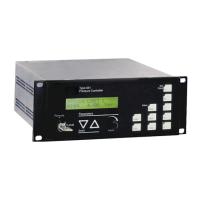
How To Unpack the Type 250 Unit
MKS has carefully packed the Type 250 unit so that it will reach you in perfect operating order.
Upon receiving the unit, however, you should check for defects, cracks, broken connectors, etc.,
to be certain that damage has not occurred during shipment.
Note
Do
not
discard any packing materials until you have completed your
inspection and are sure the unit arrived safely.
If you find any damage, notify your carrier and MKS immediately. If it is necessary to return the
unit to MKS, obtain an ERA Number (Equipment Return Authorization Number) from the MKS
Service Center before shipping. Please refer to the inside of the back cover of this manual for a
list of MKS Calibration and Service Centers.
Caution
Only qualified individuals should perform the installation and any
user adjustments. They must comply with all the necessary ESD and
handling precautions while installing and adjusting the instrument.
Proper handling is essential when working with all highly sensitive
precision electronic instruments.
Unpacking Checklist
Standard Equipment
•
Type 250 Unit
•
Type 250 Instruction Manual (this book)
•
Power Cable
Optional Equipment
•
Rack Mounting Kit:
RM-6
•
Electrical Connector Accessory Kit:
250E-K1 (includes an I/O connector for the rear panel of the unit, a cover for the
I/O connector, and a screw lock assembly for the I/O connector cover)
•
System Interface Cables (refer to Table 2, page 10)


 To Next Page