Front Panel Controls Cha
ter Three: Overview
24
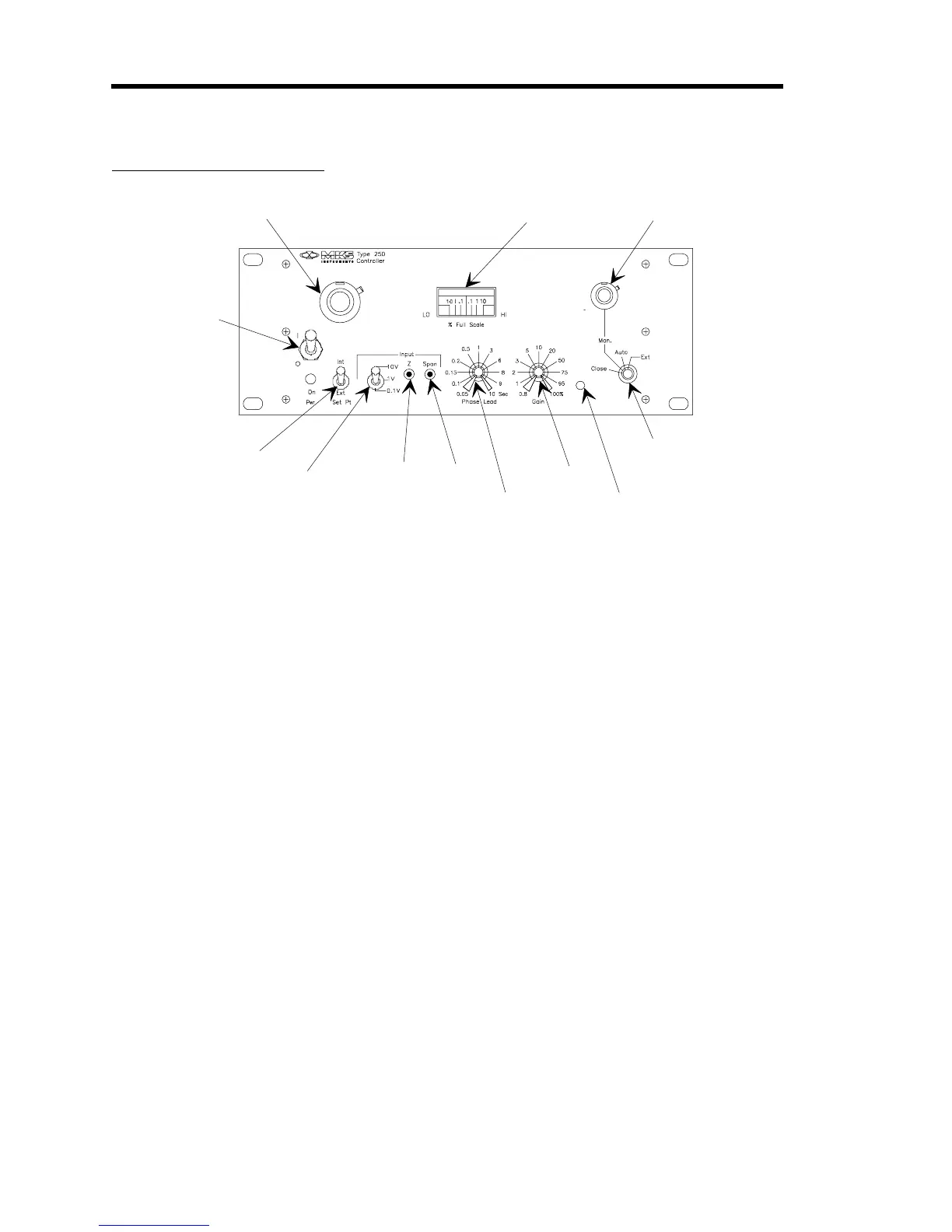
Front Panel Controls
On/Power
Int/Ext
Span
10V/1V/0.1V
Phase Lead
Gain
Valve Mode Switch
Error Meter
Set Point Control
Z (Zero)
Bias
Bias
Manual Control
Figure 5: Front Panel Controls
ON/POWER
- Controls the AC power to the 250 controller. The LED indicator below it
indicates when the power is on, that is, the plug is in and the fuse is alive.
INT/EXT
- Selects either the internal (front panel) set point control or an external set point
voltage.
10V/1V/0.1V
- Selects the full scale range of the input voltage. As shipped, the 250 controller is
calibrated for ±0.25% on the 10V range. The 1V and 0.1V ranges are calibrated for ±2%, but can
be adjusted closer with the span pot (refer to SPAN below).
Z (ZER0)
- Allows offsetting for any initial zero errors in the transducer. With zero pressure (or
flow) on the transducer and the set point at zero, adjust the zero pot for zero error on the error
meter (or 0000 reading on the optional DVM).
SPAN
- Allows precise adjustment of the full scale input voltage. Any range can be accurately
calibrated for any voltage within its range by applying an accurate full scale voltage, turning the
set point to full scale, and adjusting the SPAN control for zero error. For example, with a 5.00
Volt input, put the SPAN select on 10V and adjust the SPAN for zero error on the error meter (or
10000 reading on the optional DVM).
PHASE LEAD
- The PHASE LEAD control allows you to compensate for the major lag in the
control system. In pressure systems, this lag is generally caused by the restrictions in the gas
flow line and the capacity of the pressure vessel. In flow systems, the lag is generally the time
constant of the mass flow meter. Typical settings are 0.5 to 5 seconds. A setting that is too low
will cause overshoot; too high will cause a slow response.


 To Next Page