Instruction Manual #122162 19
5. Installation & Power-Up
5.1 SENTRY 1510
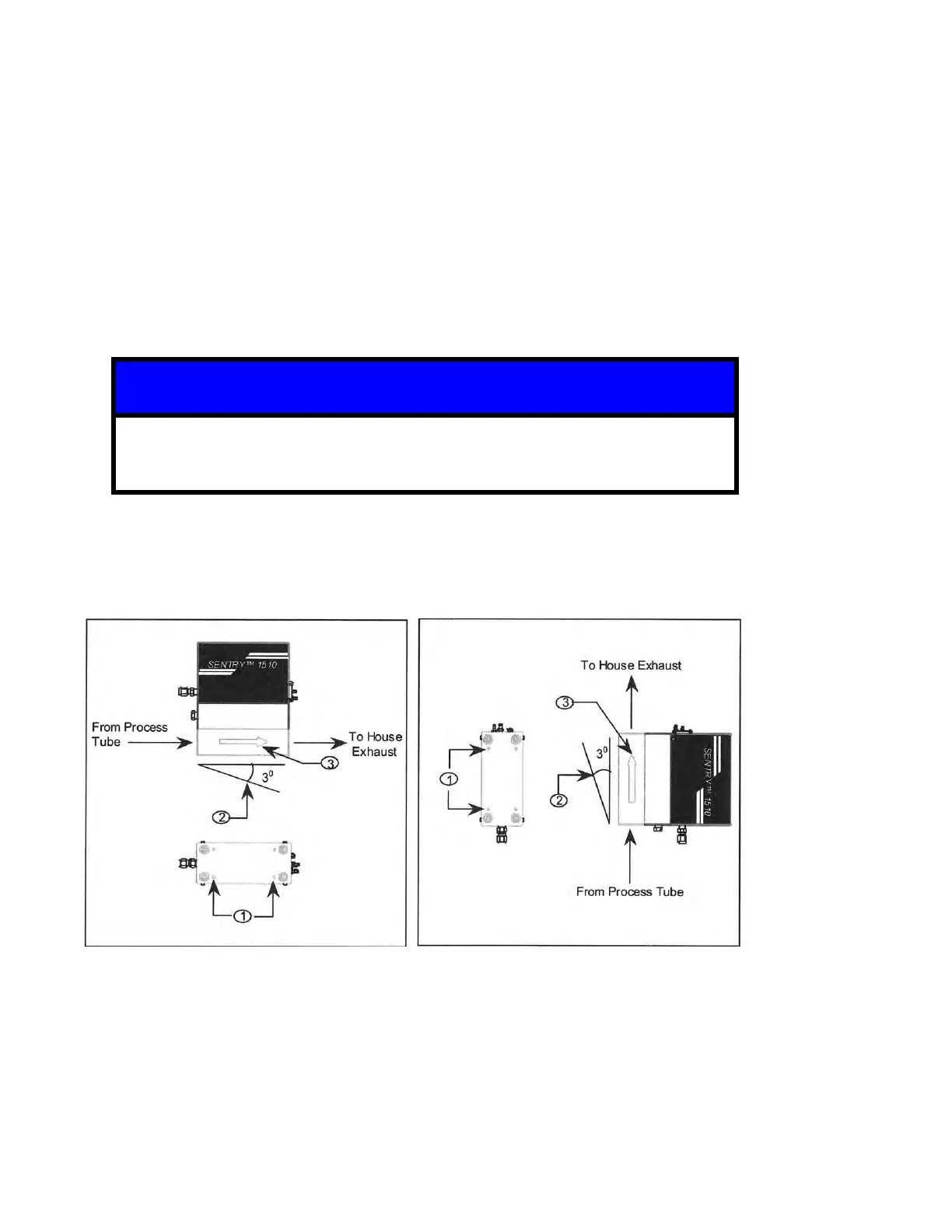
The SENTRY 1510 is available in a horizontally mounted configuration and a vertically
mounted configuration. Both versions will be illustrated throughout this manual. Before
beginning your installation verify the part number is the appropriate number for your
installation.
5.1.1 Mounting the SENTRY 1510 to the Process Tool
1. Selected a location for the SENTRY 1510 and mount the SENTRY 1510 Controller to the
support structure using 10-32 hardware in the threaded holes located at the base of the
unit.
Do not to over-tighten the 10-32 screws, as this could result in damage to the
internal threads.
2. For horizontal configurations be sure the 1510 Controller is within 3 degrees of horizontal.
For vertical installations be sure the unit is mounted to within 3 degrees of vertical.
3. Be sure the arrow indicating the direction of flow is pointing towards the house exhaust.


 To Next Page