Mobileye Proprietary and Confidential
support@mobileye.com
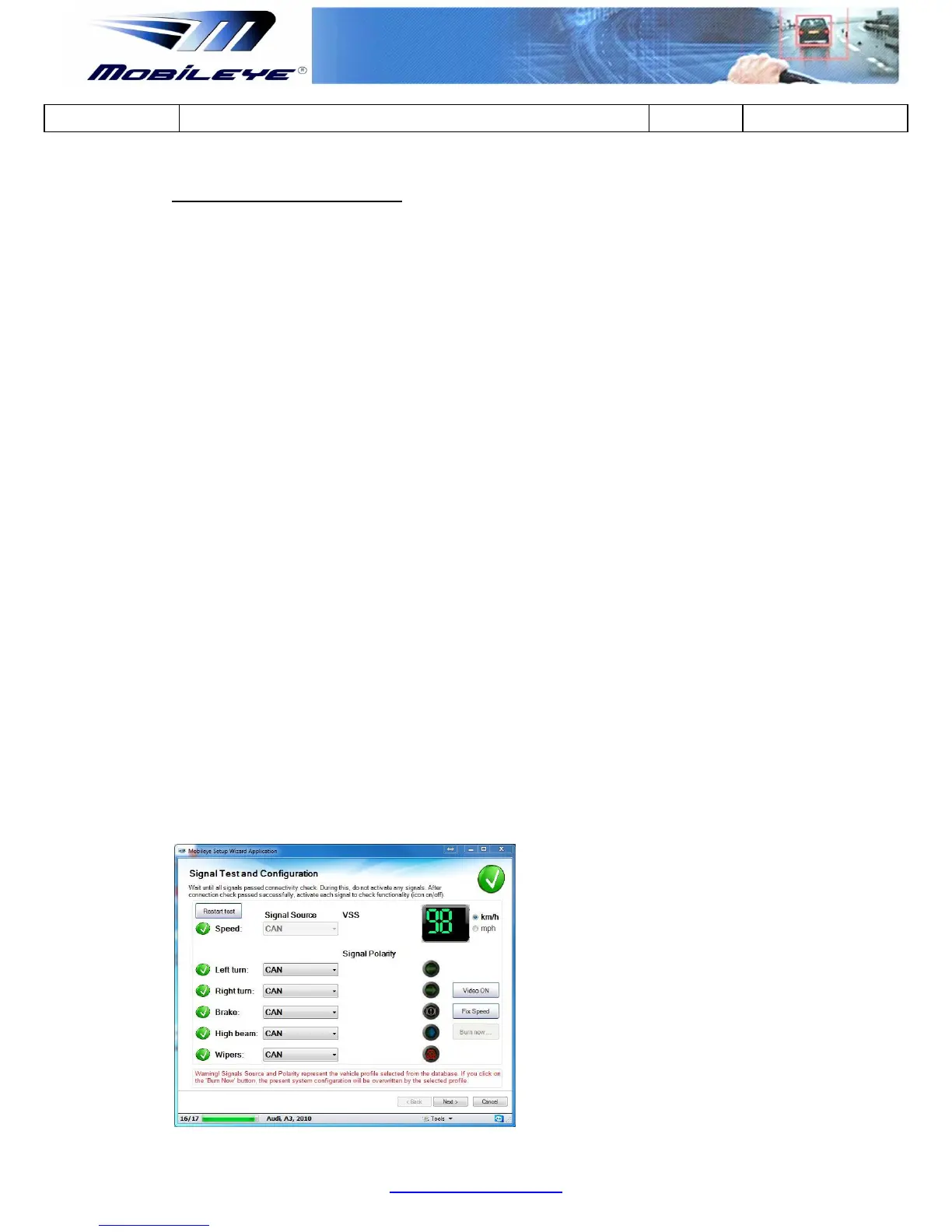
Step 3 - Verify Speed signal
Drive and confirm speed indication in the Mobileye setup wizard matches to the
actual speed of the car.
Note: Be aware that there is a 2 to 3 second delay between the vehicle`s speed to
the speed indication in the Mobileye Setup Wizard application.
Click "Video ON" if you want to see the camera image (low resolution)
while performing the test drive.
When using the analog speed signal and the real vehicle speed does not
match the speed shown in the Mobileye setup wizard, you will need to
change the VSS rate and click "Burn now" for the changes to take effect.
(This option is available only when using the E-box).
Fix Speed - OBDII universal speed signal acquisition (speed by request from
OBD2)
we will use this option if the speed signal is not accurate or not working.
Note: Works only when connected to OBDII CAN-Bus on a bus speed of
250kbs or 500kbs (and only when connected to Pins 6 & 14 in OBDII)
Note: Will not affect other signals received from the OBDII CAN-Bus.
Note: Other required signals not available on OBDII CAN-Bus will be
Analog
chosen) even if available on a different CAN-bus (since only 1 CAN-bus
configuration is available)
SAFETY WARNING!
Drive carefully and according to the law during the test drive!



 To Next Page