Further information on how to avoid damage caused by lightning and over voltage is available from man-
ufacturers of lightning and over voltage protection devices.
Installing the Sensor Modules
NOTE! Upon delivery, the sensor module sockets in the front plate 1.3 are fitted with transport plugs 1.4.
When operating the camera, it needs to be fitted either with sensor or blind modules 1.5. This closes off the
front plate and protects the camera against foreign objects, animals and water.
WARNING! Make sure the power supply to the camera is disconnected before installing or replacing sensor
modules.
WARNING! When installing the sensor modules or closing the module housing, make sure that the sensor
module cables are not damaged or bent sharply.
CAUTION! Do not operate the camera until all three module receptacles have been fitted with sensor mod-
ules or blind modules.
Procedure
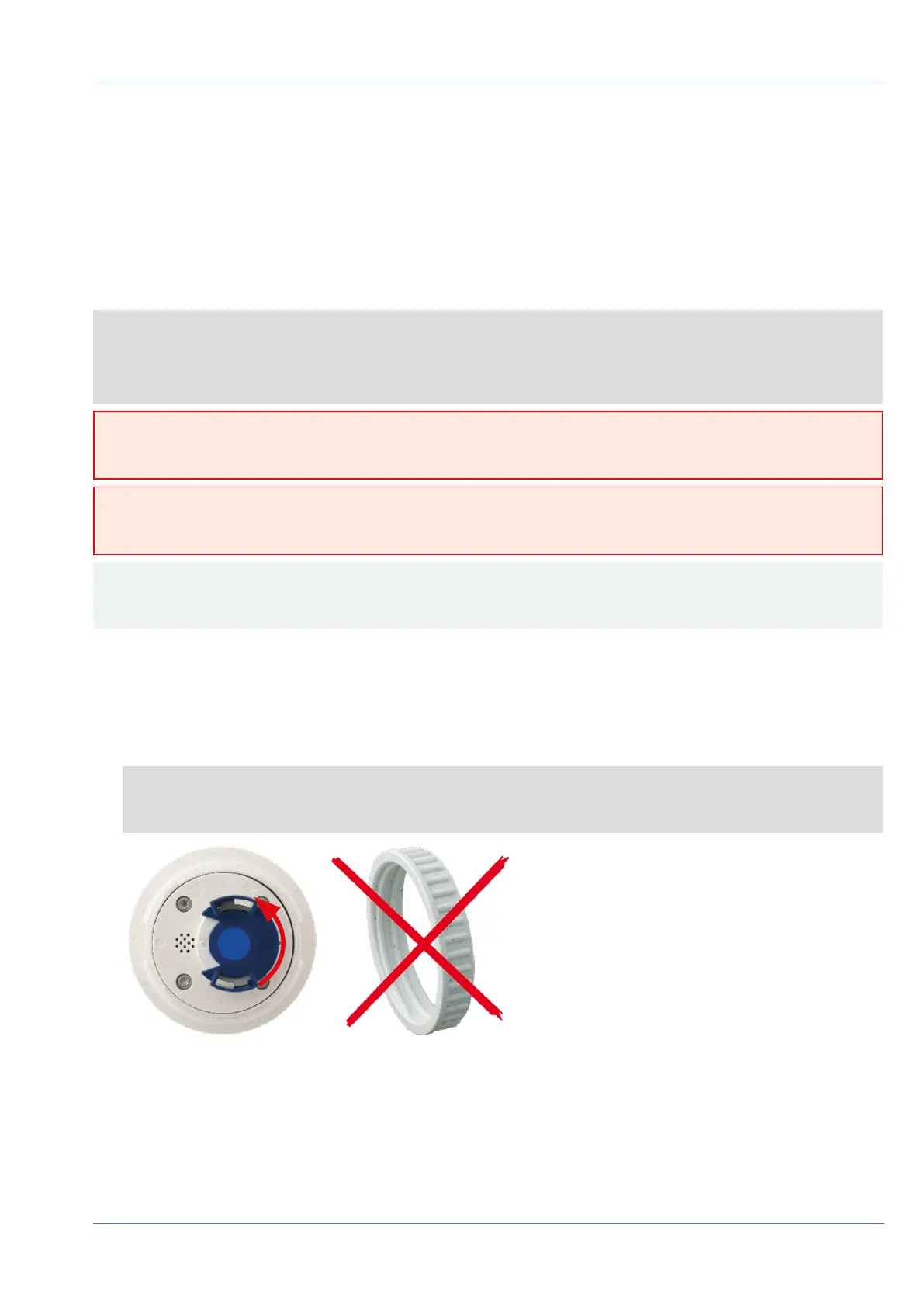
1. Prepare the sensor module: Remove the bayonet catch by rotating it counter-clockwise, then remove
the blue rubber plug.
NOTE! If the plastic nut has been installed, remove it.
This nut will not be used any more in the mounting process.
Fig. 6: Prepare sensor module for mounting; remove plastic nut!
Mounting
Installing the Sensor Modules
38 / 110



 To Next Page