102
Q26 Camera Manual: Installation
Connecting the Patch Cable to an MX-Overvoltage-Protection-Box, an MX-NPA-Box or a
Standard Network Outlet
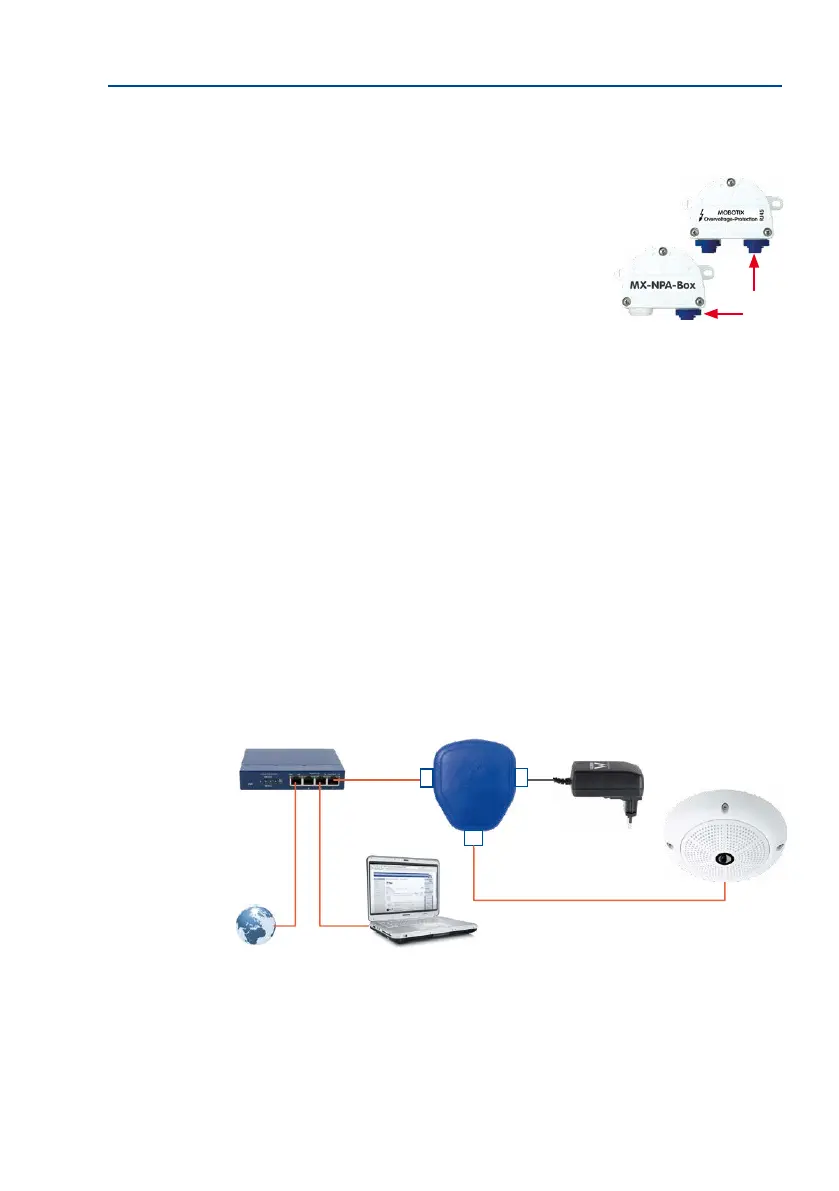
To establish the network connection of the camera using an
MX-Overvoltage-Protection-Box or an MX-NPA-Box, remove the
blue bayonet catch and the blue sealing plug from the right-hand
side of the box. Insert the MOBOTIX patch cable into the box
and fasten the cable using the blue bayonet catch.
For additional’ information on how to install an
MX-Overvoltage-Protection-Box
or an
MX-NPA-Box
, open
the Products > Accessories > Interface Boxes section on
www.mobotix.com.
When using a standard network outlet (only for indoor installations), insert the MOBOTIX
patch cable of the Q26 directly into the network outlet.
If additional cables are required inside the housing, they must be connected as described in
Section 2.9.6, «Connecting a USB Cable» and Section 2.9.7, «Connecting a Two-Wire MxBus
Cable».
2.9.3 Power Supply Using a Switch
1. Connect the factory pre-installed cable of the camera to the camera connector of
the PoE adapter.
2. Connect the LAN/Power connector of the PoE adapter to the Ethernet connector of
the switch/router or the Ethernet port.
3. Plug the RJ45 connector of the power supply unit into the PC/Power connector of
the PoE adapter.
IP addresses in the gure are
shown only as an example!
Switch/router
PoE adapter
Power supply
LAN/www
Camera
(10.8.0.99)
LAN/Power
PC/Power
Camera
RJ45
RJ45
RJ45
PC
(10.8.0.11/255.0.0.0)



 To Next Page