97
Installing the Corner and Pole Mount
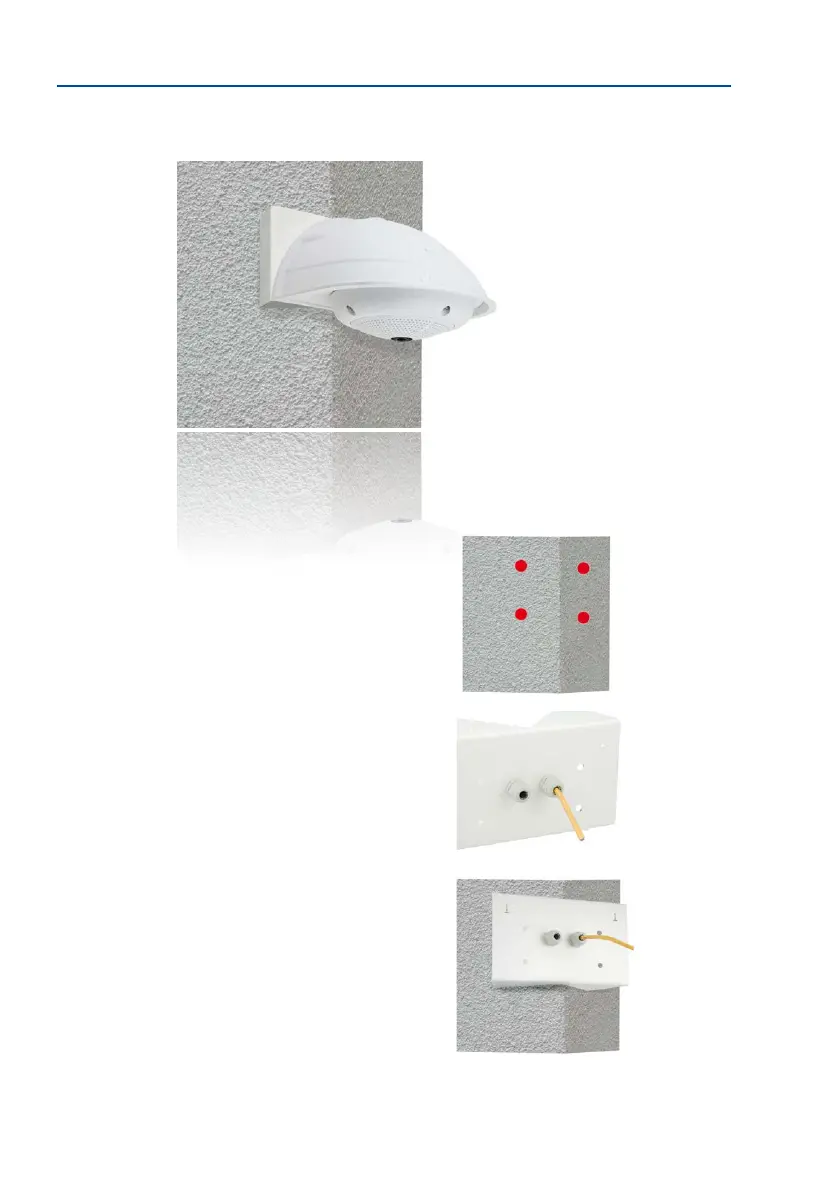
2.7.3 Mounting to a Wall or Building Corner
Use the included screw anchors, screws and washers to aix the Corner and Pole Mount to
a building corner.
• Mark the four screw anchor holes on the corner of the
building, ensuring that the arrows on the mount point
upwards. Drill the holes with a 10 mm wall drill.
• Pass the on-site network cable through one of the large
round holes at the back of the Corner and Pole Mount,
then through one of the 16 mm diameter holes on the
front of the mount. In order to properly protect the cabling,
you should let the cabling run from the inside of the
building through the Corner and Pole Mount directly into
the camera (concealed cabling). Note: The cable length
from the building corner should be at least 80 cm!
• Place the included wall anchors in the drilled holes and
screw the Corner and Pole Mount into place on the corner
of the building using the wood screws and washers. Use
the supplied drilling template (available for download
-
ing from www.mobotix.com) to mark the positions for
drilling the holes.
•
Next, install the Wall Mount on the Corner and Pole Mount
(see next section).



 To Next Page