104
Q26 Camera Manual: Installation
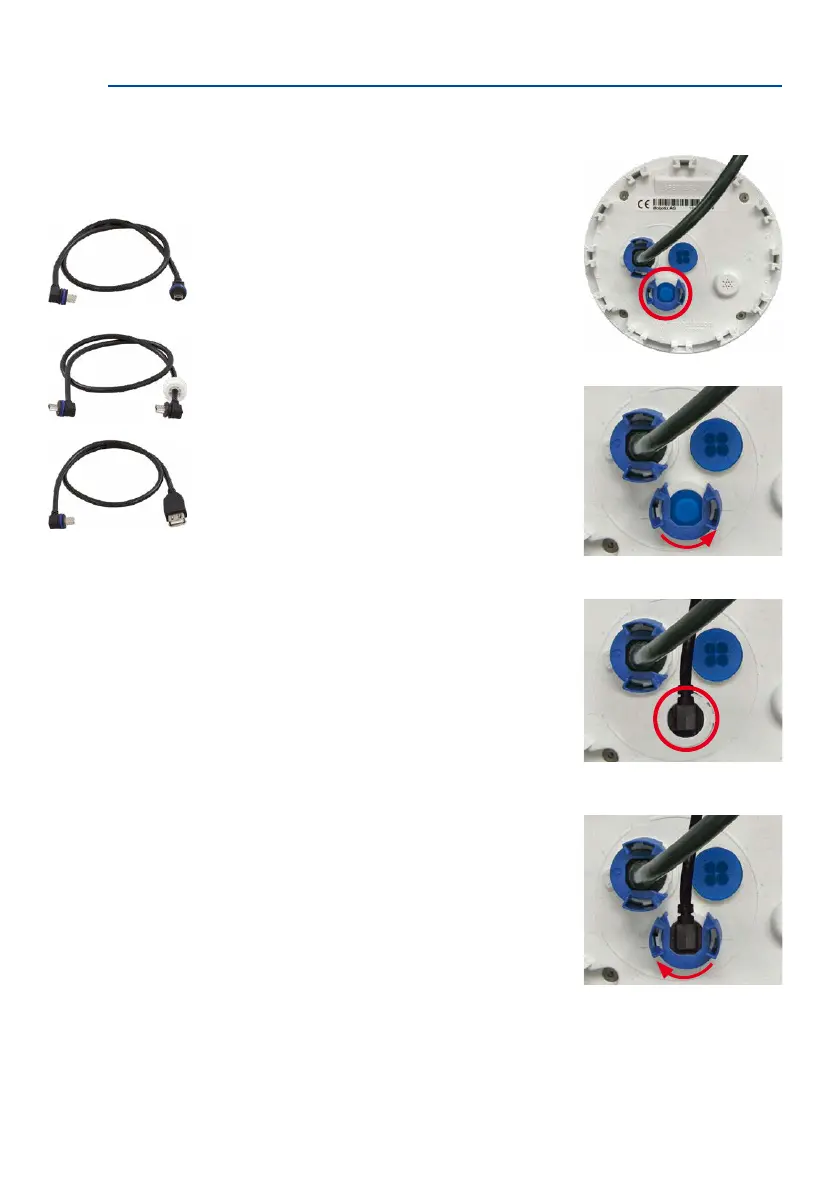
2.9.6 Connecting a USB Cable
Using the USB plug (red circle in gure), you can attach
existing expansion modules, such as the MOBOTIX ExtIO
(USB), the MX-232-IO-Box or external USB hard drives to
the camera in a weatherproof and well-protected manner.
Procedure
1.
In case the camera had already been installed, remove
the camera so you can access the connectors on the
back.
2.
Remove bayonet catch and USB plug: Turn the bay-
onet catch to the le (red arrow in gure), take it o
and remove the blue USB plug.
3. Connect USB cable: Push the MOBOTIX cable with
the angled MiniUSB plug into the connector (red
circle in gure).
4.
Attach bayonet catch: Attach bayonet catch and turn
it clockwise until it gently snaps shut (see gure).
Only use USB cables with
angled plugs inside the
housing of the Q26!



 To Next Page