99
Replacing the MicroSD Card
2.8 Replacing the MicroSD Card
The camera must be taken down to remove, insert or replace a MicroSD card. To avoid data
loss, be sure to deactivate MicroSD card recording in the camera soware and reboot the
MOBOTIX camera before removing the card.
Caution
A MicroSD card may only be removed from the camera aer you have deactivated
Recording to SD Card and rebooted the camera. Failing to do so may lead to data loss!
2.8.1 Removing the MicroSD Card
1. Deactivate recording: Recording to MicroSD card must be deactivated (Admin Menu >
Storage on External File Server / Flash Device). If MicroSD card recording is still active,
deactivate recording and reboot the camera. Section 3.4, «MicroSD Card Recording»,
contains more information on this topic.
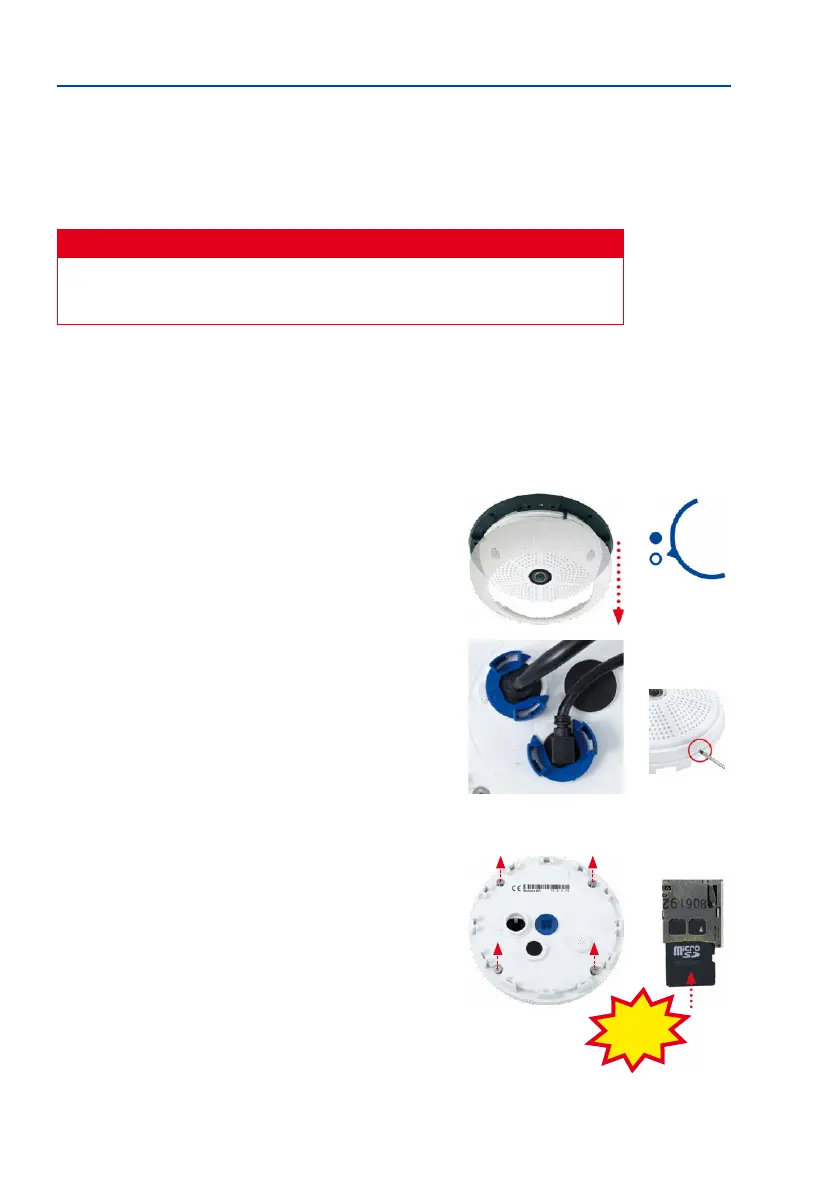
2. Remove the outer shell: Remove all four Allen screws
using the supplied Allen wrench and li o the outer shell.
3. Remove the connection cables: The connected cables
(patch cable, MiniUSB if present) must be removed from
the camera rst by rotating and opening the bayonet
catch (see «Removing the Cable Retainer» in Section 2.2.2,
«Procedure»).
4.
Remove the back of the camera and take out the MicroSD
card: Remove the four screws from the back plate using
the supplied 2 mm Allen wrench and carefully li o the
back plate. Gently push on the MicroSD card in the card
slot of the camera. The card will be released from the slot
and can then be removed from the camera.
To use the camera without a MicroSD card, continue with step 2
in the next section.
Bayonet catch open
Carefully loosen the rear
casing at the openings on
the side with a screwdriver
before removing it.
Push-push function: only
remove the MicroSD card
aer rst gently pushing it in
Click!



 To Next Page