13
Q26 Hemispheric
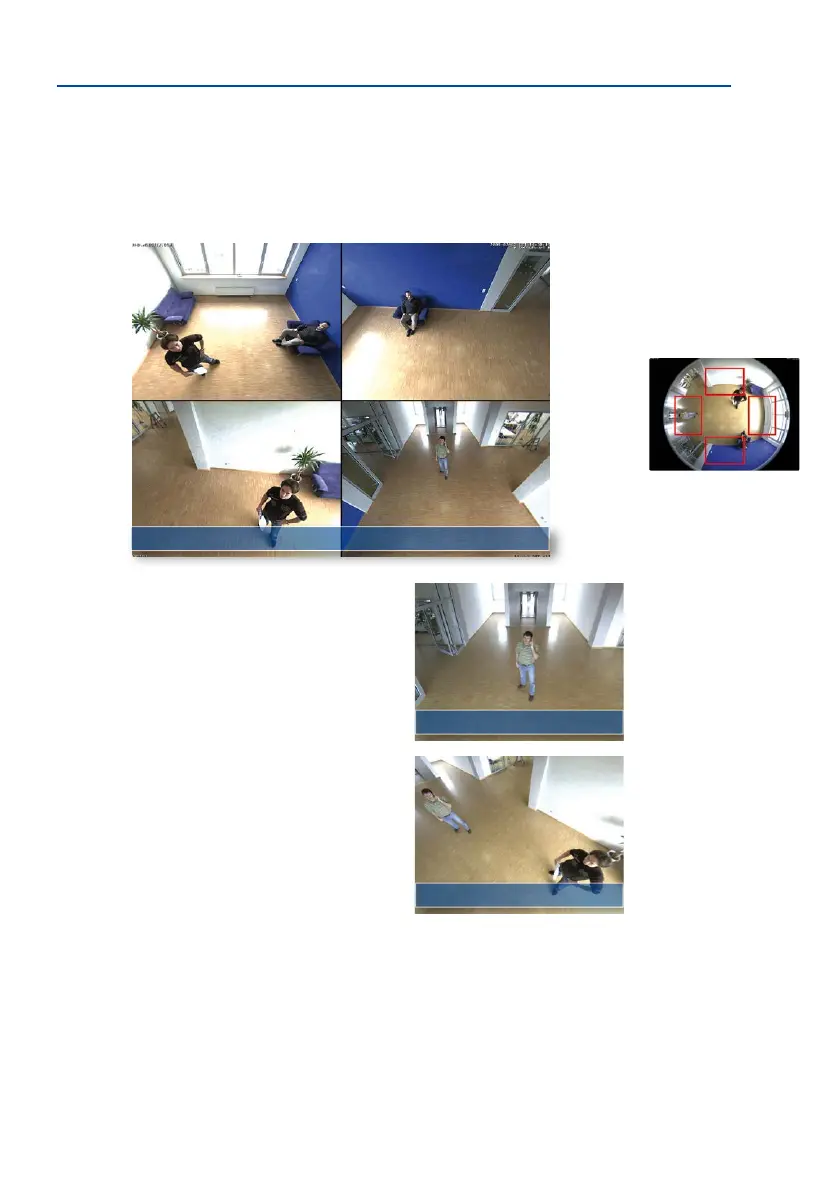
Surround View (Quad View), Based on the Correct Full Image
The Q26 “Surround” display mode replaces (when ceiling mounted) four cameras, and shows
four directions simultaneously on the monitor in a quad view. The preset North position can
be moved to any direction in the image; the camera generates the other three directions
(East, South, West) automatically and stores them as separate views.
Each of the four views features a soware-controlled
pan/tilt/zoom function (virtual PTZ), allowing it to be
customized as necessary.
In order to reduce user workload, the Q26 can store in
addition to the North, East, South and West standard
views, a total of 256user-denedcameraviewsusing
the vPTZ function, which can easily be brought up using
joystick keys or sobuttons. Besides being able to man-
ually bring up specic camera views, the camera can
also show them automatically by moving through the
North, East, South and West views or by showing the
rst 16 saved camera views (one aer the other like in
a slide show).
Complete HiRes Video Solutions by MOBOTIX
As opposed to conventional solutions, MOBOTIX cameras with their decentralized approach
oer so much more – state-of-the-art, network-based video security technology that increases
operating eiciency and yields a high degree of every-day usefulness.
Original Q26 image: Each
of the 4 views can be
individually modied
Original full image
Surround view: Quad
vPTZ & Zoom
vPTZ & Zoom



 To Next Page