4. INSTALLATION
12
CONNECTING AN
EXTERNAL
WATER FILLING
TANK
(OPTIONAL, automatic
filling function)
To avoid having to periodically fill the water tank (see Chapter 5, “First Start-Up”), it is
possible to connect the sterilizer to an external filling tank (supplied as an option), that the user
will periodically fill, or to a commercially-available, reverse-osmosis water purification system
with accumulation tank.
In that case, when the internal water tank reaches the MIN level, the autoclave activates a
pump that automatically fills the internal tank.
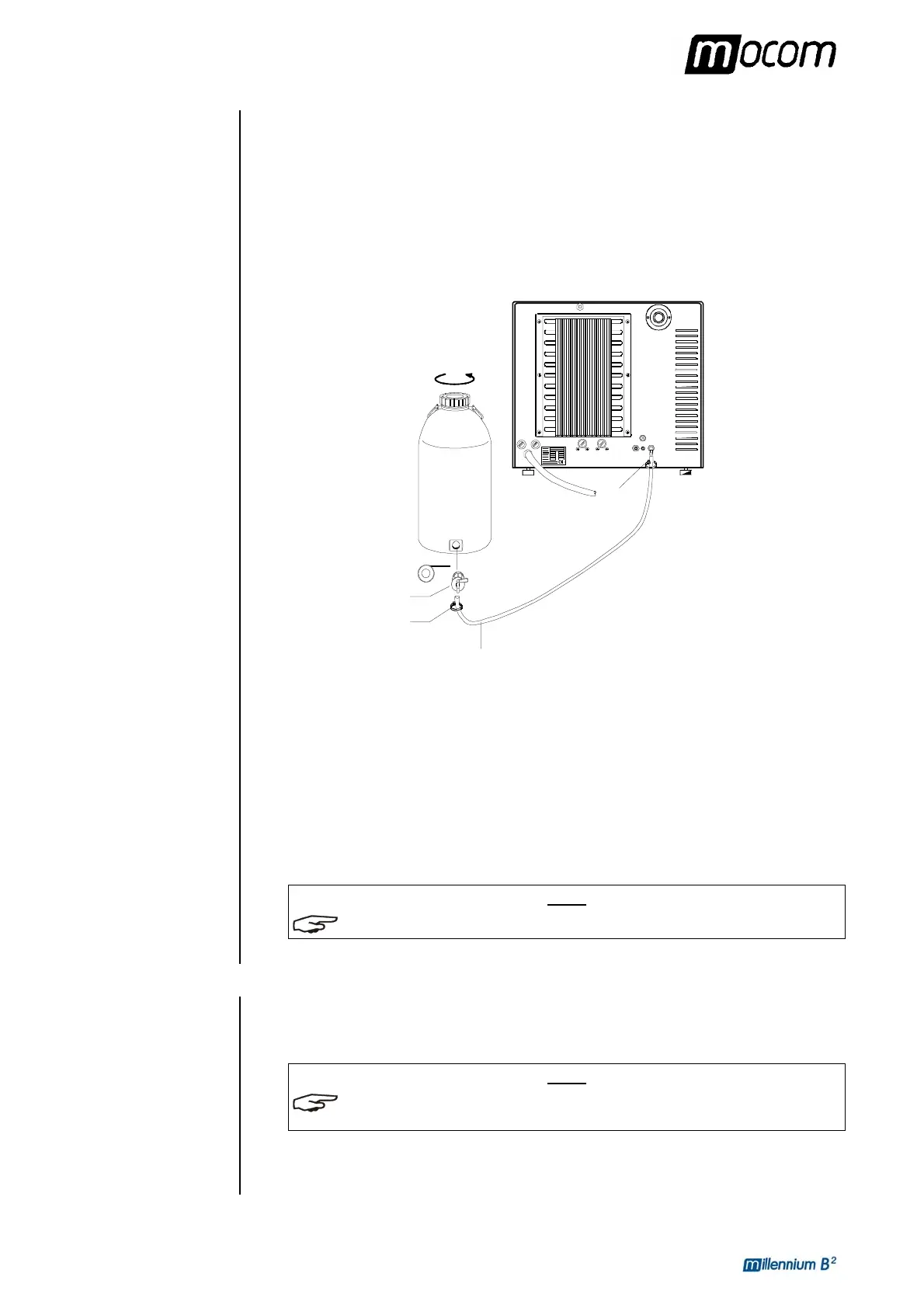
Follow the instructions below for the correct connection of the external tank:
– Install the tap provided on the filling tank; use Teflon tape or connector sealant for a perfect
seal.
Clip
Silicon pipe
Tap
Filling
tank
Clip
Teflon
– Use the filling tanks silicone tube (or other suitable tube, max length 2m) and insert it on
the filling connector taking care to push it completely on.
– Lock the tube to connector with the plastic tie provided.
– Insert the other end of the tube on the tap of the filling tank.
– Make sure that the tube runs freely from the device to the filling tank, without being bent,
crushed or obstructed in any way.
– Loosen the upper plug to facilitate the flow of water (also remove any gasket or under-
plug);
– Open the tap on the filling tank.
NOTE
REFER TO THE CHAPTER, “CONFIGURING THE DEVICE – AUTOMATIC FILLING OPTION ”.
CONNECTING
DEMINERALIZER
MILLDROP
The sterilizer can be connected to MILLDROP (water treatment system by reverse osmosis)
warranting the automatic reservoir filling with high quality demineralized water.
Refer to MILLDROP operating manual for the installation instructions.
NOTE
FOR THIS OPTION SETTING, REFER TO CHAPTER “CONFIGURING THE DEVICE –
AUTOMATIC FILLING OPTION”.
For additional information and advice about the correct connection of the sterilizer to the
various water purification systems, contact M.O.COM. customer support (see Appendix Z).



 To Next Page