4.4.3 The Information Button
The [Information] button is located in the top right hand corner of the screen:
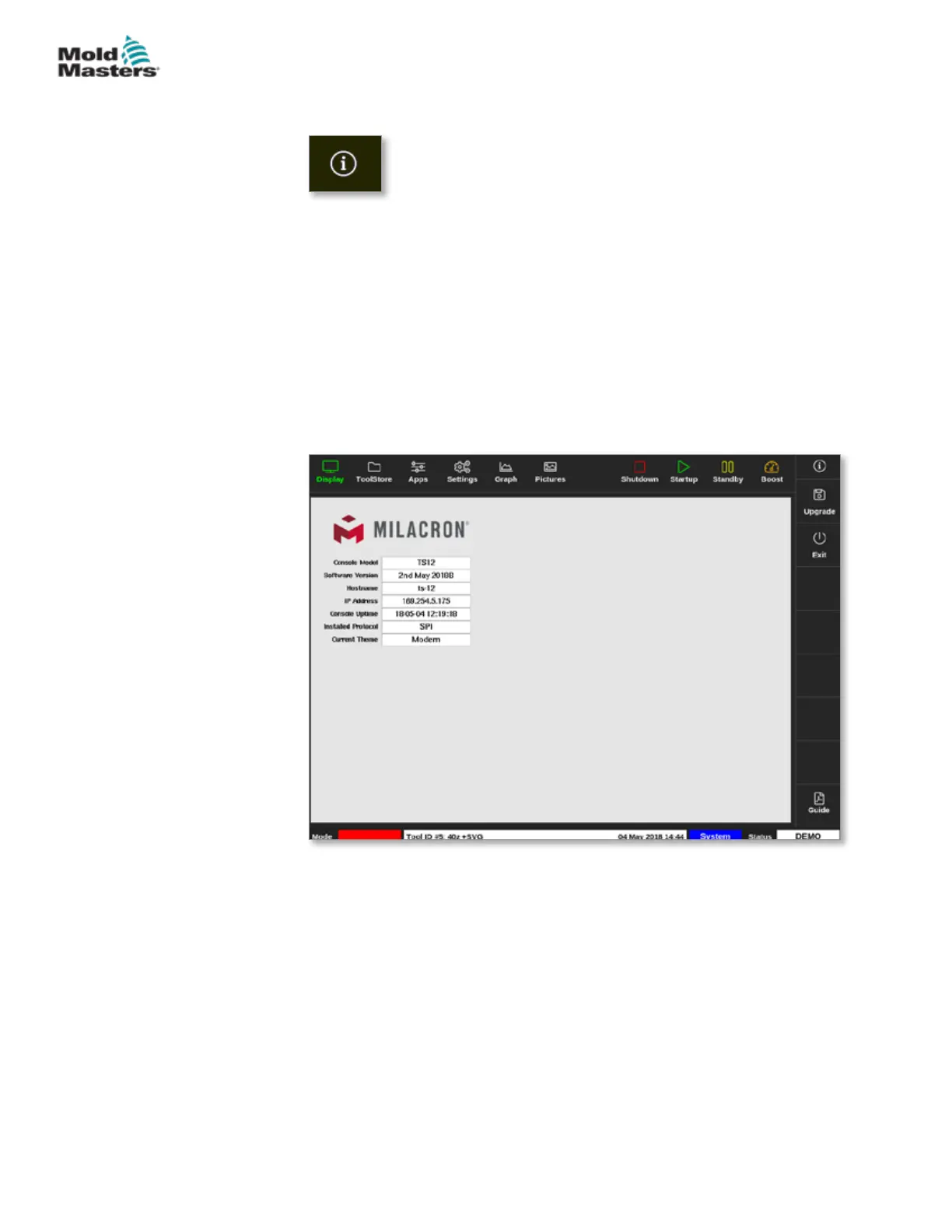
Use this button to access the following controller details:
• console model
• software version
• hostname
• IP address
• console uptime
• installed protocol
• current theme
• access to the quick guide
See Figure 4-4.
Figure 4-4 Information screen
The user can access a quick guide of operational instructions from this
screen. For more information, see "6.4 Quick Start Guide" on page 6-6.
The user can change the theme from this screen. For more information on
changing the screen theme, see "4.6 Modern Theme" on page 4-9.
This screen is also used to install software upgrades. For more information
on upgrading the software, see "8.1 Upgrade Software" on page 8-1.
4-7
© 2021 Mold-Masters (2007) Limited. All Rights Reserved.
OVERVIEW
M2+ Controller User Manual


 To Next Page