User Manual
15
http://internet
IP: web port (such as 8080)
http:// intranet IP: web port (such as 8080 only available at the same intranet)
When selecting Static from the Type, user can directly set IP address, Subnet Mask, Gateway, Web Port
and DNS shown as Picture 5-9.
Media Port: manually forward this port to router, details please refers to Picture 5-12.
Web port: equal to Web Application Manager’s web port no and manually forward this port to router.
IP Address: Input a special IP address, and the IP address is unique in full service intranet.
Net Mask: consistent with router’s
Gateway: consistent with router’s
DNS: Input DNS server
Click <save> button and restart DVR, all above parameters will be effective. Now you visit the DVR
remotely via below IP:
http://public IP: web port
(such as 8080)
http://intranet IP: web port
(such as 8080 )
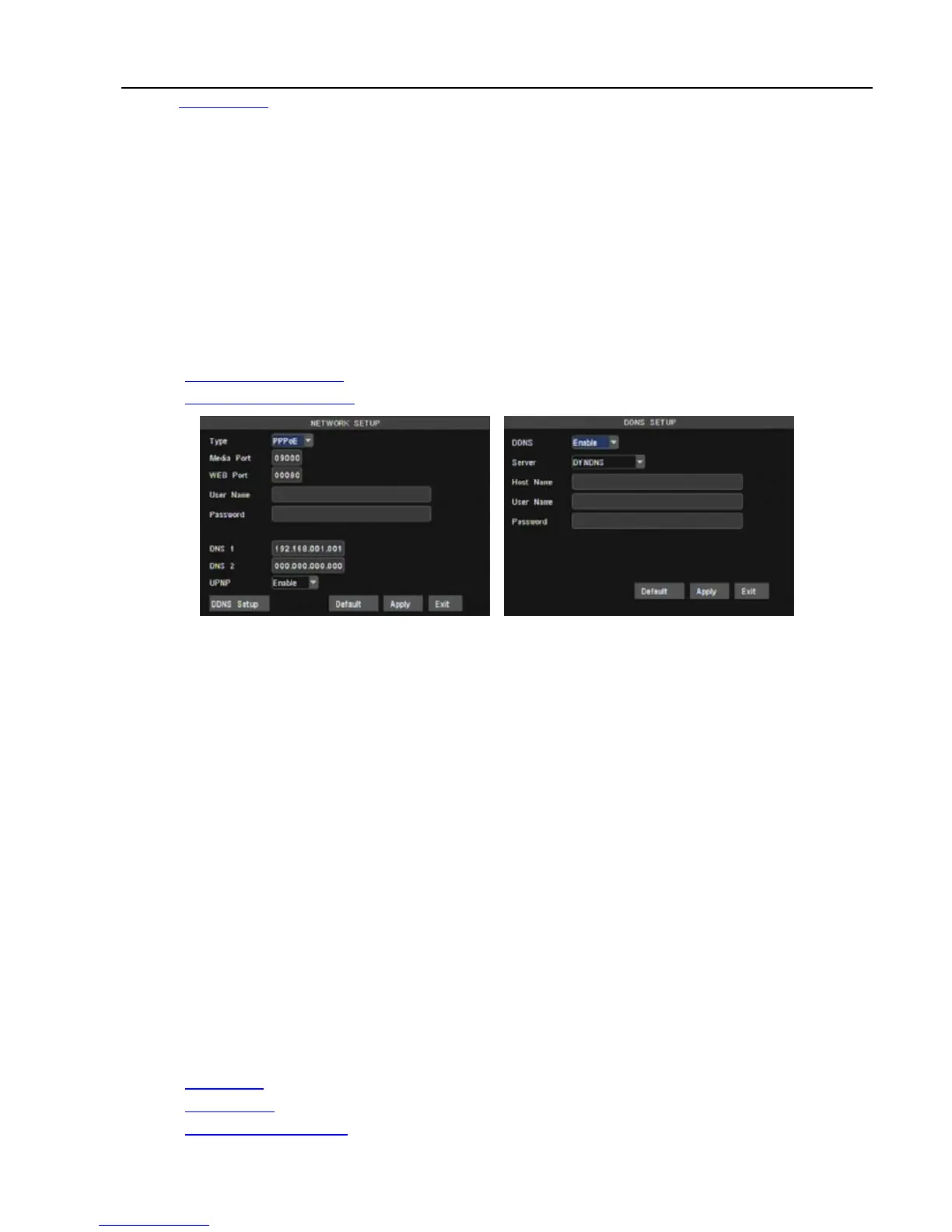
When selecting PPPoE form the Type, user can input user name and password provided by ISP and set
Media and Web port (details please refer to the Picture 5-10). You can visit your DVR via public network
without port forwarding when network type is set to “PPPoE” and web port is right.
DDNS (Dynamic DNS) is a service that register a domain name and the floating IP address with the DDNS
server so that the domain name can be routed to the IP address even if the IP address is changed in a
dynamic IP system.
At the bottom of the NETWORK SETUP window there is an option to setup the DVR to be accessed
through a DDNS service. When you click on the DDNS button it brings up the window displayed as Picture
5-11. You can access the DVR through a static or dynamic IP address; however a dynamic address can
change from time to time. How often depends on your service provider When it changes you need to go to a
website such as www.myipaddress.com from a computer attached to the same router as the DVR to find out
what the new IP address is.
1、 Server: select a Dynamic domain name server provided by ISP;
2、 Host Name: Input host name registered from Dynamic Domain Naming System, for example:
DVR2009.3322.org;
3、 User Name: Input a user name registered before applying for a domain name;
4、 Password: Input a password you set when registering a user name.
User can enter below website or domain name as per current PC network environment to visit the remote
DVR.
http://public
IP: Web port(such as 0080)
http://intranet
IP: Web port(such as 0080)(only available at the same LAN)
http://superdvr.3322.org
: Web port(such as 0080)
Picture 5-10 Picture 5-11



 To Next Page