User Manual
22
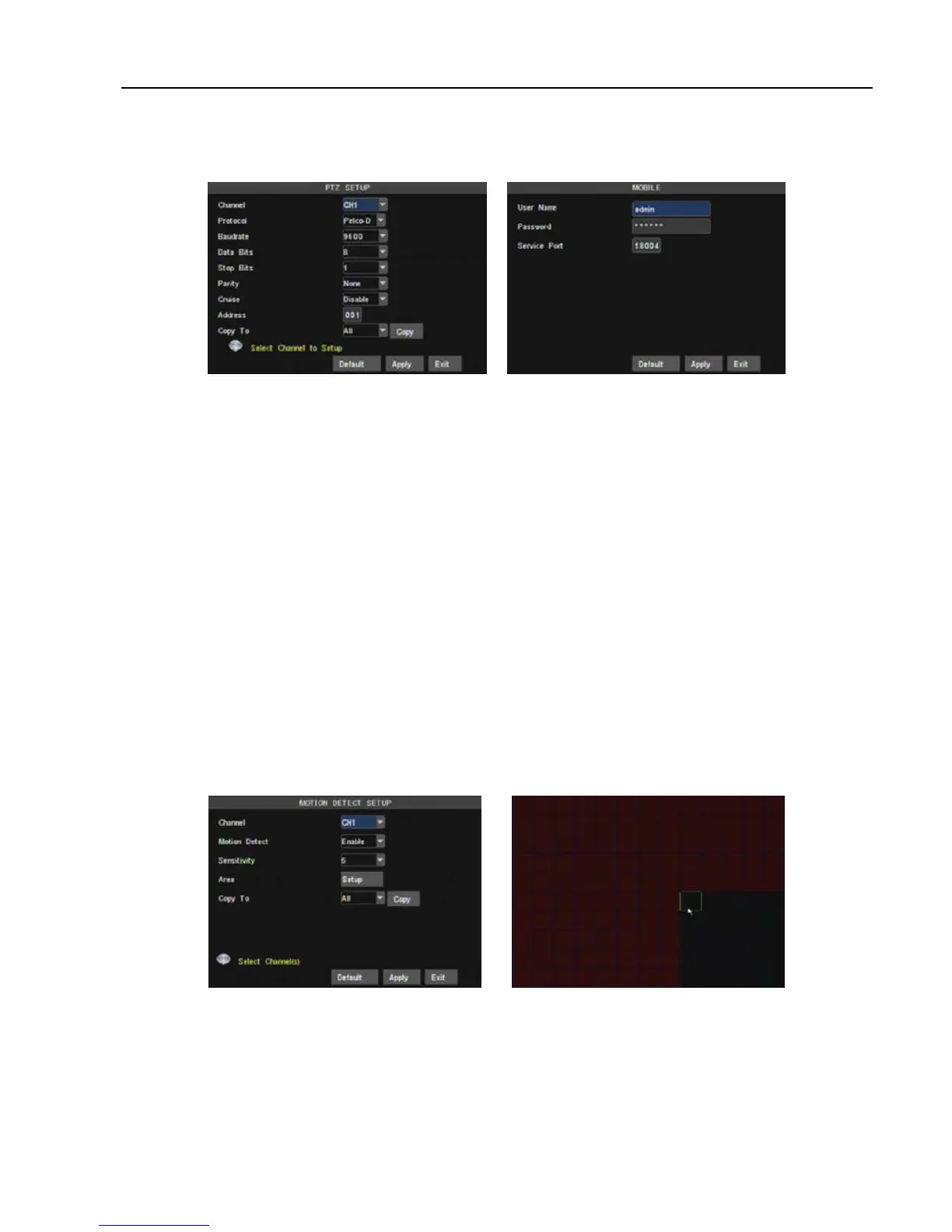
5.3.6.3 PTZ setup
Enter into [Main menuDevice PTZ Setup] to select the channel you desire to control and set PTZ
protocol (Pelco-D or Pelco-P), Baud Rate (1200, 2400, 4800, 9600), Data bit (8, 7, 6, 5), Stop bit (1, 2), Parity
Check (None, Odd, Even, Mark, Space), Address Code and Cruise status respectively.
5.3.6.4 Mobile setup
The DVR is currently compatible with mobile phones running Andriod, Windows Mobile,Symbian, Iphone
and Blackberry operating systems on 3G networks. Details access methods please refer to separate Mobile
phone Access Instructions.
Click [Main menuDeviceMobile] to enter into [Mobile] menu shown as Picture 5-31.
User Name: indicate user name of DVR, and system supports up to 15 characters.
User password: indicate user password of DVR, and system supports up to 15 characters.
Server port: Mobile monitoring port. Setting value is adjustable between 1024 and 65535.
Explanation: Please connect DVR to Internet before setting DVR port number and the server port no is not
equal to network menus.
5.3.6.5
Motion Detection
Click [Main menuDeviceMotion] to enter into the [Motion Detection] menu shown as Picture 5-32.
The [Motion detection] Menu has three sections, including Channel Status, Sensitivity and Motion area.
Channel: This option allow you enable motion detection on any channel.
SENSITIVITY: This option allows you to set sensitivity level of motion detection from higher to low with 8
being the most sensitive.
MD AREA: This option allows you select the area you want to be sensitive to motion.
Copy to: allow you copy current channel parameters to any other channel or all channels.
The channel is separated into a 15X12 grids for PAL system and 1 15X10 grids for NTSC system. When
any object moves into the motion detection area, and the area where the object is located is displayed in red
recording will be triggered. In the semi-transparent area the motion detection is off.
5.3.7 System
<System> menu include the sub-menu-Time set, User password, A/V set, Language, System Information
and system maintain.
Picture 5-30 Picture 5-31
Picture 5-33 Picture 5-32



 To Next Page