User Manual
24
Video System: allow you set Camera system (PAL, NTSC).
VGA Resolution: include four options - 1280×1024、1024×768、800×600 and 1440×900.
OSD Device: allow you select video output device, Main output and VGA. User can hold pressing [Rew]
button on the front panel to convert output device quickly.
Poll time: allow you select sequence time between from 5s and 300s.
Click the [Volume] and/or [Margin] options on the right-bottom corner of the Video/Audio screen to adjust
the volume and/or margin respectively. Details please kindly find the Picture 5-41.
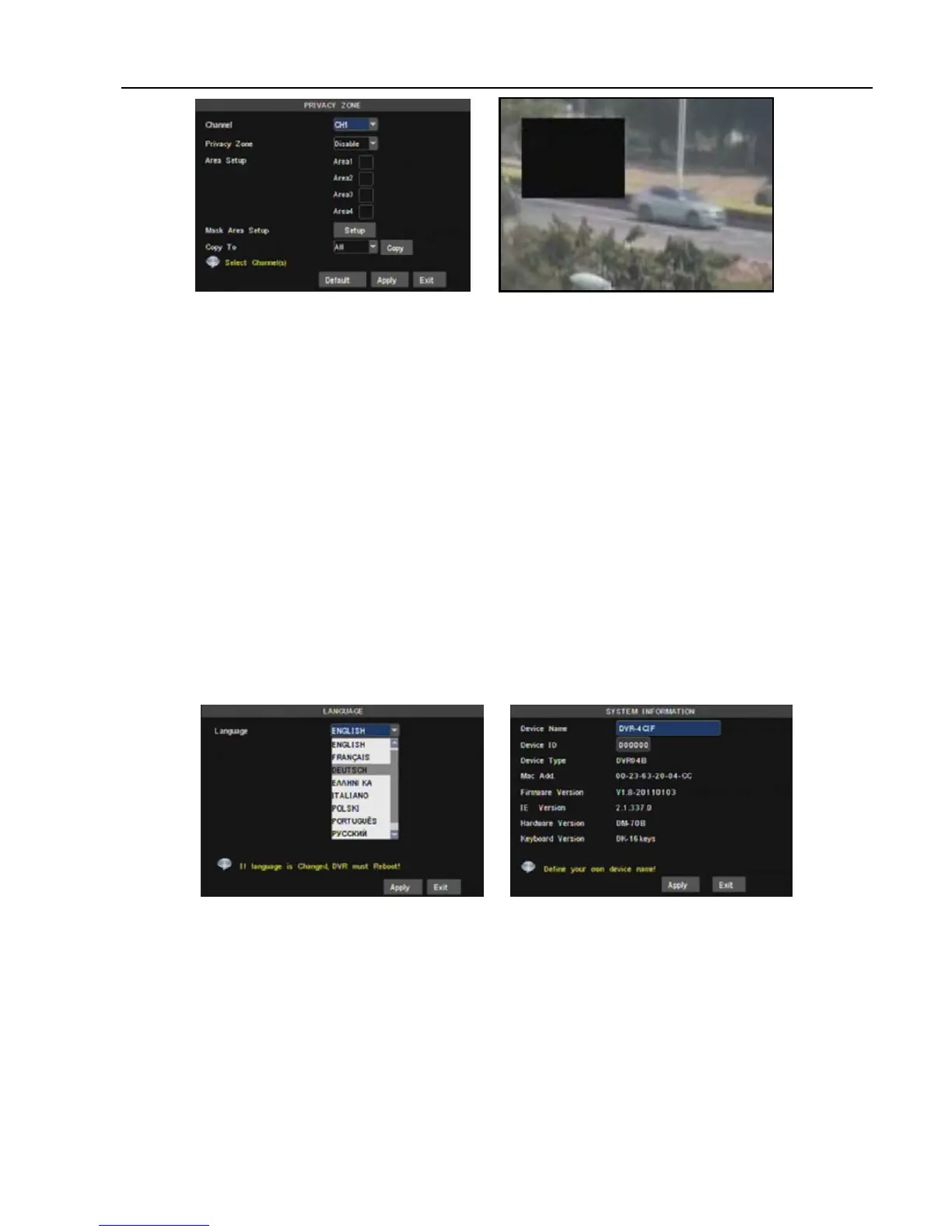
And you are allowed to set <video blind> area shown as Picture 5-42 and Picture 5-43.
5.3.7.4 Language Select
Enter into [Language] menu to select the language you want to use on the DVR (shown as Picture 5-40),
and then click [APPLY] button. The selection will be available after system Auto restarts.
5.3.7.5 System Information
Enter into [System Information] menu to view system info, including Device type, Software (firmware)
version, IE version and MAC address etc.
When connecting multiple DVRs to the same local area network environment, you need to change MAC
address for each DVR respectively; otherwise, you may not connect these DVRs to network.
5.3.7.6 Maintain
This option allows you recover the DVR settings to factory default settings, update system software
(firmware), and set system auto-maintenance. Click [Main menuSystemMaintain] to enter into the [System
Maintain] menu shown as Picture 5-42(a)
Auto Maintain: After enabling [Auto Maintain] function, system will perform regular maintenance as per
the schedule you have set. Please note the [Auto Maintain] function will be available only when DVR is on the
Main interface and have no user online.
System Update: Copy the file named with “DVR upgrade” to U flash drive; and connects U flash drive to
USB port of DVR, and third click [System upgrade] menu.
Default: Click the [Load Default] button to recover all the DVR settings back to factory set shown as
Picture 5-43
Picture 5-42
Picture 5-45 Picture 5-44



 To Next Page