User Manual
6
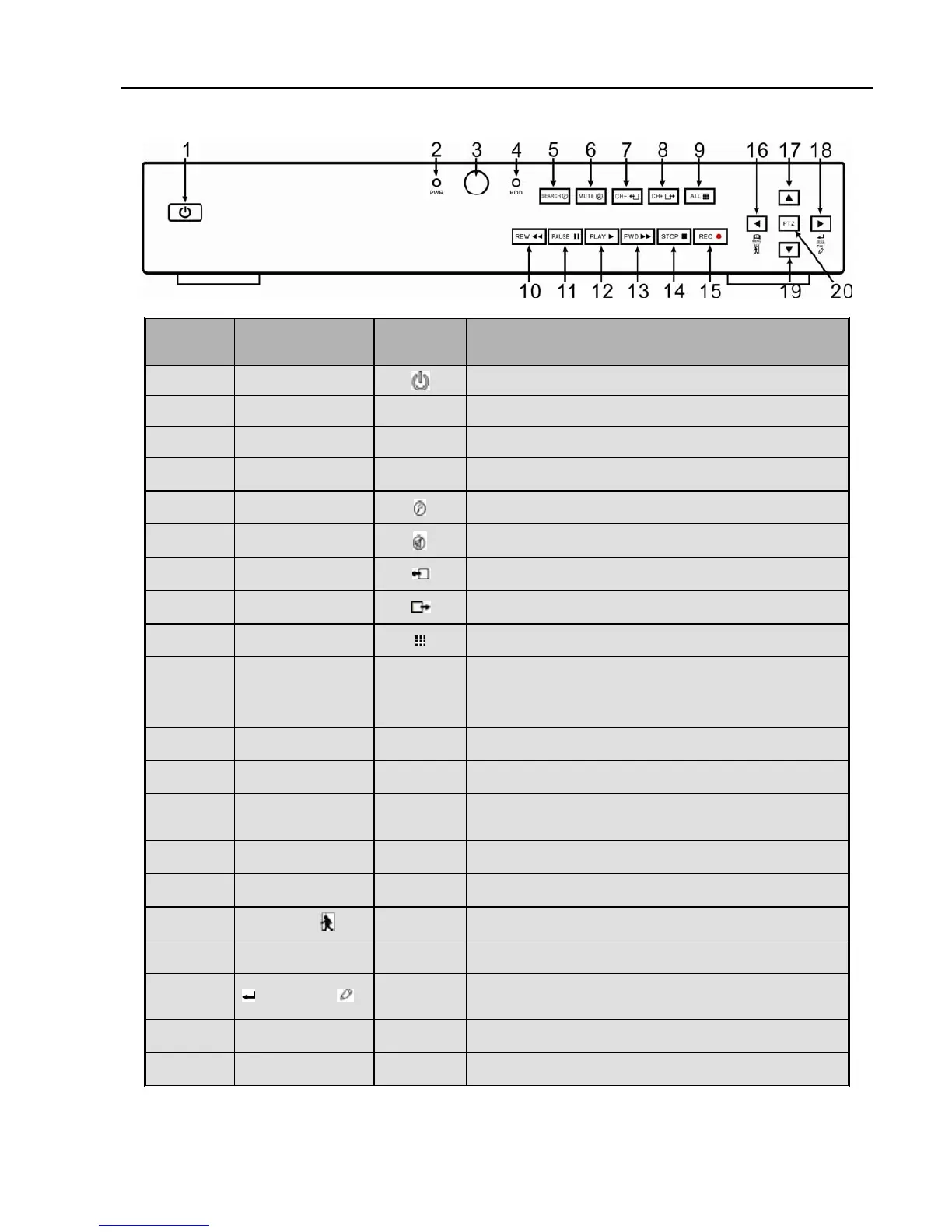
2.1.2、8-CH DVR Front Panel
Item
Key title
or Indicator
Remark Function & Description
1
Power button
Power on/off
2
Power Indicator
PWR
If the “Green” indicator is on the system is getting
5
SEARCH
Record search
6
MUTE
Mute on/off
7
CH-
Switch to previous channel
8
CH+
Switch to next channel
9
QUAD
On Live mode, switch to 4-split and 8-split display
10
REW
Move to left;
Multiple speed rewind playing;
Decrease parameter value of image setting.
11
PAUSE
Pause/play frame by frame manually
12
PLAY
Enter into pop up menu; Play recording file
13
FWD
Move to right; Multiple speeds forward playing;
Increase parameter value of image setting
14
STOP
Stop playing; Stop manual record
15
REC
●
Start manual record
16
MENU/ESC
Enter into Main menu/Exit
17
Up arrow key
Move to up
18
SEL/EDIT
Enter into pop-up menu; Confirm the selected
operation
19
Down arrow key
Move to down
20 PTZ:
Enter into PTZ Control interface
List 2-2



 To Next Page