User Manual
18
Export:
User can export all the logs which have been searched to U flash disk and save it as TXT format.
Before exporting the logs, please make sure you have connected the U flash disk well. Detail operations please
refer to Picture 5-18.
After Log export success, please click [OK] button shown as Picture 5-19.
5.3.5 Playback Player
1. Copy backup file to your PC;
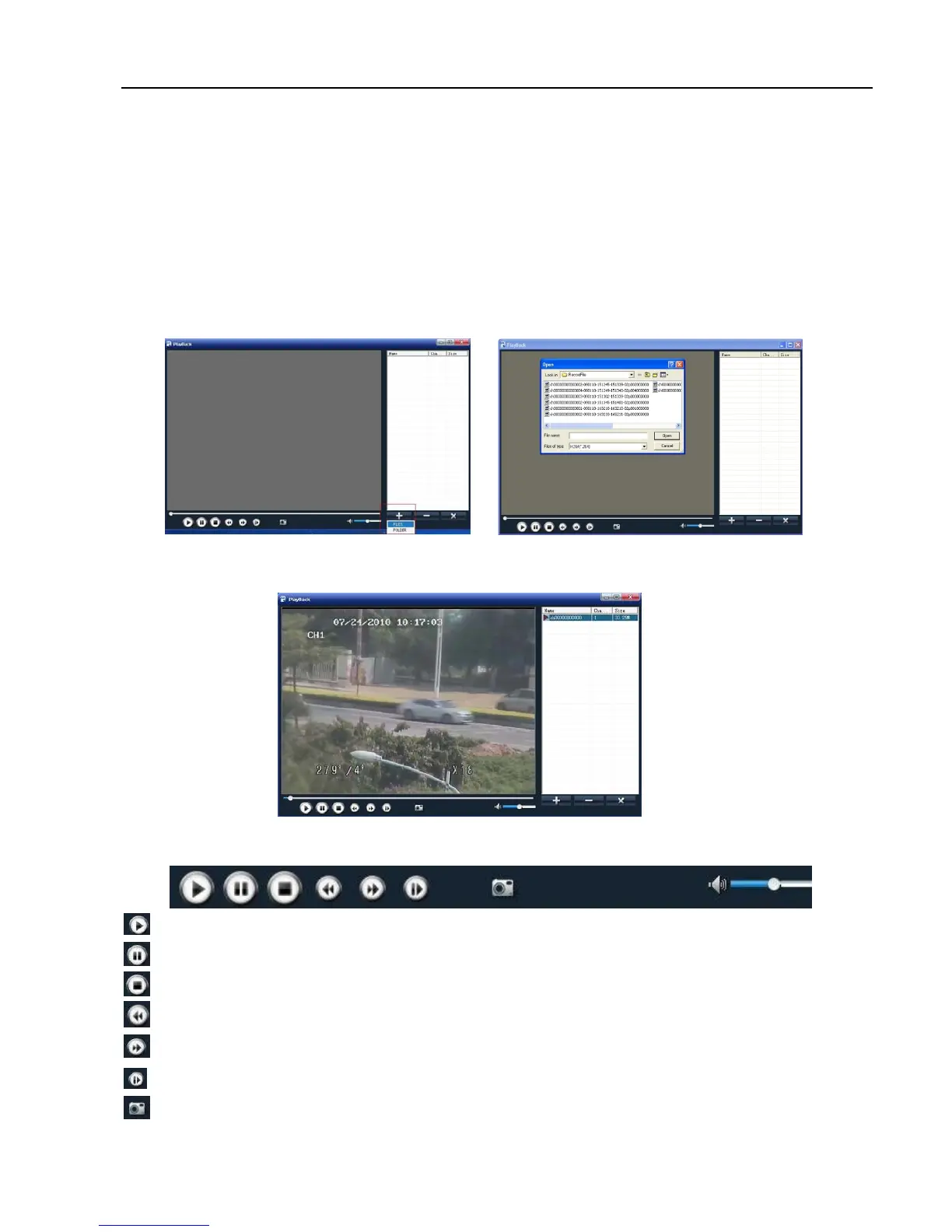
2. Open Playback Player, and then click [+] button to open the file shown as Picture 5-20
Note: Please select the file with *.264 or *.nvr format. The record file backed-up by U flash disk or removable
disk is with *.264 format, and DVD Recorder with *.nvr format.
3. Select the playback file you desired from the file shown as Picture 5-21.
(1) Double-click the record event at the right side of screen to start record file playback shown as Picture 5-22.
(2) The button functions from left to right in turn are as follows:
[Play] button: start playing record file
[Pause] button: pause the record file playback
[Stop] button: stop the record file playback
[Rewind] button: rewind playing the record file at X2, X4, X8 and X16 speeds.
[Forward] button: forward playing the record file at X2, X4, X8 and X16 speeds.
[Frame by frame]: Play the record file frame by frame.
[Snapshot]: click the button to capture the record image and save the image to a specified position.
Picture 5-20
Picture 5-21
Picture 5-22



 To Next Page