User Manual
17
NEXT (Next page): When viewing event list, clicking [Next page] button will take you to the page after the
one you are currently viewing (except the last page).
LAST (Last page): Indicates the last page of recording history you have searched. When you view other
pages, clicking [Last page] button will take you to the Last page.
ALL (Select All): Allows you to select all the events on the current page.
INVERSE (Select Invert): Allows you to select other events on the current page except those you have
currently selected.
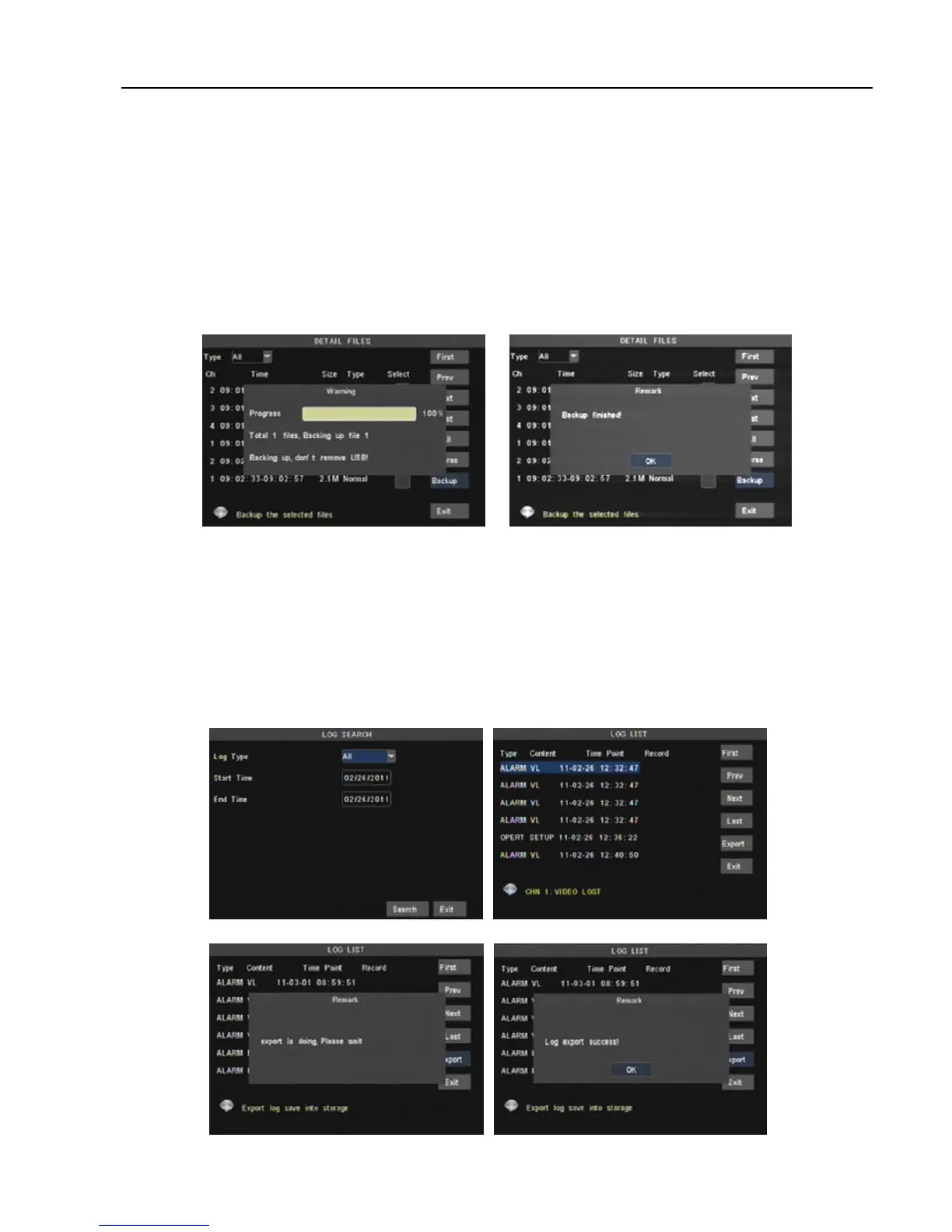
Backup: In [File List] mode, if you wish to backup records, please tick-select the [Select] check-boxes
which corresponds to the records and click [Backup] button to enter into the below windows illustrated in
Picture 5-15. When backup processing ends, system will prompt you “Backup finished!” shown as Picture
5-16.
Note: Backup file will be saved as H264 format; you can playback the recorded files using the Multimedia
Player program that comes with the DVR or through the net-viewer program.
Please make sure you have connected backup device, such as USB and DVD, well before backing-up.
Log Search
In the <Record Search> screen, Click [Log Search] to pop up the Log search screen shown as Picture
5-17(a).
Select log type, enter start date & end date, and then click the [Search] button on the bottom of the
interface to search all the logs you need shown as Picture 5-17(b).
Picture 5-15
Picture 5-16
Picture 5-7(a)
Picture 5-17(b)
Picture 5-18 Picture 5-19



 To Next Page