User Manual
20
Note: It is an important first step when configuring your DVR to make sure that the hard drive (HDD)
options are correctly set. So, it is strongly recommended that you do format the HDD before start the first
record.
5.3.6.2 Alarm Setup
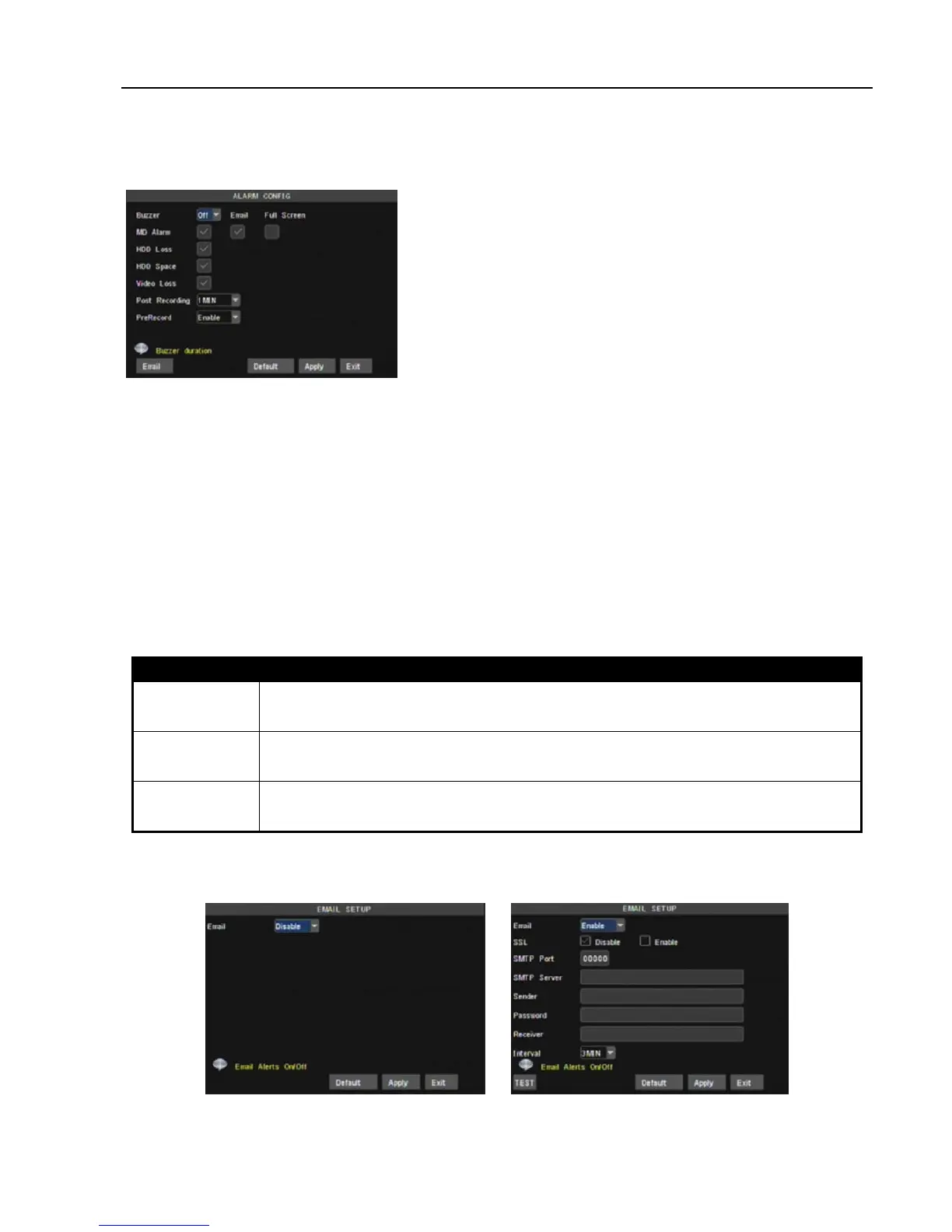
Video Loss: When setting [Buzzer] to ON and when a camera has been disconnected. “Video Loss” icon
will also appear on the screen with buzzer sound. Set to OFF, you will only see the “Video Loss” appear but no
sound.
Alarm Manage Buzzer time: you can set how long the buzzer will sound when alarm is triggered (0s, 10s,
20, 40s, 60s);
Alarm duration time: you can set how long alarm record will last when alarm ends (0s, 30s, 1m,2m,5m);
Pre-record time: you can set how long record will last before alarm occurs (Off, on).
Full screen Alarm: The function is defaulted to “On". When the motion detection or external alarm is
triggered, the corresponding channel will be displayed on the full screen mode.
Email:The option allows you set the alarm images is issued to a specified email or not.
You could freely select buzzer alarm or not and alarm output time for all the alarm types, and for the MD alarm
and I/O status alarm you could set email and full screen reminder.
Alarm Type Function
Video Loss
Sends alarm when DVR can’t receive video signal (such as camera damage, cable broken or
damaged or power supply malfunction).
Motion Detection
When an object moves into motion detection area, alarm will be triggered. You can adjust sensitivity
level to suit the needs of your actual application environment.
HDD loss
When Hard Drive is not detected (HDD damage, power supply malfunction), or HDD auto-overwrite is
off, and free space is not enough, an alarm will be triggered.
List 5-1
EMAIL Setup
Click [Email Set] to enter into the interface shown as Picture 5-26.
On the [EMAIL] screen, when Enabling [Email] option, you can set its parameters shown as Picture 5-27.
Click [Alarm Config] on the bottom of the [Alarm setup] screen
to enter into the interface shown as Picture 5-26.Now you are
allowed to set detailed alarm parameters.
HDD Loss: When setting [Buzzer] to ON and there be no HDD
detected or the HDD is not formatted, a small “H” appears on the
screen with buzzer sound. Setting this to OFF will only show the
“H” on the screen but the buzzer will not sound.
HDD Space: When setting [Buzzer] to ON and the DVR is
running out of storage space the buzzer will sound. No alarm will
sound if it is set to OFF.
Picture 5-25
Picture 5-26
Picture 5-27



 To Next Page