User Manual
21
SSL: is a security link transport protocol. You can encrypt your communication info (including your email)
using SSL to prevent hackers from monitoring your email or communication info and even your password.
Generally Gmail.com server set SSL to [On], and other mail server to [Off]. If your setting is still not right,
please contact the web site where you have applied for your email box to get SMTP port and SSL of mail box.
SMTP Port: indicates sender port of SMTP server. Generally the SMTP port value is 25, but there are
exceptions, for example, SMTP port of G-mail server should be 465.
SMTP server: indicates email server address you use.
Sender email: indicates sender’s email address. The email address should be consistent with the server
you use. That is to say, when you use email address – aaa@gmail.com
, the according server should be
smtp.gmail.com.
Receiver address: indicates receiver’s email address. The email address is used to receive image
transmitted from motion detection alarm of DVR. Please clear the images you have received as soon as
possible to avoid overloading your email account.
Email Test: clicking the button check your SMTP port, server, sender and receiver address. Once the
parameters are wrong, system will return misinformation back to inform user modified.
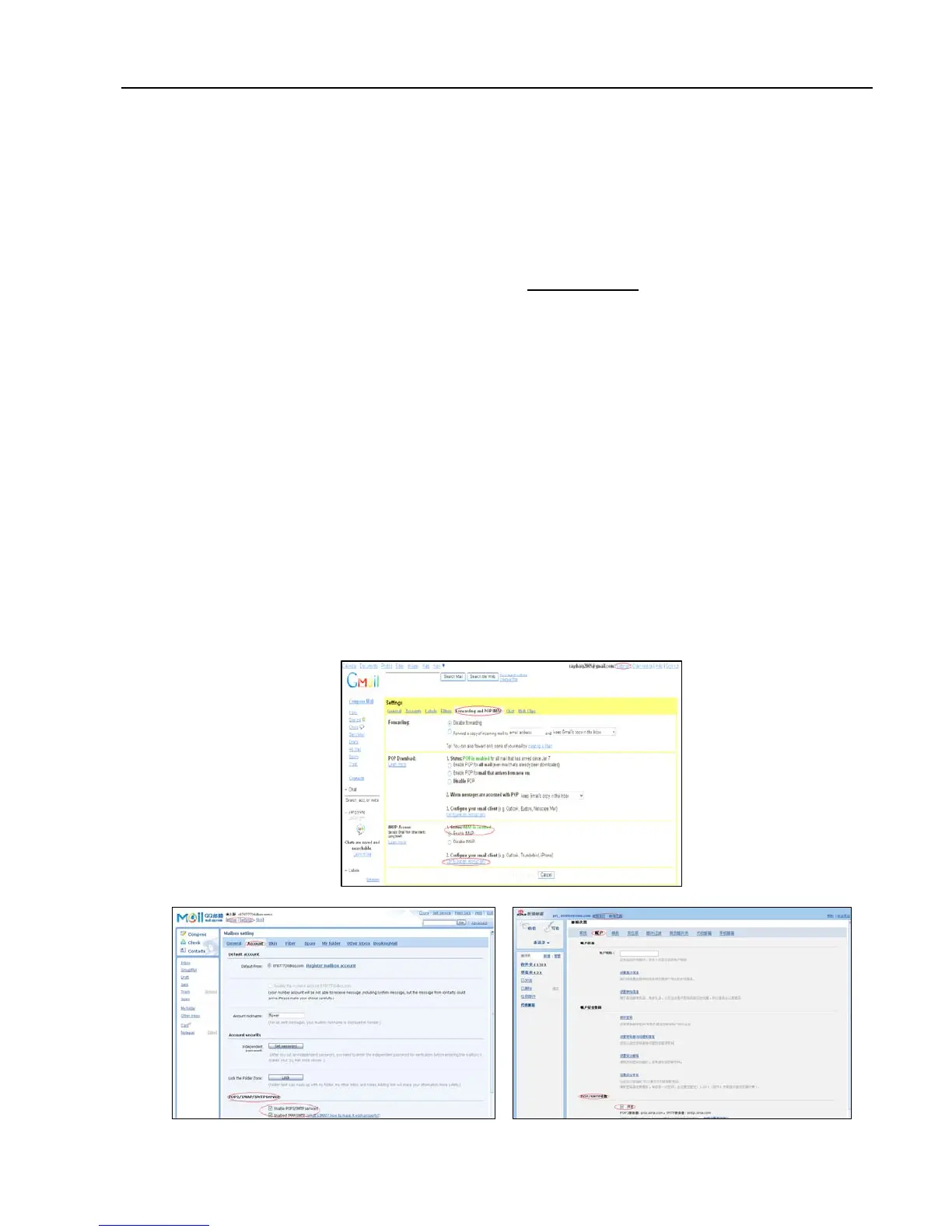
Note: Sender email is required to enable IMAP/POP3/SMTP function (details please refer to Picture 5-28
& Picture 5-29 (a & b), which show IMAP/POP3/SMTP Enable setting function for Gmail, QQ and SINA mail).
Login your GMAIL ID and turn to Settings page. Find out Forwarding and POP/IMAP option and then
tick-select [enable IMAP] option.
If you can’t receive email alarm information successfully, please check below points:
DVR connection is normal or not;
The receiver and sender email support SMTP protocols or not;
Emails account setting is correct or not;
Email alarm parameters configuration is right or not;
DVR is on the status of I/O alarm or Motion detection or not.
Picture 5-28
Picture 5-29(a)
Picture 5-29(



 To Next Page