User Manual
30
Display set
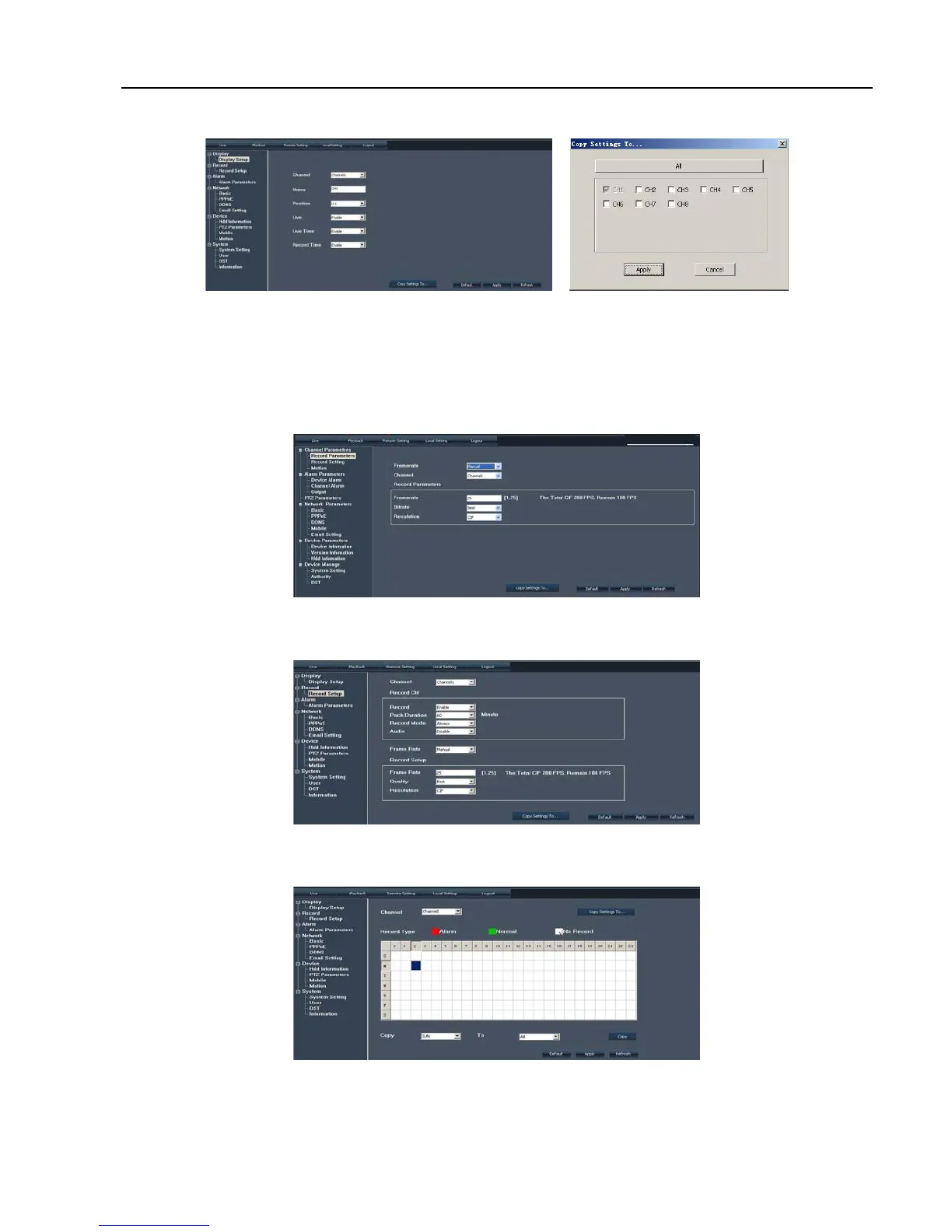
Enter into [Channel] menu shown as Picture 6-5(a).
Click [Copy to] option on the right-bottom corner of the interface to copy all the remote set to any channel
shown as Picture 6-5(b).
Record Set
Enter into [Record Set] option to set record control parameters, including record enabling, audio enabling,
Pack time, Record mode and Timer Rec. schedule etc. (shown as Picture 6-6).
When frame rate is set to <adjustable>, you are allowed freely to adjust image quality, frame rate, resolution and
package time shown as Picture 6-7.
When record mode is set to <Scheduled>, you are allowed to enter into the interface shown as Picture 6-8. Details
please refer to section 5.3.2 – <Record set>.
Alarm Parameters
Click [Alarm Parameters] option to enter into the Alarm interface shown as Picture 6-9. You are allowed to
set buzzer time, Post Record time, Alarm out time, and open Pre-record function for each channel, and also
Picture 6-6
Picture 6-7
Picture 6-8
Picture 6-5(b) Picture 6-5(a)



 To Next Page