6 Mounting
Maschinenfabrik Reinhausen GmbH 2021 497817454/02 EN TAPCON
®
230 Expert
Connection
1. Connect the D-SUB 9-pole connector to the COM-X3 interface.
2. Connect the COM-X1 RJ45 interface to the CPU-X5 interface using the
supplied patch cable.
6.4.5.3 Fiber-optic cable
To ensure error-free data transmission, observe the information from the
manufacturer of the fiber-optic cable and the following instructions:
▪ Radii must not fall below the minimum permissible bend radii (do not bend
fiber-optic cable).
▪ The fiber-optic cables must not be over-stretched or crushed. Observe the
permissible load values.
▪ The fiber-optic cables must not be twisted.
▪ Be aware of sharp edges because they can damage the fiber-optic cable's
coating during laying or can place mechanical loads on the coating later
on.
▪ Provide a sufficient cable reserve near distributor cabinets. Lay the re-
serve such that the fiber-optic cable is neither bent nor twisted when tight-
ened.
Fiber-optic cable, 1,310nm Multimode
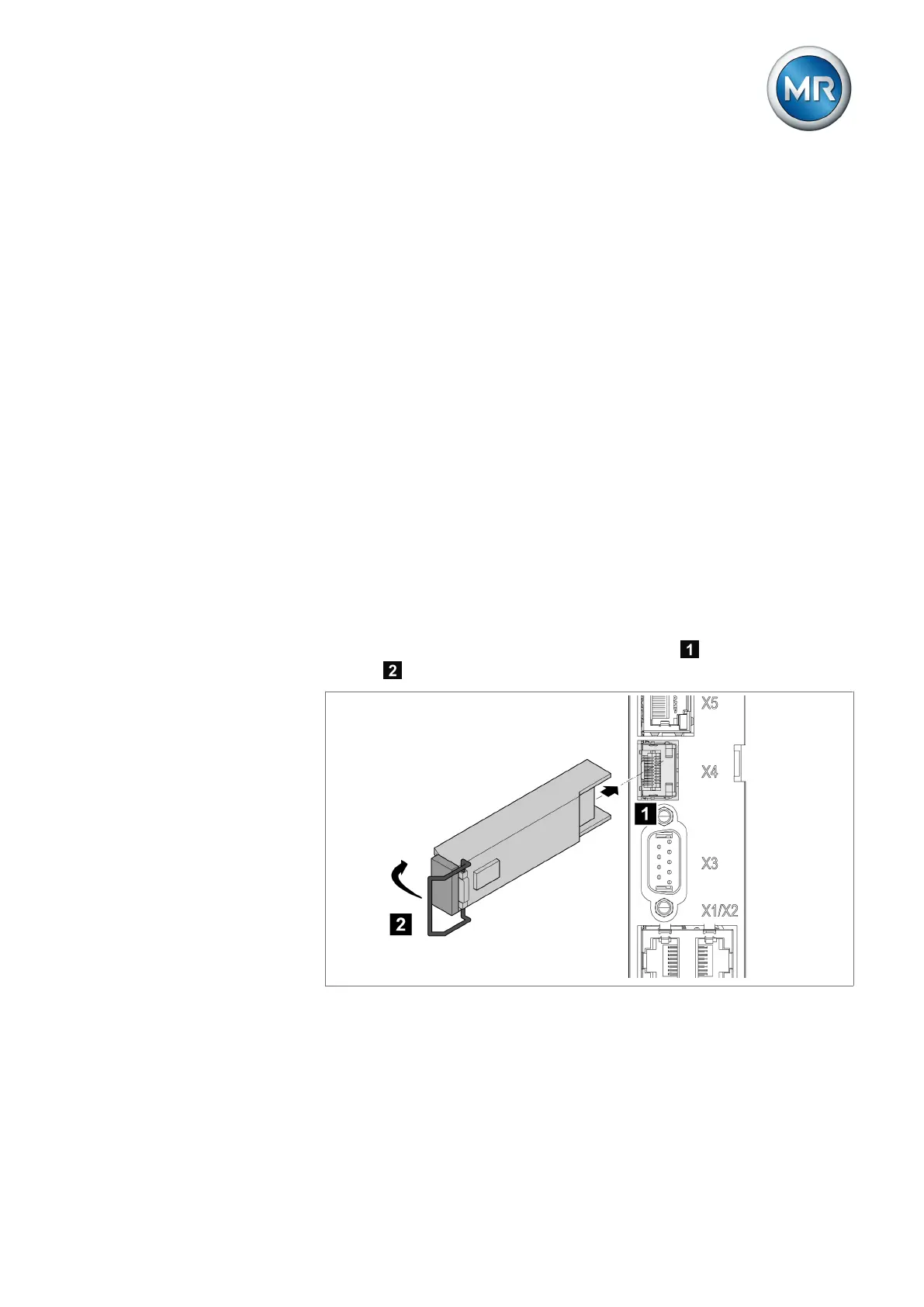
1. Slide the SFP module into the COM-X4 interface and fold down the
clasp .
Figure33: Engaging the SFP module



 To Next Page