Appendix C, RS-232 Output
Chemgard Infrared Gas Monitor
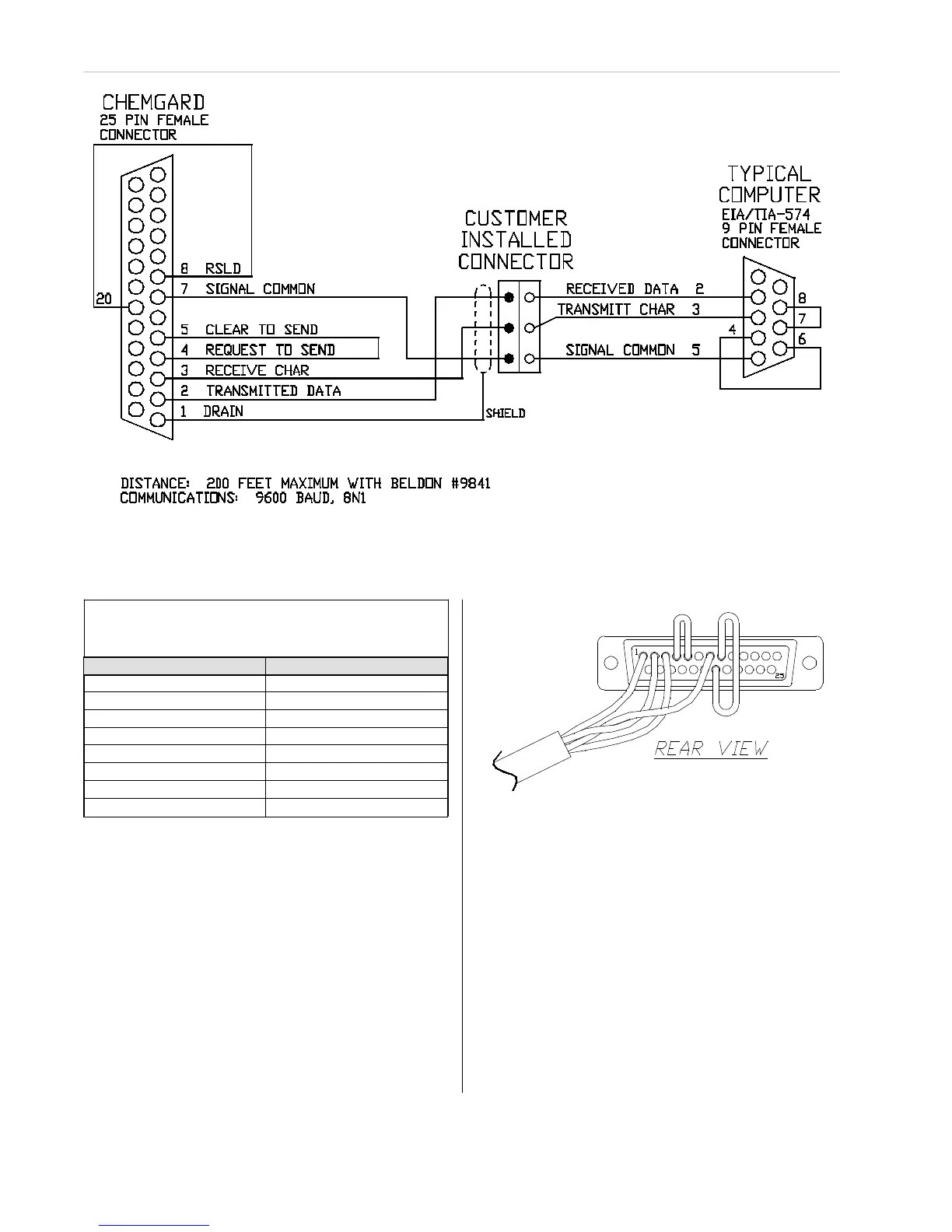
Figure C-2. Typical RS-232 Wiring
Table C-5. Voltage Output Corresponds to
Channel
Figure C-3. RS-232 Connector
During unit setup, configure the voltage output to
stepping, thus enabling the voltage output to
reflect the channel being sampled.
Password Protection
(Remote Display Only)
To prevent accidental re-configuration or
discourage unit tampering, a password entry can
be enabled. This password prevents setup values
from being changed. If the password entry is
selected, the user must enter th
ree alphabetic
characters before any additional information
is available.
The password feature is especially useful when a
Remote Front Panel is connected to the
Chemgard Infrared Gas Monitor. The Remote
Front Panel or the Chemgard Infrared Monitor
may have no password or it may have a different
password.
To enable this feature, a switch on the front
display card must be set. This switch is under the
metal cover. To set this switch:
1. Open the front door of the unit.



 To Next Page