Video Grabber User Manual - v. 1.19 (FW 1.29)
4.2.1. Output
In the Output section of the Configuration page user can define the format and protocol which will be
used by Video Grabber to output captured video signal.
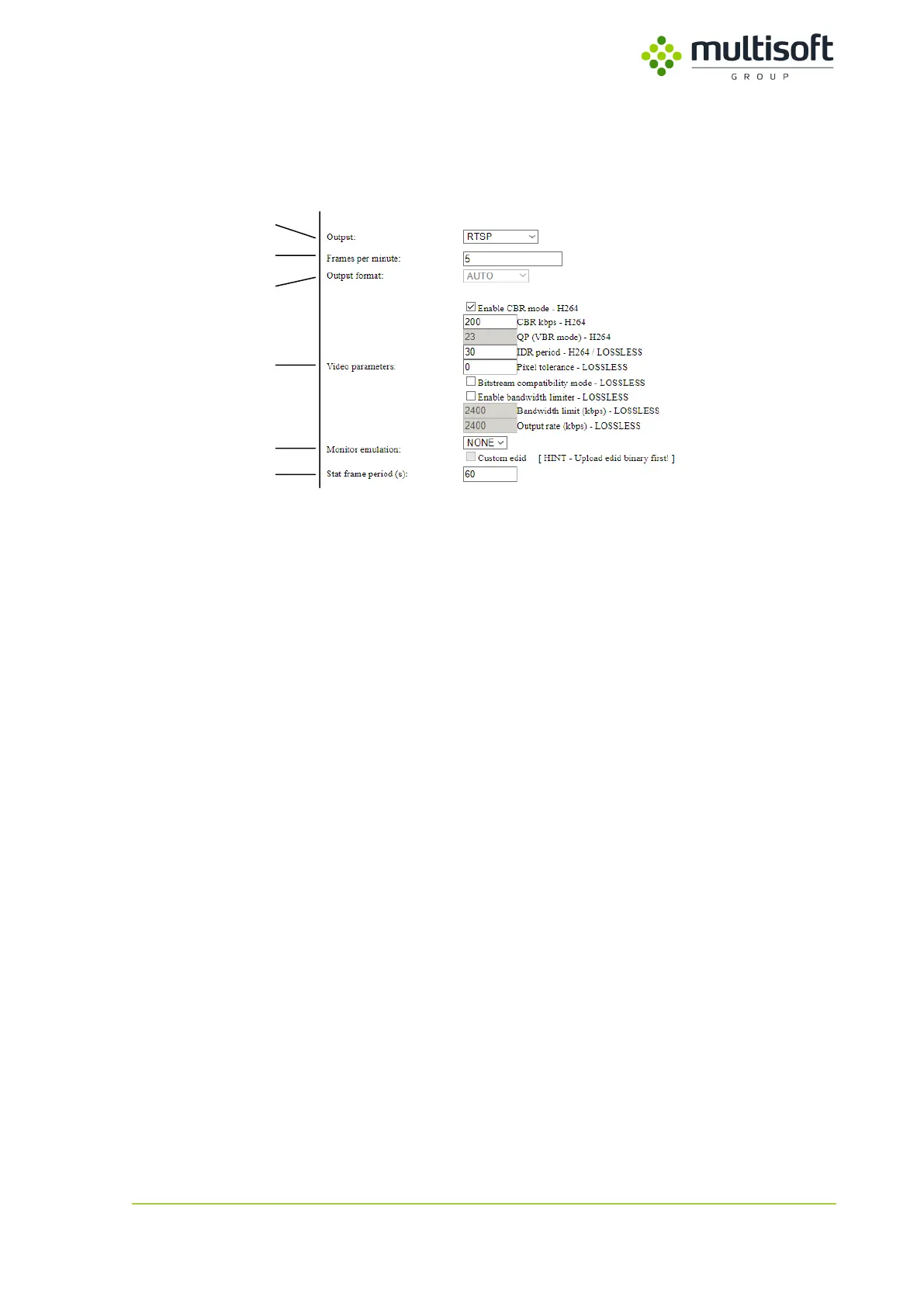
Figure 15: Output section on the Configuration page.
1. Output – protocol to be used for output of the video signal data.
2. Frames per minute – frequency of video signal capture.
3. Output format – format to be used for output of video signal data.
4. Video parameters – parameters to be used if H.264 or LOSSLESS format is selected.
5. Monitor emulation – option to emulate the monitor.
6. Stat frame period (s) – frequency of stat frame.
4.2.1.1. Output protocol
There are four output protocols available:
1. Broadcast – Video Grabber will broadcast on the available networks (from both LAN ports)
captured video signal in the form of images.
Available formats: BMP, PNG, JPEG, JPEG2000, H.264, LLE.
2. NFS – Network File System – Video Grabber will save captured video signal in the form of
images on the configured NFS share. Appropriate credentials (UID and GID) have to be
provided (see 4.2.2.2).
Available formats: BMP, PNG, JPEG, JPEG2000, H.264, LLE.
3. SMB – Server Message Block – Video Grabber will save captured video signal in the form of
images on the configured SMB share. Appropriate credentials (Username and Password)
have to be provided (see 4.2.2.3). Only SMBv1 version of protocol is supported.
Available formats: BMP, PNG, JPEG, JPEG2000, H.264, LLE.
4. RTSP – Real Time Streaming Protocol – Video Grabber will setup a video stream containing
the captured video signal. User can connect to the stream using RTSP connection string that
is shown on the right of the ‘Output’ option.
Available formats: H.264, LLE
See the 4.2.1.7 for sample output configurations.



 To Next Page