Chapter 3 – Installing Software
22 MultiVOIP® Voice/Fax over IP Gateways
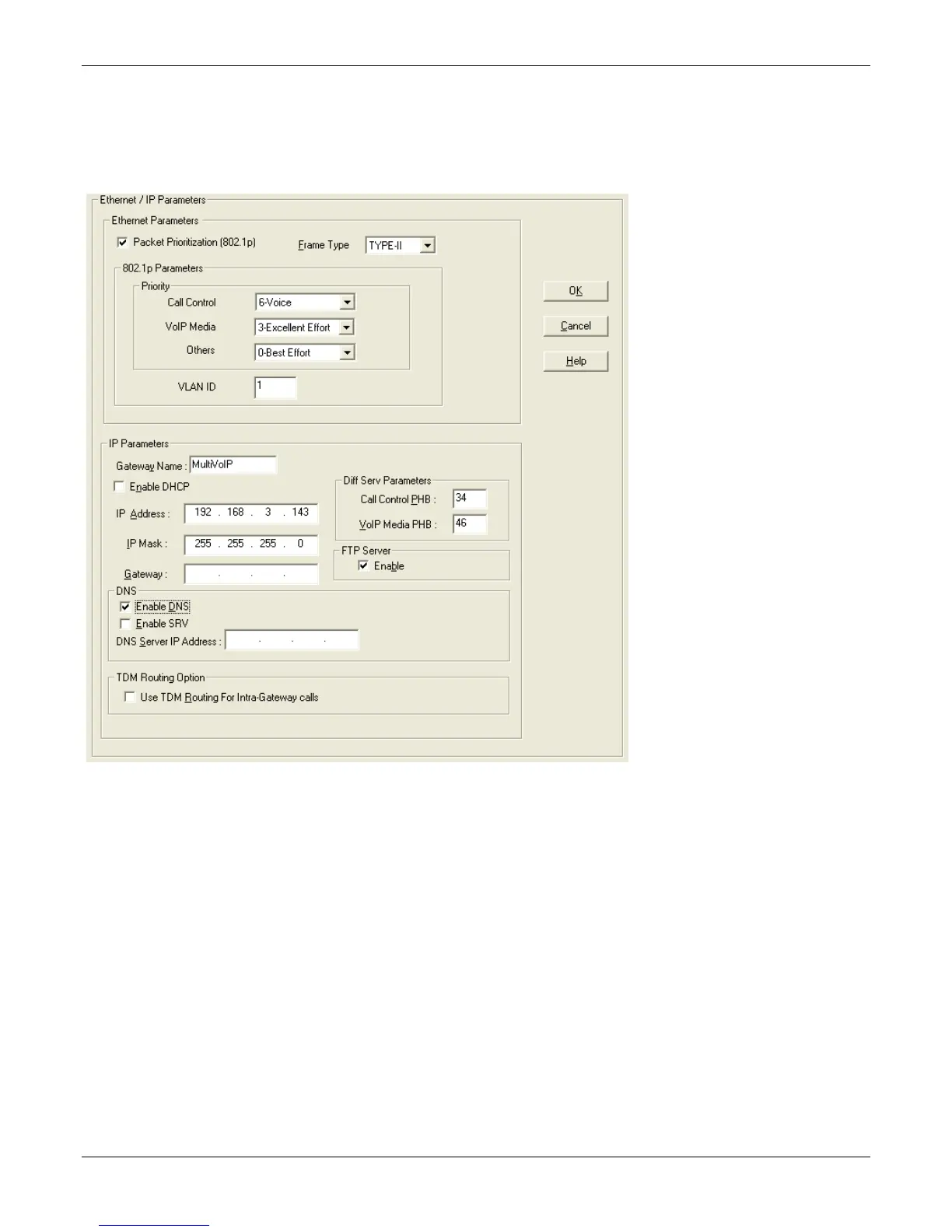
Setting IP Address
For basic functioning of the unit, you must set a unique LAN IP address as well as a subnet mask and Gateway IP.
Other settings here control specific features and protocols. These setting are not necessary for basic operation.
Chapter 4 describes all settings.
To configure IP settings:
1. If you are using packet prioritization:
a. Check Packet Prioritization.
b. Set 802.1p Priority Parameters as needed. The Priority levels can be from 0 – 7, where 0 is lowest
priority. VLAN ID identifies a virtual LAN by a number (1 to 4094)
2. From the Frame Type drop-down list, select the Frame Type that matches the network to which the
MultiVOIP is attached: TYPE II or SNAP
3. Enter Gateway Name.
4. If DHCP is used, check Enable DHCP.
5. Enter IP Address for the MultiVOIP unit.
6. Enter Subnet IP Mask for the MultiVOIP unit.
7. Enter Gateway IP.
8. If desired, check the Enable DNS checkbox.



 To Next Page