Chapter 4 – Configuring Your MultiVOIP
MultiVOIP® Voice/Fax over IP Gateways 45
When interoperating with older MultiVOIP products (i.e., earlier than release x.11), for backward compatibility,
configure the payload type values to default ones, which match the values of older MultiVOIP’s.
Configuring Interface Parameters
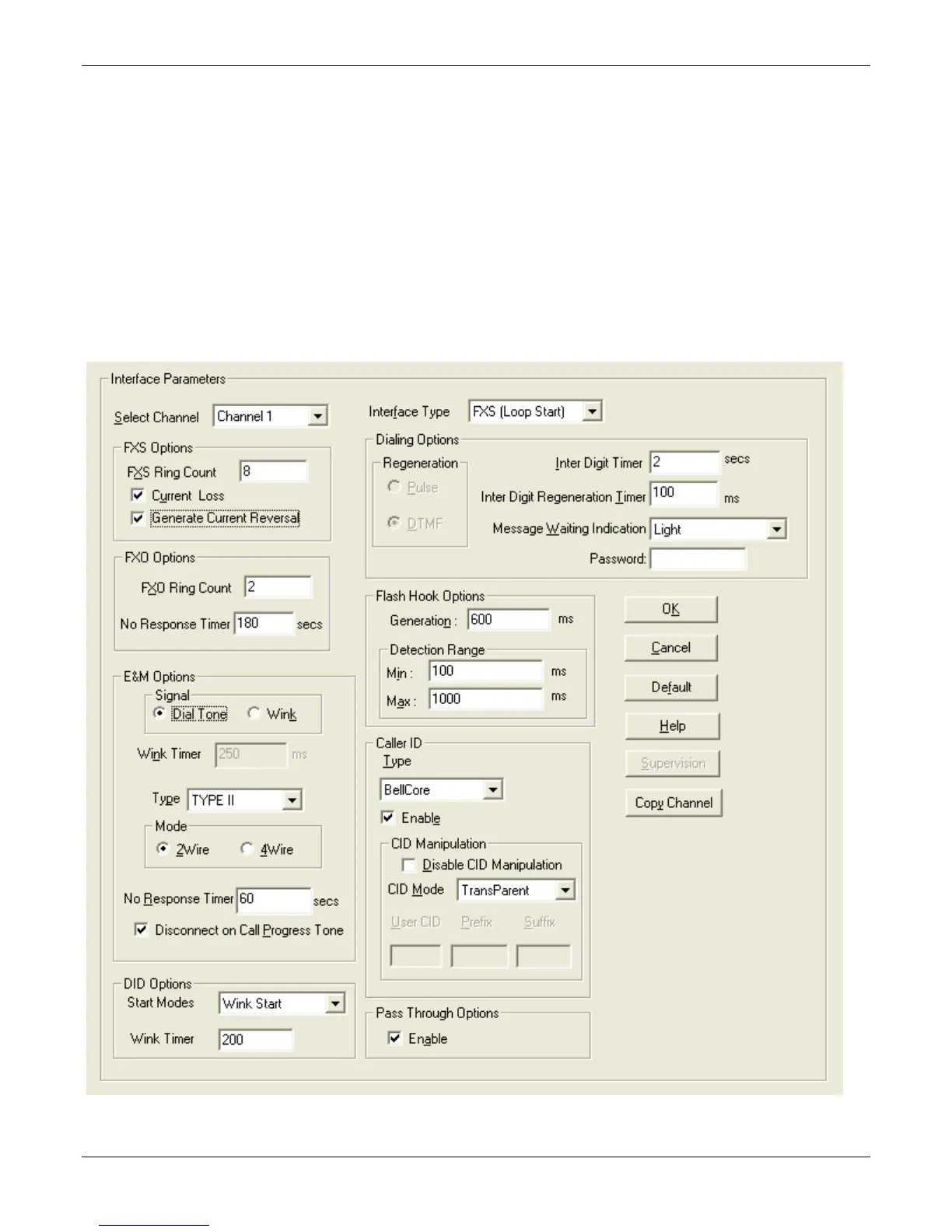
The Telephony Interface parameters are set individually for each channel and include the line types as well as
some specific situational settings for those that need them. The kinds of parameters for which values must be
chosen depend on the type of telephony supervisory signaling or interface used (FXO, E&M, etc.). Here you find
the various parameters grouped and organized by interface type. Note that the SS and FX models only support
FXS/FXO. In each field, enter the values that fit your particular setup. Once you have established a set of
Interface parameters for a particular channel, you can apply this entire set of Voice/FAX parameters to another
channel by using the Copy Channel button and its dialog box. To copy a set of Interface parameters to all
channels, select “Copy to All” and click Copy. The screen below shows more options available than are actually
used for clarity. Your settings determine what fields are available. The –SS series of MultiVOIPs do not support
Caller ID Manipulation.



 To Next Page