Chapter 4 – Configuring Your MultiVOIP
MultiVOIP® Voice/Fax over IP Gateways 77
Logs/Traces
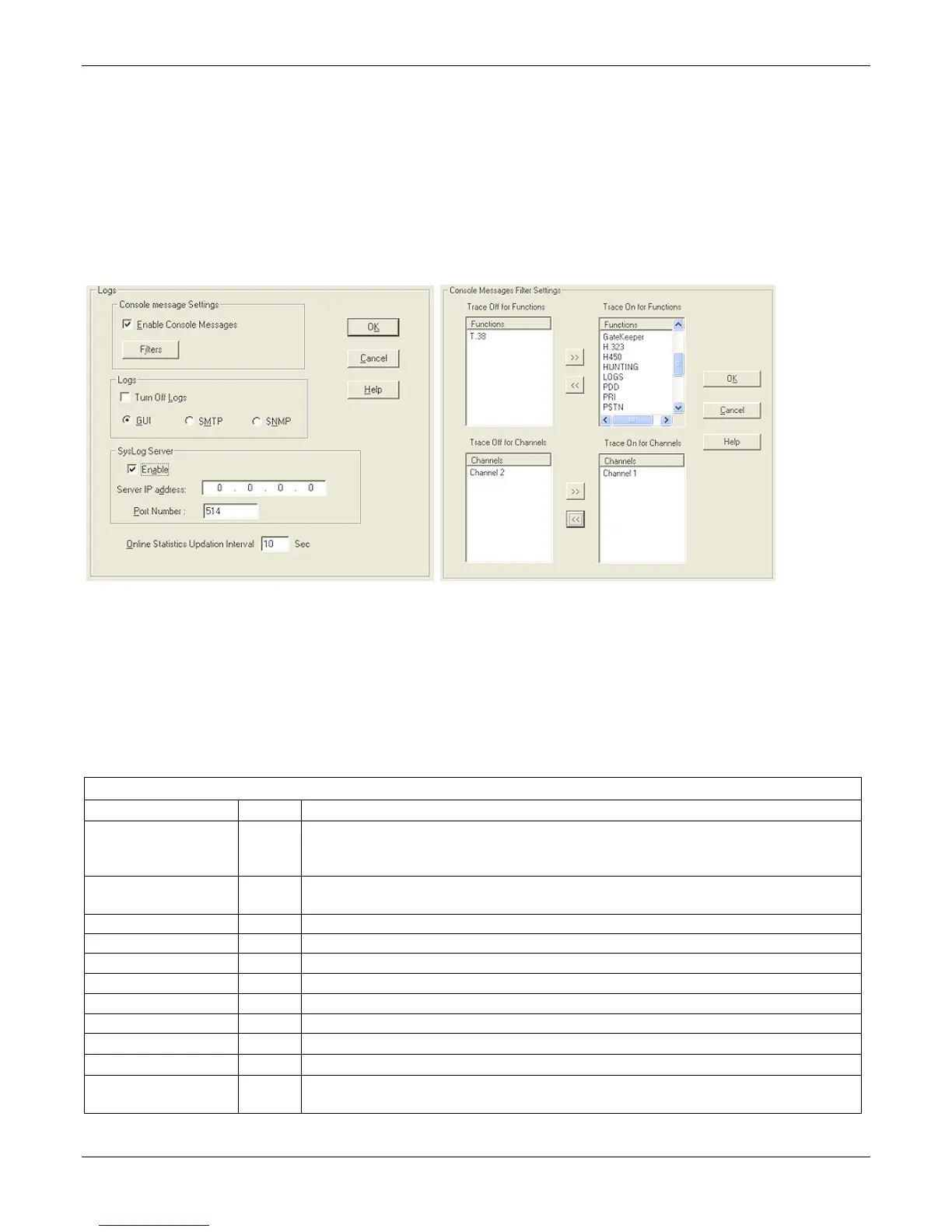
The Logs/Traces window lets you choose how the VOIP administrator receives log reports about the MultiVOIP’s
performance and the phone call traffic that is passing through it. The VOIP administrator receives log reports in
one of three ways:
● In the MultiVOIP program (interface)
● Through email (SMTP)
● At the MultiVoipManager remote VOIP system management program (SNMP).
If you enable console messages, you can customize the messages included in and excluded from log reports. To
do so, click Filters and use the Console Messages Filter Settings screen.
If you use the logging function, select the logging option that applies to your VOIP system design.
To use a SysLog Server program for logging, in the SysLog Server group, check the Enable checkbox. The
common SysLog logical port number is 514.
If using the MultiVOIP web browser interface for configuration and control of MultiVOIP units, be aware that the
web browser interface does not support logs directly. However, when the web browser interface is used, log
files can still be e-mailed to the VOIP administrator. This requires using the SMTP logging option.
“Logs” Screen Definitions
Field Name Values Description
Enable Console
Messages
Y/N Allows MultiVOIP debugging messages to be read by using a basic terminal program like
HyperTerminal ™ or equivalent. In most cases, disabled this option because it uses MultiVOIP
processing resources. Console messages are meant for IT support personnel.
Filters (button) Click to access secondary screen on where console messages can be included/excluded by
category and on a per-channel basis.
Turn Off Logs Y/N Check to disable log-reporting function.
Logs Buttons Only one of these three log reporting methods, GUI, SMTP, or SNMP, may be chosen.
GUI
•
User must view logs at the MultiVOIP configuration program.
SNMP
•
Log messages are delivered to the MultiVoipManager application program.
SMTP
•
Log messages are sent to user-specified email address.
SysLog Server Enable Y/N Check this item if logging is done with a SysLog Server program.
IP Address n.n.n.n IP address of computer, in VOIP network, on which SysLog Server program is running.
Port 514 Logical port for SysLog Server. 514 is commonly used.
Online Statistics
Updation Interval
integer Set the interval (in seconds) at which logging information is updated.



 To Next Page