2-14 Advanced scan functions
Editing message (e-mail Subject)
When transmitting a scanned image via e-mail, you can edit the mail text and subject
of the e-mail you are sending. You can also enter the mail text of the e-mail using a
template registered in advance.
NOTE
•For details on registering the e-mail templates, see chapter 2, “Setting e-mail
templates” in “Setting templates” in the OfficeBridge Guide.
•You can edit the message for the currently scanning document, but not save it on
the machine to use it later.
•This function can be used with “Scan to e-mail”.
1
Press the mode change key to change to scan mode.
2
Press <Advanced>.
3
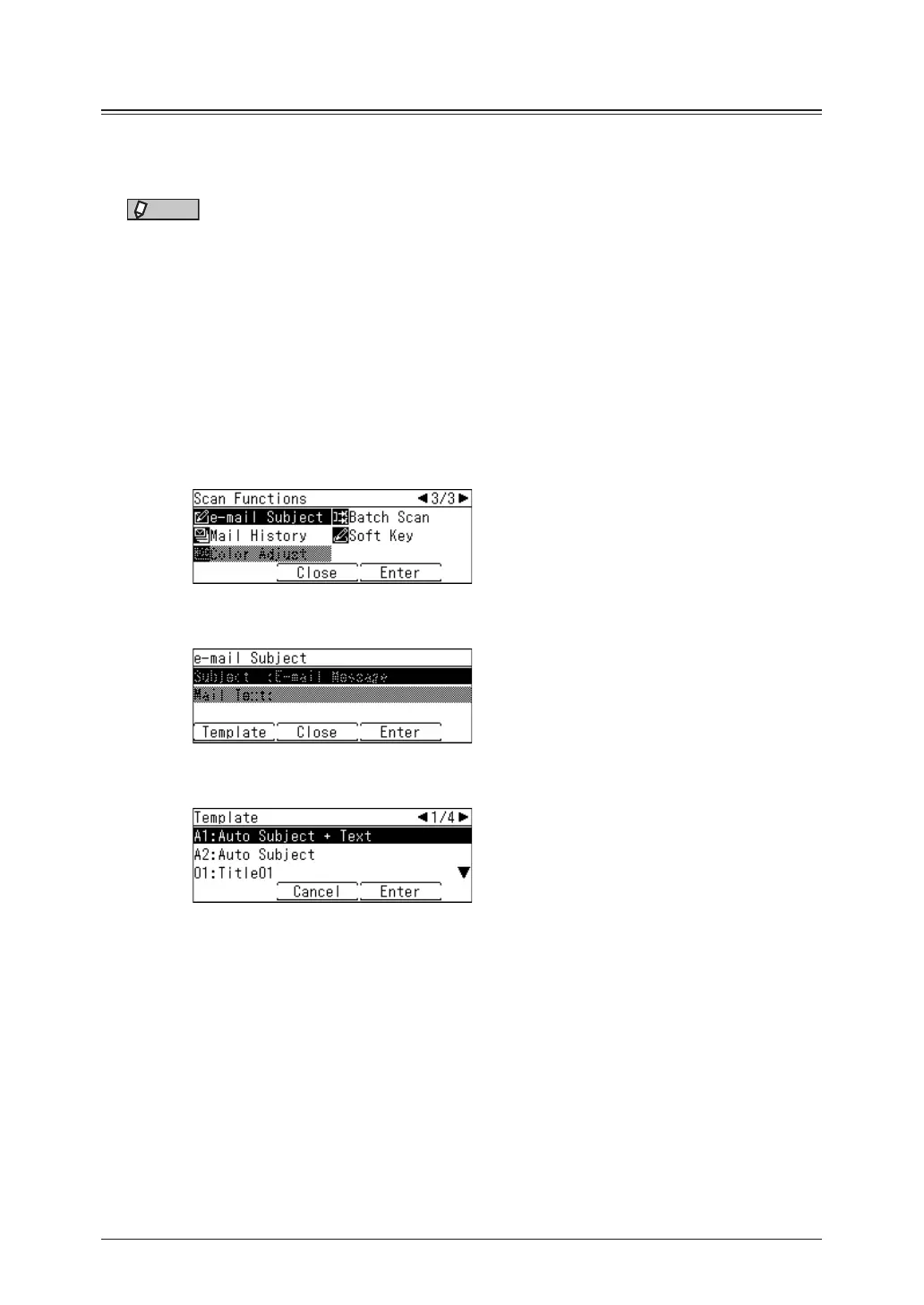
Select “e-mail Subject”, and press [Enter].
4
Press [Template].
5
Select the template to use, and press [Enter].
•If you selected “A1:Auto Subject + Text”, you cannot edit the subject and mail text.
Proceed to step 10.
•If you selected “A2:Auto Subject”, you can only edit the mail text. Proceed to step 8.
6
If you want to edit subject, select “Subject” and press [Enter].
Otherwise, go to step 8.



 To Next Page