1
2
3
4
Advanced fax functions
Transmission related settings 4-11
Delayed transmission (Delayed Tx)
You can use this function to specify the date and time to send the fax.
•You can specify a time and date up to a month ahead. The document for delayed
transmission is stored in memory until the specified time, at which point transmission
will start.
•If real time transmission is specified, the document will remain loaded until the
specified time, so you will not be able to copy, scan, or transmit other faxes.
•This function can be also specified in combination with other functions (such as
broadcasting, etc.).
1
Press the mode change key to change to fax mode.
2
Press <Advanced>.
3
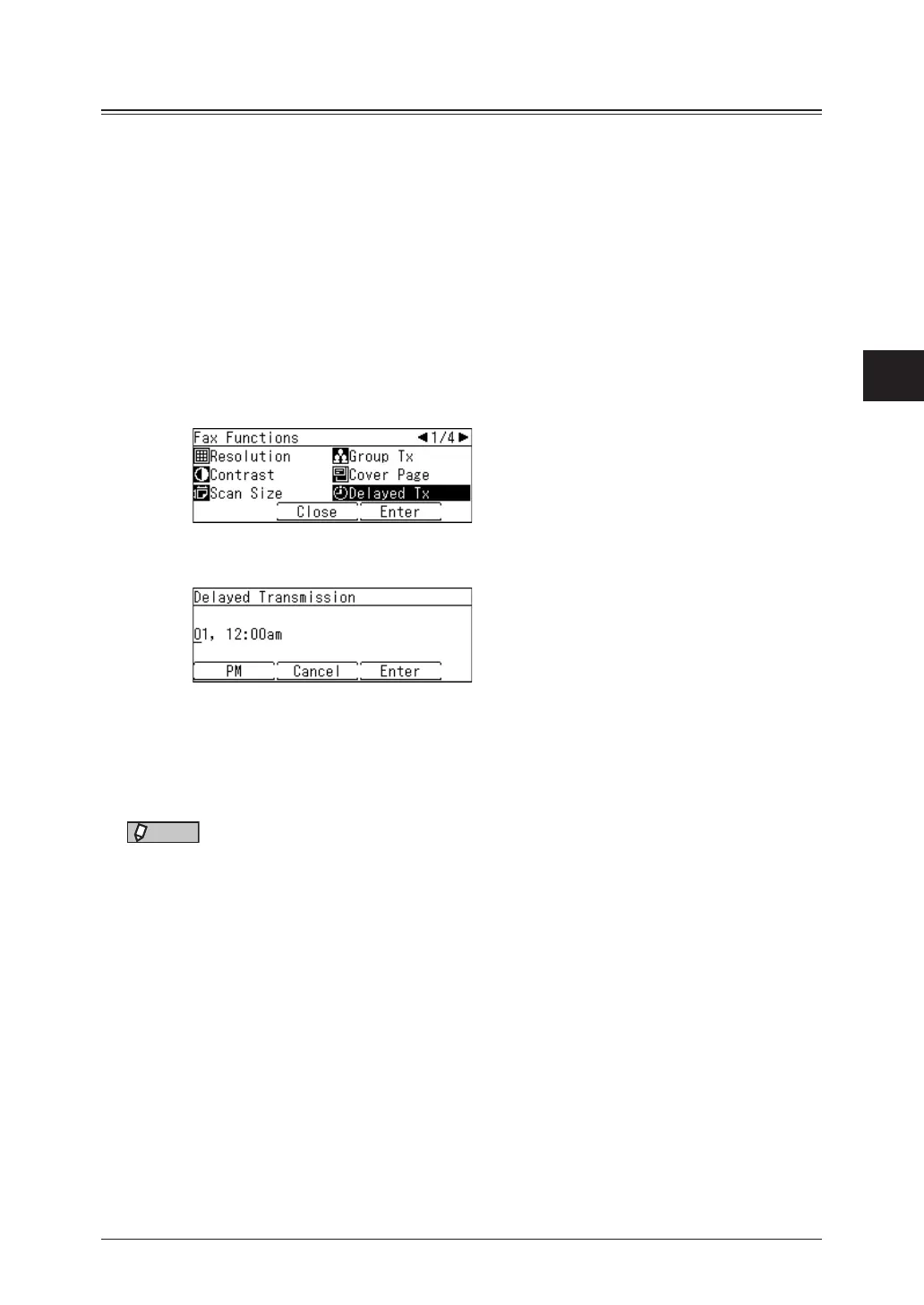
Select “Delayed Tx”, and press [Enter].
4
Press [PM] or [AM] and enter the transmission date and time, and press [Enter].
•Enter the time in 12 hour format.
•You can use the cursor key and numeric keys.
5
Specify the destinations, then press <Start>.
For details on specifying the destinations, see “Specifying destinations” (page 5-2).
NOTE
•After scanning the document, you can check or delete the reserved transmission by
pressing <Job Confirm.
Fax Cancel> (page 3-11).
•To change the specified time after scheduling the transmission, you need to delete
the delayed transmission and then set transmission date again.



 To Next Page