VS1 Operations and Maintenance Manual Operating the transmitter
Page 2-100 Issue 3.1 2013-10-01
Calibrating Exciter TCXO - Using the front panel
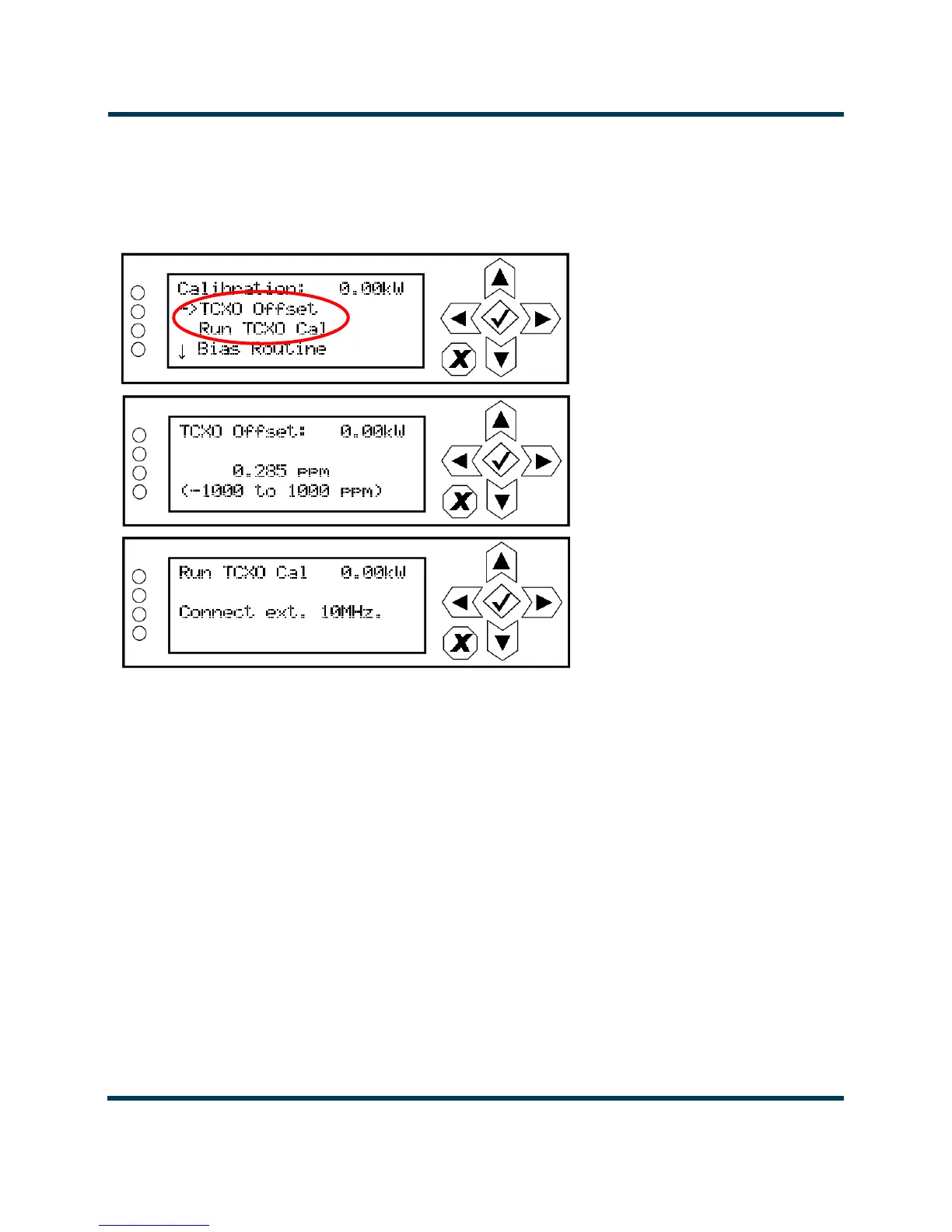
To view the front panel’s TCXO calibration screens (see Figure 2.88), select System Settings ->
Calibration
from the Main Menu.
Figure 2.88: Front Panel - TCXO Calibration
Use the up or down arrow to place the cursor next to TCXO Offset, then press the accept
(checkmark) button to enter the TCXO Offset screen. Use the up and down arrows to set the TCXO
offset value (in ppm) for the external 10 MHz source. When complete, press the accept (checkmark)
button to save the change. Press cancel (X) to discard changes and return to the previous menu.
From the calibration menu, press the down arrow to place the cursor next to
Run TCXO Cal, then
press the accept (checkmark) button to enter the Run TCXO Cal screen. The calibration routine will
begin when the external 10 MHz source is connected.



 To Next Page