VS1 Operations and Maintenance Manual Operating the transmitter
Issue 3.1 2013-10-01 Page 2-51
Managing Presets
This section includes the following subjects:
• Managing Presets - Using the AUI
• Loading presets using the AUI - see page 2-52
• Activating presets using the AUI - see page 2-52
• Editing or creating presets using the AUI - see page 2-53
• Managing Presets - Using the front panel - see page 2-67
• Configuring an HD Powerboost Preset - see page 2-89
Presets contain operational data (power level, frequency, mode, program input characteristics) for the
transmitter. You can create presets and manage their various settings.
You can manage presets using the remote AUI (see Managing Presets - Using the AUI) or using the
local front panel display (see Managing Presets - Using the front panel on page 2-67).
To configure and operate an HD PowerBoost preset, see Configuring an HD Powerboost Preset on
page 2-89.
Managing Presets - Using the AUI
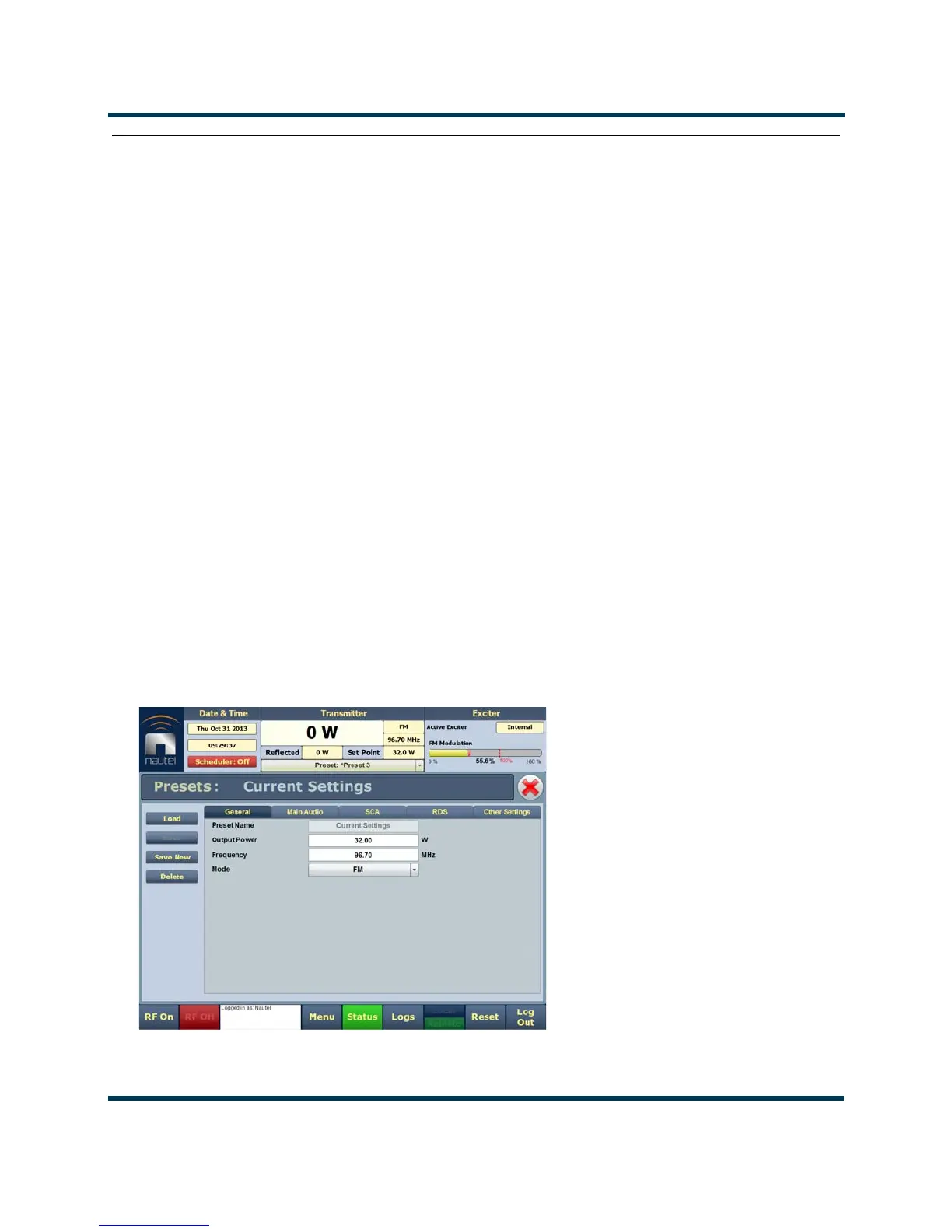
The Presets page (see Figure 2.37) allows you to create up to 63 operating presets or edit existing
presets. To view the Presets page, select Presets from the Menu options.
Figure 2.37: Presets page (General tab shown)



 To Next Page