VS1 Operations and Maintenance Manual Operating the transmitter
Page 2-52 Issue 3.1 2013-10-01
Loading presets using the AUI
When first entering the Presets page, the current “active” preset is displayed (see Figure 2.37 on page
2-51). If the current preset is not the desired one, use the
Load button on the left-side of the AUI to
call up a window containing a list of available presets.
Select the desired preset and press the
OK button to view or enable editing of the preset. Press the
Delete button to delete the selected preset. Users cannot delete the current "active" (operational)
preset or any preset that is referenced in the Remote I/O menu as either a remote input or output.
Those links in the Remote I/O menu must be deleted before the associated preset can be deleted.
Press Cancel to return to the Presets page.
Activating presets using the AUI
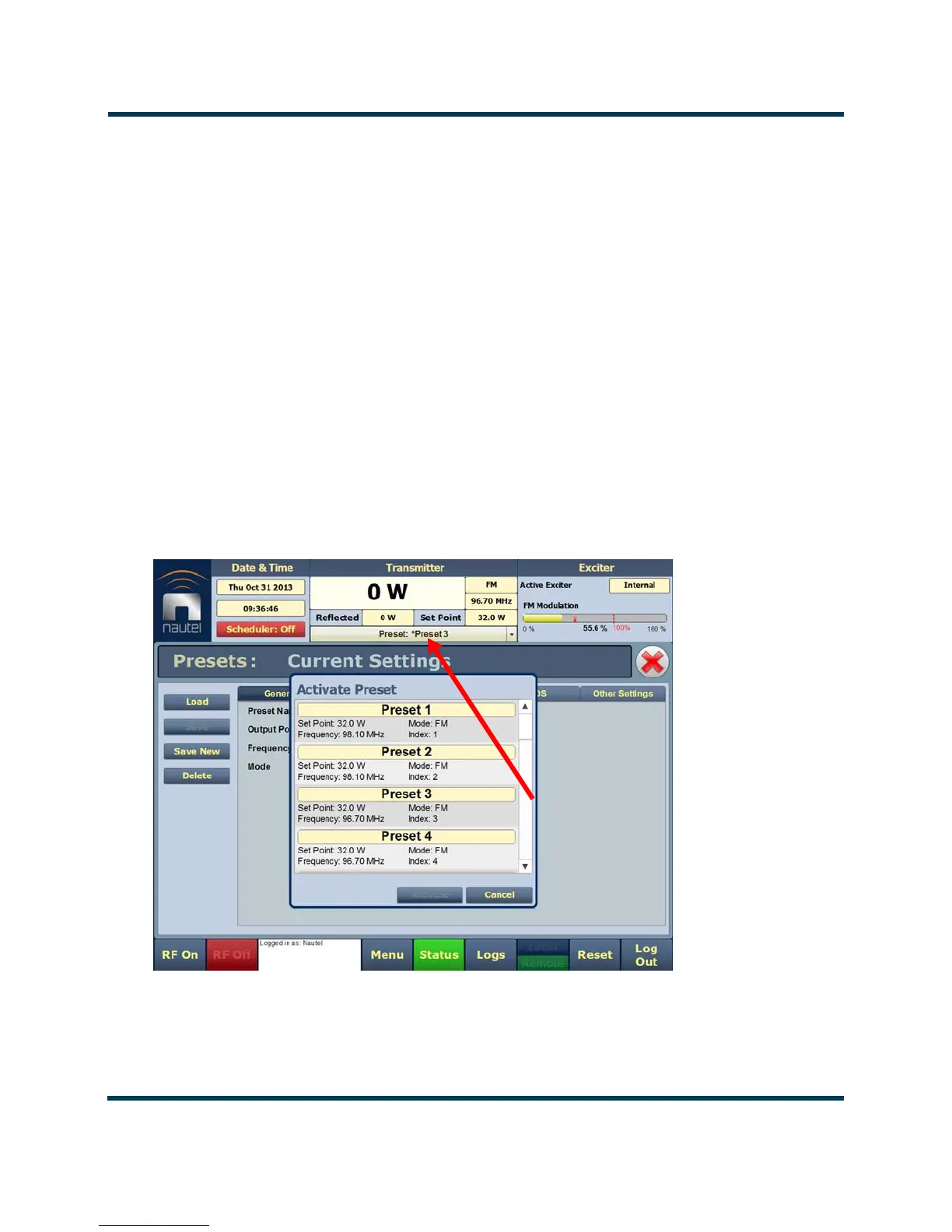
In the Transmitter block in the AUI’s top banner, press the bar that contains the active preset name
and the drop-down arrow (see Figure 2.38). The Activate Preset window will appear, which contains
a list of all preset options. Press and highlight the desired preset and press the Activate button to
enable the preset as the transmitter’s active preset. Press the Cancel button to close this window.
Figure 2.38: Activating Presets
CLICK HERE TO
DISPLAY PRESET
SELECTION
OPTIONS



 To Next Page