VS1 Operations and Maintenance Manual Operating the transmitter
Issue 3.1 2013-10-01 Page 2-23
Viewing Transmitter Log
This section includes the following topics:
• Transmitter Log - Using the AUI
• Managing the log - see page 2-24
• Transmitter Log - Using the front panel - see page 2-28
You can view transmitter log information using the remote AUI (see Transmitter Log - Using the
AUI on page 2-23) or using the local front panel display (see Transmitter Log - Using the front panel
on page 2-28).
Transmitter Log - Using the AUI
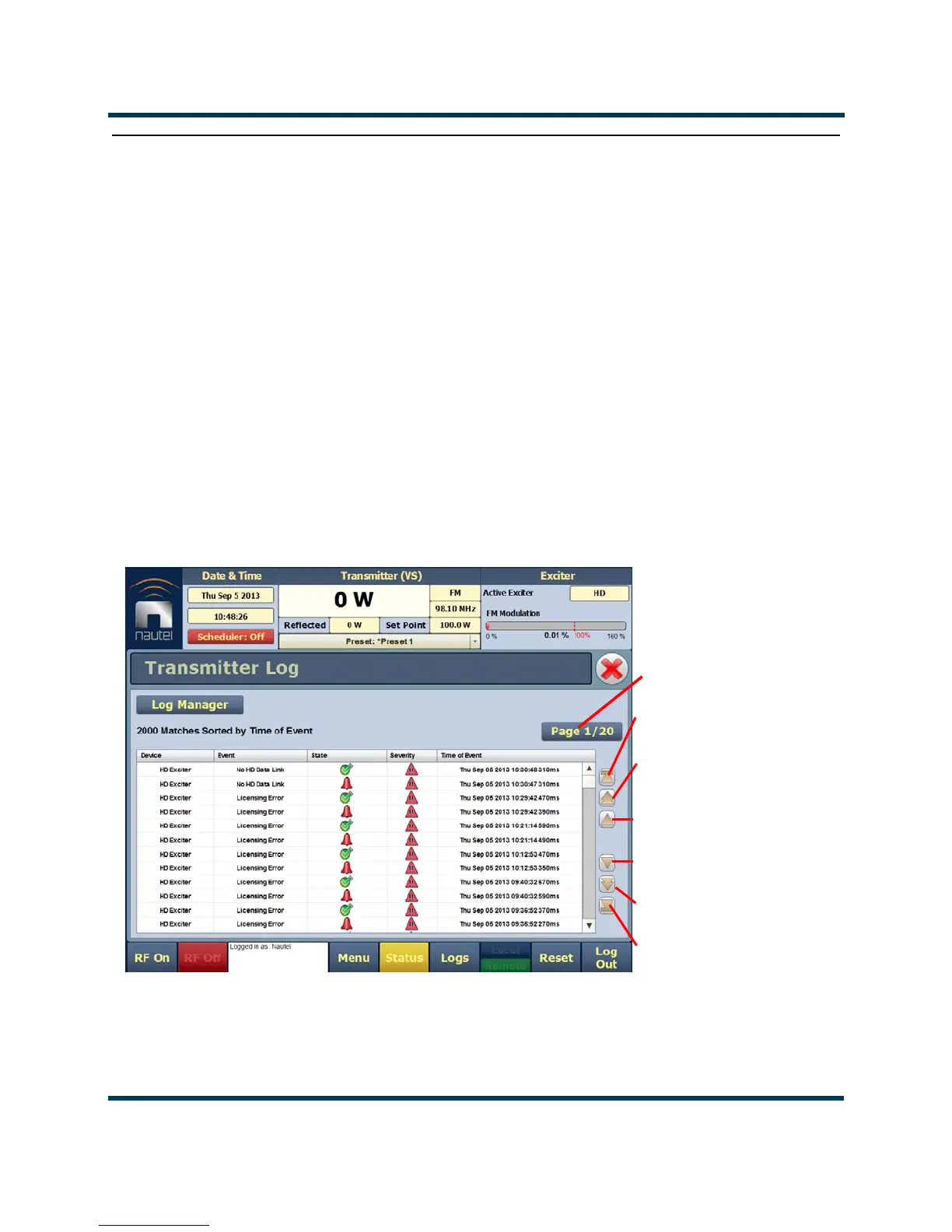
You can view the VS1’s events log using the AUI’s Log page - see Figure 2.9. This page shows a
configurable log of all transmitter events. To view the Log page, click the
Log button in the bottom
banner of any AUI screen.
Figure 2.9: Log page
The main screen displays a chronological listing of events. Depending on the selections made in the
Log Manager screen (see Managing the log on page 2-24), the events displayed may be filtered by the
originating device (Controller or Exciter), and the time of occurrence.
Selects item at top of
current page
Selects next
lower page items
Scrolls up one
Scrolls down one
Selects next
higher page
Selects item at bottom
of current page
Page number of
displayed page



 To Next Page