VS1 Operations and Maintenance Manual Operating the transmitter
Page 2-160 Issue 3.1 2013-10-01
The Available Files on USB section is used for adding audio files to the playlist (Add Files button) or
refeshing the playlist (Refresh button) . Audio files must be stored on an external USB device
plugged into the USB-A (A1J8B) or USB-B (A1J8C) connector on the rear of the controller; they are
not stored in the transmitter. Only the audio files stored in the root directory of the most recently
connected USB device appear on the playlist. The list will be empty if no USB device is connected.
The USB drive must be formatted with a FAT32 file system. Click the Refresh button to force an
update of the list of files on the mounted USB.
The audio player supports only one USB device at a time. If multiple USB devices are connected,
only the most recently connected USB is recognized as the active USB drive. If multiple USB devices
are connected and one is removed, both devices are unmounted.
The Manage Files button displays a pop-up window that allows the user to Browse for files and
Upload them to the USB or Delete them from the USB. You should not delete files that are part of
more than one playlist.
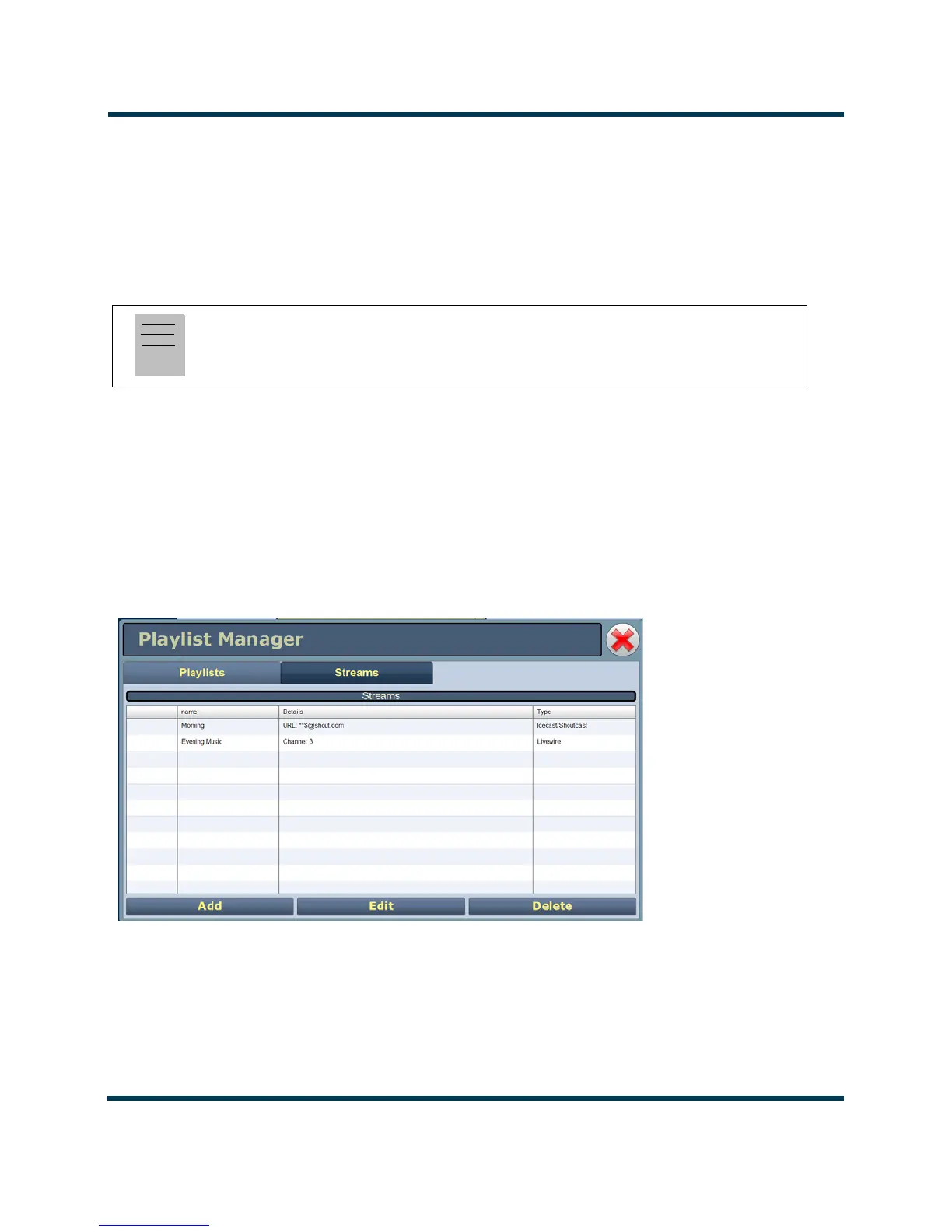
Figure 2.144: Playlist Manager Page - Streams Tab
Note:
MPEG Layer-3 audio coding technology licensed from Fraunhofer IIS and Thomson.


 To Next Page