NComputing!L300!and!L350!User!Manual!!
Page!@V!of!?@!! ! 498943_v2!
5.3!Information!Tab!
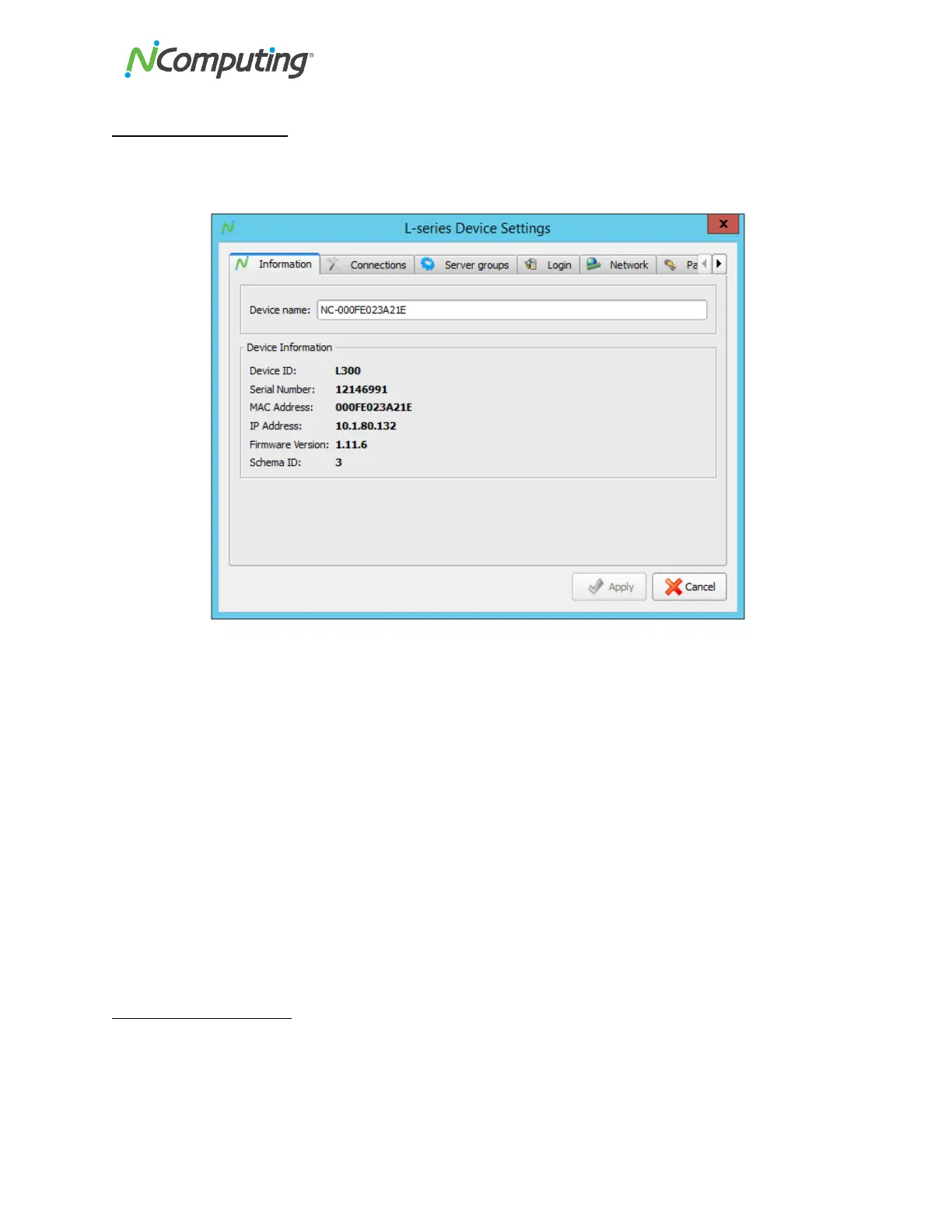
The!“Information”!tab!provides!basic!informatio n !o n !a !se lec te d !d ev ic e,!in clu d in g !its !n et w o rk !ad d re ss !
and!serial!number.!This!tab!also!allows!you!to!rename!the!device!to!facilitate!identification.!
!
!
Displays!the!designated!device!name.!This!can!be!edited!as!desired.!
The!Model!ID!of!the!selected!device!
The!serial!number!of!the!selected!device!
The!MAC!address!of!the!selected!device!
The!current!IP!address!of!the!selected!device!
Displays!the!currently!loaded!firmware!version!of!the!selected!device.!In!this!
example,!the!device!firmware!is!out!of!date,!as!indicated!by!the!text!“Please!
update!firmware.”!
Miscellaneous!build!information!(for!NComputing!internal!use!only)!
5.4!Connections!Tab!
The!“Connections”!tab!provides!several!hosts!configuration!options!that!determine!how!the!device!finds!
and!then!connects!to!available!hosts.!From!here,!you!can!set!the!device!to!automatically!detect!
available!servers,!or!instruct!the!device!to!connect!to!specific!predetermined!hosts!or!groups!of!hosts.!


 To Next Page