EasyManua.ls Logo

NEC Express5800 120Li - User Manual

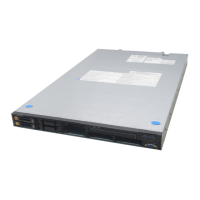
NEC Express5800 120Li
344 pages
Print Icon
To Next Page IconTo Next Page
Loading...
N8100-1239F/1240F/1325F/1326F/1298F
NEC Express5800/120Li
User's Guide
2nd Edition
12-2006
856-124032-101-01
ONL-4152cN-120Li-100-99-0612

Table of Contents

Other manuals for NEC Express5800 120Li

Questions and Answers

  • S
    Sharon RodriguezAug 18, 2025
    How to troubleshoot NEC Server that fails to power on?
    • B
      Brian PowellAug 18, 2025
      If your NEC Server fails to power on, it might not be properly supplied with power. Check if the power cord is connected to a power outlet (or UPS) that meets the power specifications for the server.
  • M
    Miss Kimberly HarrisAug 21, 2025
    What to do if NEC Express5800 120Li Server fails to access internal or external devices?
    • J
      Jonathan Ortiz DDSAug 21, 2025
      If your NEC Server fails to access internal or external devices, the cables might not be properly connected. Make sure that the interface cables and power cord are properly connected.
  • J
    Jose MilesAug 23, 2025
    What does it mean if the STATUS lamp is unlit or lit/flashing in amber on NEC Server?
    • H
      heather44Aug 23, 2025
      An unlit or lit/flashing amber STATUS lamp on your NEC Server indicates that the server has failed.
  • C
    Carlos CameronAug 26, 2025
    Why does the PXE boot fail or the NEC Express5800 120Li Server is not found on the network?
    • M
      Melanie WilsonAug 26, 2025
      If the PXE boot fails or your NEC Server is not found on the network, the internal LAN controller may be disabled in the BIOS Setup utility. Check the setting with the BIOS setup utility.
  • L
    Luke PittmanAug 28, 2025
    What does it mean if the STATUS lamp is flashing green on NEC Express5800 120Li Server?
    • S
      Steven VelezAug 28, 2025
      If the STATUS lamp is flashing green on your NEC Server, it means the server is operating with the memory or CPU in a degraded state. A single-bit memory error has often occurred. Identify the device in degraded state by using the BIOS setup utility "SETUP," and replace it as soon as possible.
  • U
    uprinceAug 30, 2025
    What does it mean when the hard disk drive access lamp is lit amber on NEC Express5800 120Li?
    • A
      Alexander CaldwellAug 30, 2025
      If the hard disk drive access lamp is lit in amber on your NEC Server, it indicates a hard disk drive error. To identify a failed hard disk drive, see the lamps provided for each hard disk drive.
  • J
    Julia DavenportSep 1, 2025
    What to do if AC power is not supplied to one of the two power supply units of NEC Express5800 120Li?
    • M
      Michael PhillipsSep 1, 2025
      If AC power is not supplied to one of the two power supply units of your NEC Server, connect the power cord to supply power. If the power supply unit is faulty, contact your service representative.
  • M
    Maria WhiteSep 3, 2025
    What to do if a temperature alarm was detected on NEC Express5800 120Li?
    • J
      jaredwilsonSep 3, 2025
      If a temperature alarm was detected on your NEC Server, check if the internal fans are clean and if the fan units are firmly connected. If the STATUS lamp indication does not change when the fans are normal, contact your service representative.
  • K
    Kelly PowellSep 6, 2025
    What does it mean if the POWER FAIL lamp is lit amber on NEC Server?
    • R
      Ryan MclaughlinSep 6, 2025
      If the POWER FAIL lamp is lit amber on your NEC Server, the power supply unit fails due to over-current, over-voltage, or fan failure. Contact your service representative.
  • C
    Cameron PattonSep 8, 2025
    What to do if a voltage alarm was detected on NEC Server?
    • E
      Elizabeth JacobsonSep 8, 2025
      Contact your service representative.

Summary

Chapter 1 Notes on Using Your Server

Warning Labels and Safety Notes

Explains warning labels, safety symbols, and general safety instructions for server use.

Power Supply and Cord Safety

Details safe practices for using the power supply and cord to prevent hazards.

Chapter 2 General Description

Basic Operations: Power, POST, and Peripherals

Instructions for operating the front panel, power, POST, and using the DVD-ROM drive.

Chapter 3 Setting Up Your Server

Setup Flow and Optional Device Installation

Outlines the overall setup process and instructions for installing optional hardware components.

Connecting Peripherals and Power

Step-by-step instructions for connecting external devices and the power cord safely.

Initial Server Power-On and System Configuration

Details the procedure for powering on the server and initial system setup tasks.

Chapter 4 Configuring Your Server

System BIOS Setup Utility

Covers accessing and navigating the BIOS setup utility, including on-screen items and parameters.

Hardware Configuration: PCI, Peripherals, and Chipset

Details configuration options for PCI slots, peripheral devices, and advanced chipset controls.

RAID Configuration and Management

Guides through RAID configuration, enabling features, and using LSI Logic setup utilities.

Chapter 5 Installing the Operating System with Express Setup

Express Setup and Windows Server 2003 Installation

Introduces Express Setup and guides the installation of Windows Server 2003.

Setup Flow and Driver Installation Process

Details the setup flow, driver installation, and advanced network/graphics settings.

Chapter 6 Installing and Using Utilities

NEC EXPRESSBUILDER: Modes and Core Functions

Introduces NEC EXPRESSBUILDER, its operational modes, and core setup functions.

Configuration Diskette Creator and Tools Menu

Details the Tools menu options and the process of creating configuration diskettes.

Chapter 7 Maintenance

Chapter 8 Troubleshooting

Error Messages and POST Codes Reference

Lists error codes, messages, and recommended actions for diagnosing hardware failures.

Chapter 9 Upgrading Your Server

Safety and Static Precautions for Hardware Upgrades

Essential safety guidelines and static discharge prevention measures for hardware upgrades.

CPU and Memory Component Installation

Procedures for CPU installation, heat sink/water cooling, and DIMM installation.

Chapter 10 Internal Cabling Diagrams

Appendix C IRQ and I;O Port Address

Appendix D Installing Windows Server 2003 x64 Editions

Appendix E Installing Windows Server 2003

Clean Installation and Partitioning Strategy

Guides through clean installation of Windows Server 2003 and drive letter modification.

NEC Express5800 120Li Specifications

General IconGeneral
NetworkDual Gigabit Ethernet
CPUIntel Xeon
RAID SupportYes
Power Supply Unit250W or 300W (depending on configuration)
Operating System SupportWindows Server, Linux

Related product manuals