E2600 Controller-Drive Tray Installation Guide 23
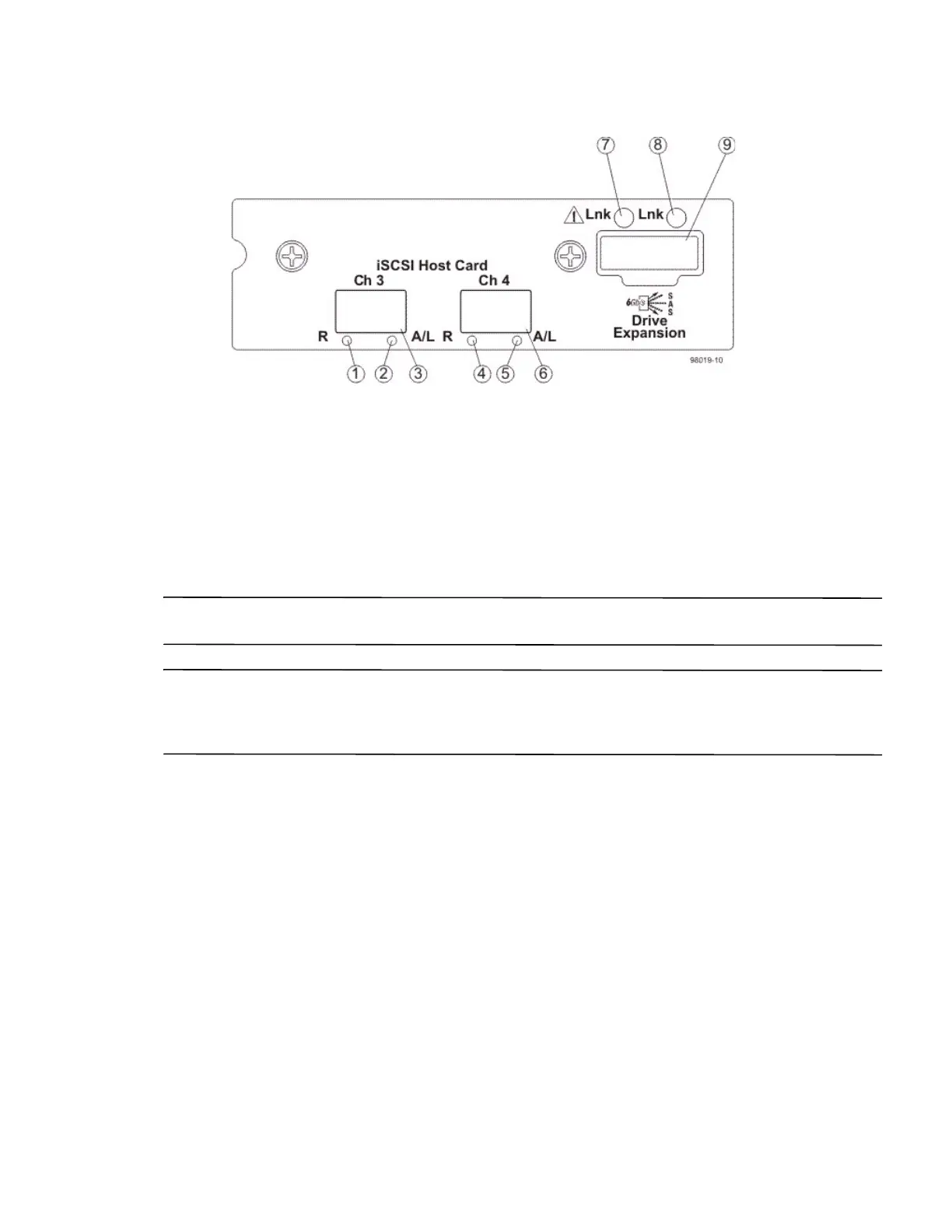
Figure 23 E2660 Right-Rear Subplate with a 10-Gb iSCSI Host Interface Card
1. Host Interface Card Link 3 Up LED
2. Host Interface Card Link 3 Active LED
3. iSCSI Host Interface Card Connector 3
4. Host Interface Card Link 4 Up LED
5. Host Interface Card Link 4 Active LED
6. iSCSI Host Interface Card Connector 4
7. ESM Expansion Fault LED
8. ESM Expansion Active LED
9. Expansion SFF-8088 Port Connector
ATTENTION Possible equipment damage – You must use the supported drives in the drive tray to ensure proper
performance. For information on supported drives, contact a Technical Support representative.
ATTENTION Risk of equipment malfunction – To avoid exceeding the functional and environmental limits,
install only drives that have been provided or approved by the original manufacturer. Not all controller-drive trays
are shipped with prepopulated drives. System integrators, resellers, system administrators, or users of the
controller-drive tray can install the drives.
For Additional Information on the E2600 Controller-Drive Tray Configuration
Refer to the Storage System Site Preparation Guide on the SANtricity ES Storage Manager Installation DVD for
information about the installation requirements of the various E2600 storage array components.



 To Next Page