E2600 Controller-Drive Tray Installation Guide 102
Table 20 LEDs on the Power-Fan Canister
Things to Know – LEDs on the E2660 Controller-Drive Tray
The following topics provide details on the LEDs found on the E2660 controller-drive tray.
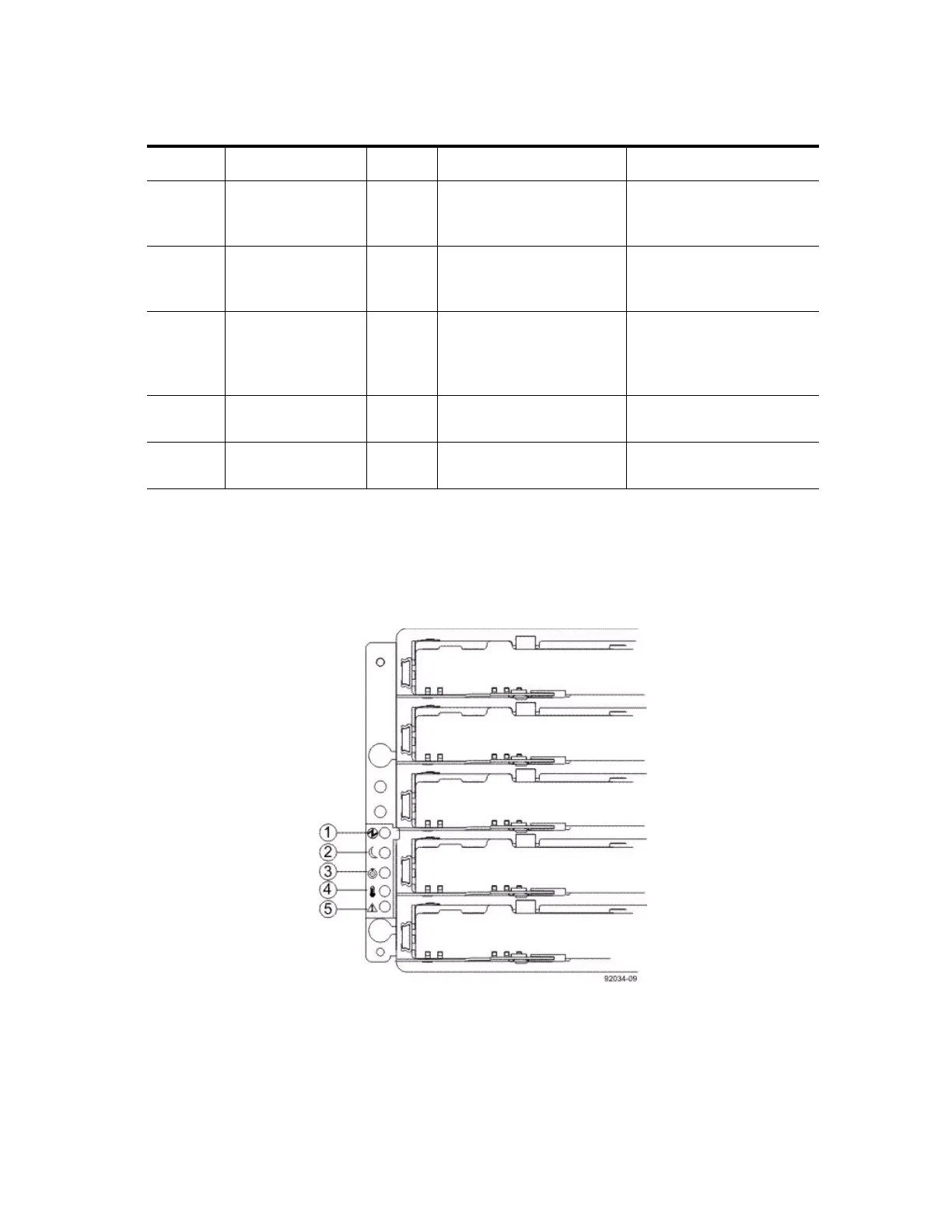
LEDs on the Left End Cap
Figure 94 LEDs on the Left End Cap
1. Controller-Drive Tray Locate LED
2. Service Action Required LED
3. Controller-Drive Tray Over-Temperature LED
4. Power LED
5. Standby Power LED
Location LED Color On Off
1 Standby Power Green The controller-drive tray is
in Standby mode, and DC
power is not available.
The controller-drive tray is
not in Standby mode, and
DC power is available.
2 Power-Fan DC
Power
Green DC power from the
power-fan canister is
available.
DC power from the
power-fan canister is not
available.
3 Power-Fan Service
Action Allowed
Blue The power-fan canister can
be removed safely from the
controller-drive tray.
The power-fan canister
cannot be removed safely
from the controller-drive
tray.
4 Power-Fan Service
Action Required
Amber A fault exists within the
power-fan canister.
Normal status.
5 Power-Fan AC
Power
Green AC power to the power-fan
canister is present.
AC power to the power-fan
canister is not present.



 To Next Page