BTS User Manual
Neware Technology Ltd.
http://www.newarebattery.com
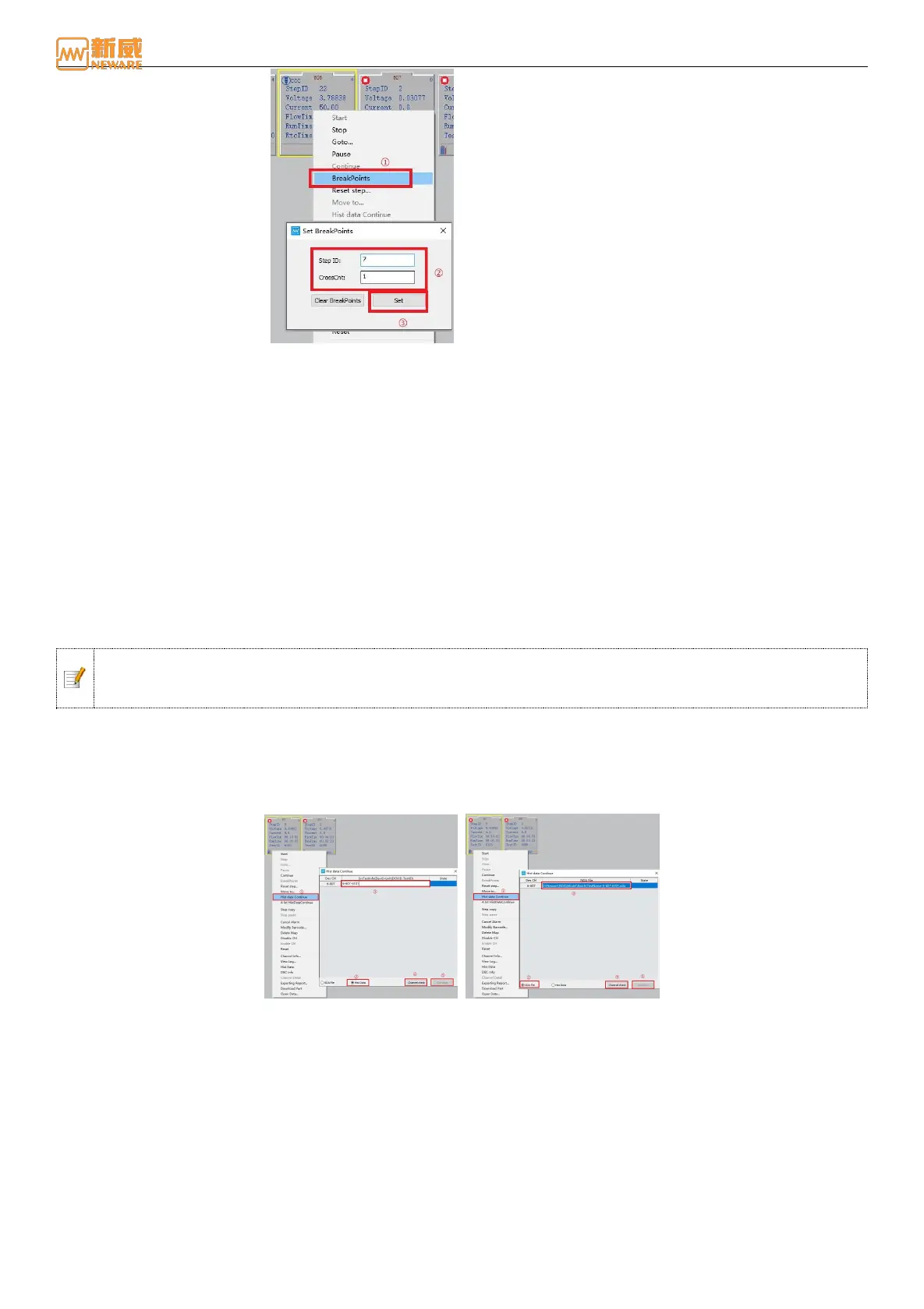
Figure 4-22 Breakpoints
The set BreakPoints interface is as shown in the figure. In the figure, it indicates that the channel test stops after the
discharging operation at the seventh step in the process. Click the Setup button to complete the setting. Users can also clear
the current settings of BreakPoints.
Continue
For the channel under manual "stop" state, "pause" state, and "protection" state, in case of power failure of the
upper-machine, the user can connect to the original unfinished test step to continue the test, effectively preventing the loss
of measurement data.
Operation: Select the channel to perform the "connection" operation. Right-click "Connection". You can restore the
corresponding channel to the step state.
Notice: ‘Stop’ and ‘Continue’ working together to suspend and resume channel test work. Channels that
have completed the test will not be able to "continue." program forcibly exits or powers off. Restart the
program and you can continue the system.
Historical Data Continue
Select the channel. You can continue the historical data, continue the step test, and maintain the consistency of test data. On
the historical data connection selection screen, select the source test information or NDA file for historical data connection.
The current test cannot connect to historical data. You need to start a new step to connect historical data. If no image file is
displayed, use the image tool to load the NDA file and connect the historical data again after the image is generated.
Figure 4-23 Source test information historical data connection Figure 4-24 Continuation with NDA file history data
The "migration" function is to change the unfinished steps and test data of the original channel to the target channel to
continue the test, so as to ensure the normal operation of the battery test, and automatically connect the test data of the
damaged channel. (The current test cannot be migrated, so you need to start a new step before the migration. If no image
file is displayed, you need to use the image tool to load the NDA file and perform channel migration again after the image
is generated.)
Users can migrate the test flow and breakpoint information from the current step to the target channel as follows:
1. Right-click the channel to be executed and click Migrate. The Channel Migration setting interface is displayed, as
shown in 4-25:



 To Next Page