BTS User Manual
Neware Technology Ltd.
http://www.newarebattery.com
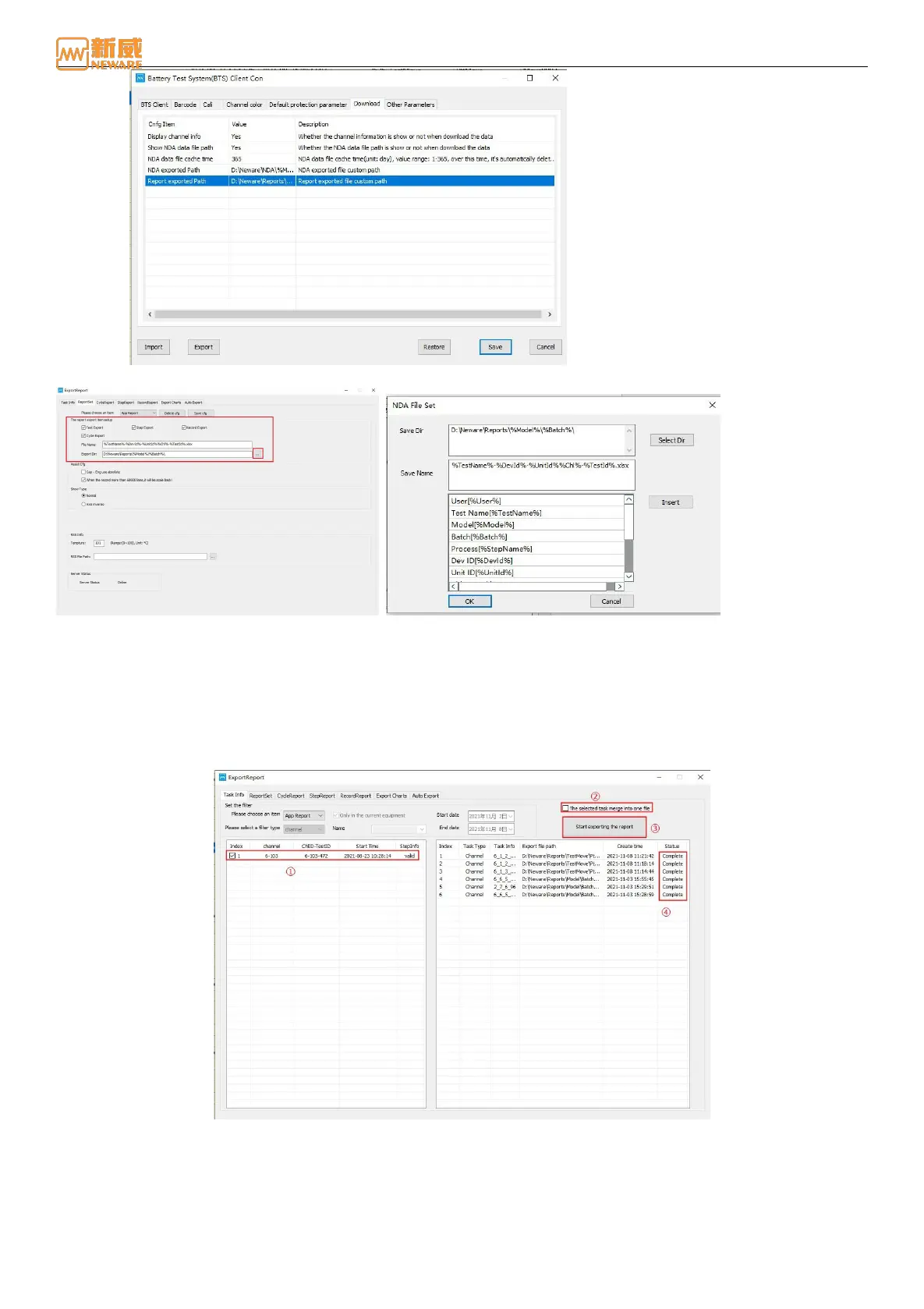
Figure 4-45 Default path for exporting reports
Figure 4-46 Report export directory Figure 4-47 Report export directory and name settings
Set the filter criteria to filter reports based on the filter type (channel, barcode number, test name, battery model, battery
batch number, and user name), name, and time. Click Start to filter. Reports that meet the filter criteria are displayed in the
report filter result bar on the left. Select the report to be exported and click "Start" to export the report. The exported report
will appear in the report guide bar on the right. After exporting the report successfully, the status will be displayed as
"complete." If you want to combine the selected reports into one report file, select Merge the selected tasks into one file.
Otherwise, the selected filtering results are exported to a report.
Figure 4-48 Report filtering setting
4.8. Battery’s Barcode Management
The BTS battery test system provides the battery barcode management software, which can insert the barcode into the main
channel and the barcode of the tray and save the data to the database. After starting the test, the abnormal battery channel
and tray number can be traced according to the barcode number. You can also query historical data and assist with battery
test data analysis.



 To Next Page