BTS User Manual
Neware Technology Ltd.
http://www.newarebattery.com
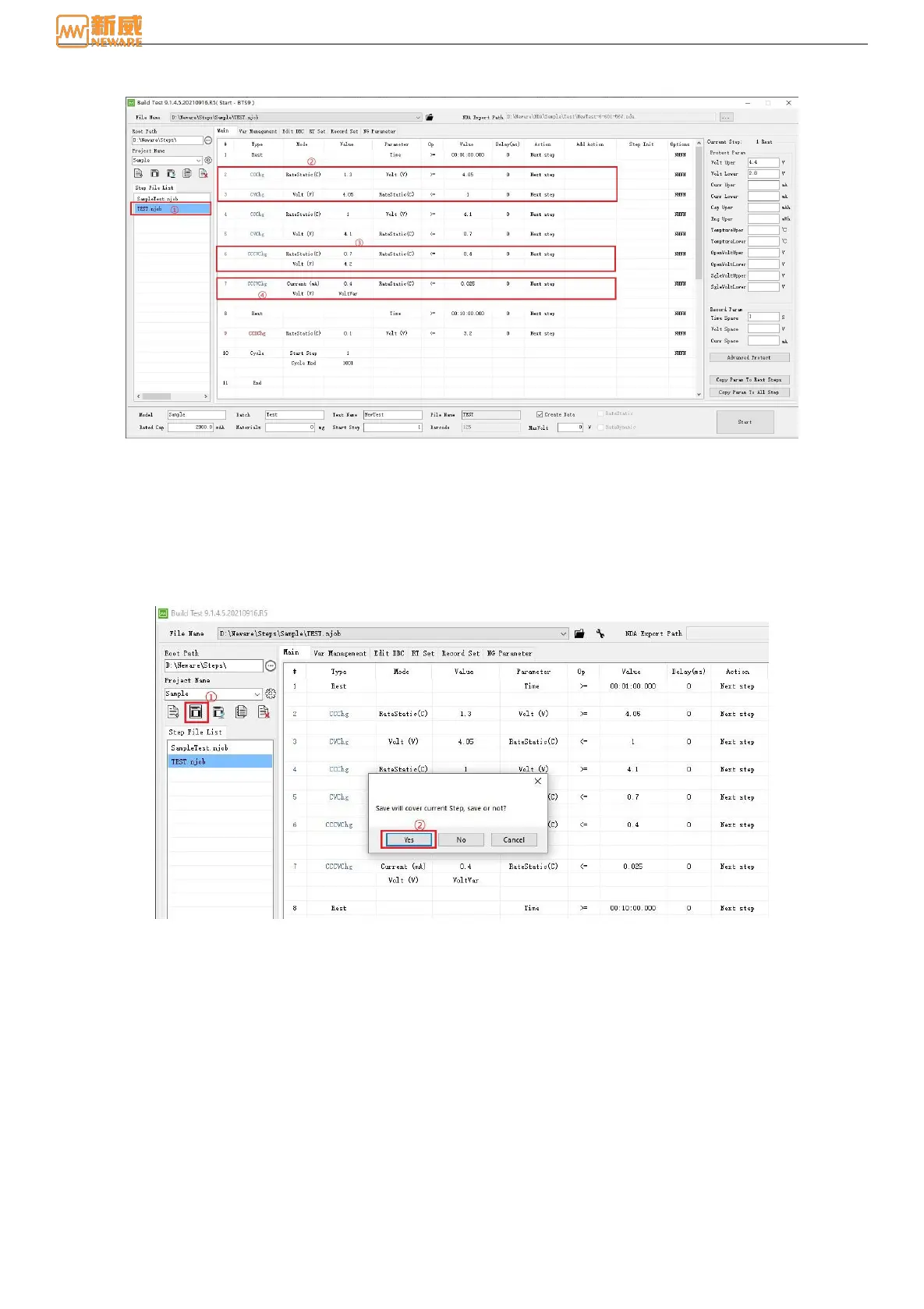
6.)Set up a complete step flow
Figure 8-24 Step Flow
Here we need to pay attention to step ②, including CC charging, CV charging, and step ③, CC and CV charging. The
meaning of the two words is consistent, that is, CC and CV. The first CC is to reach the CV value and then CV. In step ④, a
user-defined variable, VoltVar, is used as the voltage parameter, which is easy to understand and simple to operate.
Step ⑦: Nominal capacity is used to calculate the C-rate current value.
7.) Display Settings: This feature is described in section 8.4.
8.) Record Settings: This feature is described in detail in section 8.5.
9.) Save the steps.
Figure 8-25 Save steps
8.8. Successfully Start
Set up the steps flow, save and start operating the steps on the specific channel.
1.)Right-click on the channel and click Start. In the step editor, select TEST.njob, and click Start, see Figure 8-26.
2.)After the startup, right-click on the channel and you will see the DBC information column. Click DBC info to view
the real-time DBC information, Figure 8-27.



 To Next Page