331
❚❚ Aperture
Aperture is adjusted using camera controls.
Zoom and Maximum Aperture
Changes to zoom can alter the maximum aperture by up to
1
1
/
3 EV. The camera however automatically takes this into
account when setting exposure, and no modifications to camera
settings are required following adjustments to zoom.
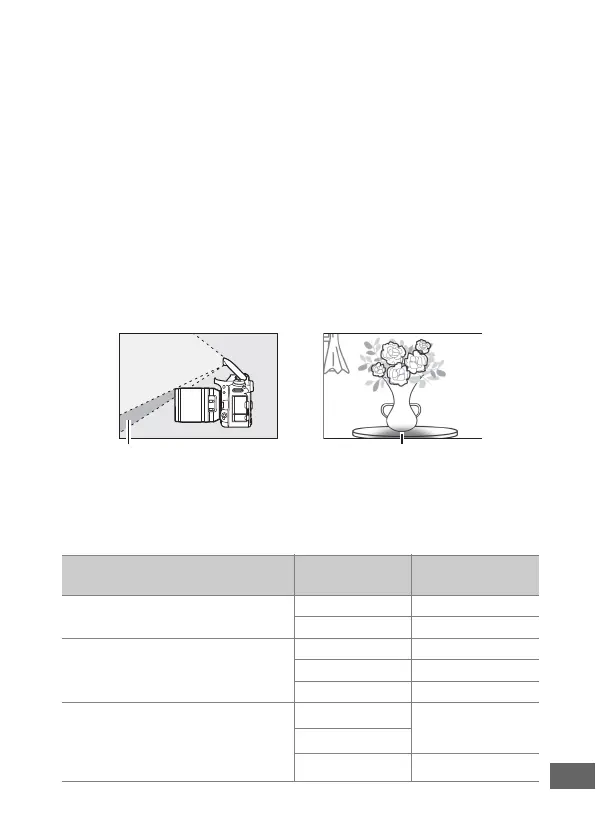
❚❚ Using the Built-in Flash
When using the built-in flash, be sure the subject is at a range of
at least 0.6 m (2 ft) and remove lens hoods to prevent vignetting
(shadows created where the end of the lens obscures the built-in
flash).
When the lens is mounted on the following cameras, the built-in
flash may be unable to light the entire subject at ranges less than
those given below:
Shadow Vignetting
Camera Zoom position
Minimum distance
without vignetting
D7500/D7200/D7100/D7000/
D300 series/D200/D100
18 mm 1.0 m/3 ft 4 in.
24–140 mm No vignetting
D90/D80/D50
18 mm 2.5 m/8 ft 3 in.
24 mm 1.0 m/3 ft 4 in.
35–140 mm No vignetting
D5600/D5500/D5300/D5200/
D5100/D5000/D3400/D3300/
D3200/D3100/D3000/D70 series/
D60/D40 series
18 mm
1.0 m/3 ft 4 in.
24 mm
35–140 mm No vignetting



 To Next Page