Home
Nikon
Digital Camera
D7500
Page 56
Nikon D7500 - Page 56
384 pages
Manual
Save Page as PDF
To Next Page
To Next Page
To Previous Page
To Previous Page
Loading...
30
3
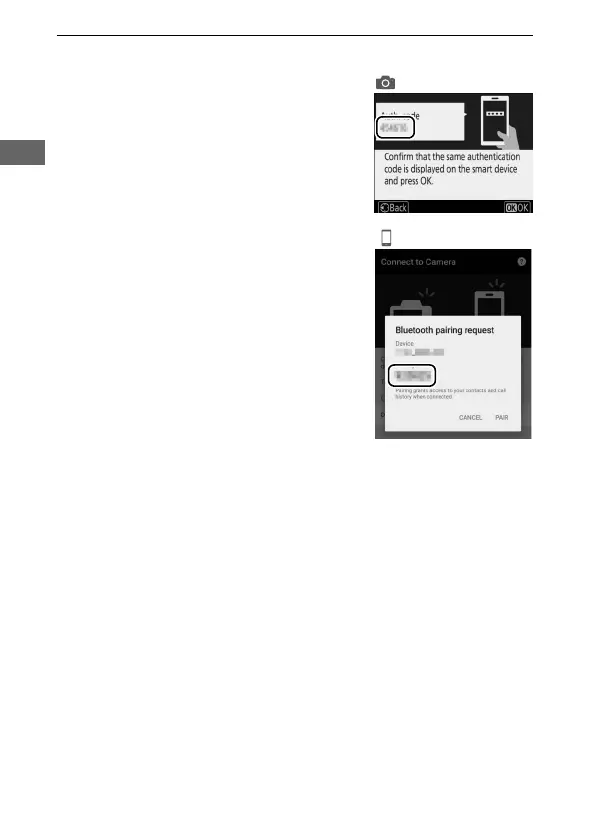
Camera/smart device
: Check the authentication code.
•
Camera
: The authentication code is
displayed in the camera monitor
.
•
Smart device
: Check that
the
authentication code sho
wn in
SnapBridge is the same as that
displayed by the c
amera.
55
57
Table of Contents
Main Page
Package Contents
6
Table of Contents
7
For Your Safety
14
Notices
18
Introduction
27
Getting to Know the Camera
27
The Camera Body
27
The Mode Dial
32
The Control Panel
34
The Viewfinder
35
The Diopter Adjustment Control
37
Using the Tilting Monitor
38
Using the Touch Screen
40
The Multi Selector
44
First Steps
45
Attach the Camera Strap
45
Charge the Battery
45
Insert the Battery and a Memory Card
47
Attach a Lens
50
Turn the Camera on
52
Connecting Using Snapbridge
54
Pairing
54
Android
55
Ios
59
The Wi-Fi Prompt (Ios)
65
Tutorial
67
Camera Menus: an Overview
67
Using Camera Menus
68
Screen Operations
71
The Battery Level and Number of Exposures Remaining
72
Point-And-Shoot" Photography (I and J Modes)
74
Tips for Live View
82
Basic Playback
85
Deleting Unwanted Photographs
86
Basic Photography and Playback
74
Matching Settings to the Subject or Situation (Scene Mode)
87
Choosing a Scene Mode
87
Special Effects
90
Choosing Special Effects
90
Options Available in Live View
92
P, S, A, and M Modes
98
Choosing a Mode
98
P: Programmed Auto
99
S: Shutter-Priority Auto
100
A: Aperture-Priority Auto
101
M: Manual
102
Long Time-Exposures (M Mode Only)
105
User Settings: U1 and U2 Modes
109
Saving User Settings
109
Recalling User Settings
110
Resetting User Settings
111
Release Mode
112
Choosing a Release Mode
112
Self-Timer Mode (E)
115
Mirror up Mode (M )
117
Image Recording Options
119
Image Area
119
Image Quality
123
Image Size
125
Focus
126
Autofocus
126
Autofocus Mode
126
AF-Area Mode
129
Focus Lock
137
Manual Focus
141
ISO Sensitivity
144
ISO Sensitivity Settings
144
Auto ISO Sensitivity Control
146
Exposure
149
Metering
149
Autoexposure Lock
151
Exposure Compensation
153
White Balance
156
White Balance Options
156
Fine-Tuning White Balance
160
Choosing a Color Temperature
163
Preset Manual
165
Viewfinder Photography
165
Live View (Spot White Balance)
169
Managing Presets
172
Image Enhancement
174
Picture Controls
174
Selecting a Picture Control
174
Modifying Picture Controls
176
Preserving Detail in Highlights and Shadows
179
Active D-Lighting
179
High Dynamic Range (HDR)
181
Flash Photography
185
Using the Built-In Flash
185
Auto Pop-Up Modes
185
Manual Pop-Up Modes
187
Flash Control Mode
190
Flash Compensation
193
FV Lock
195
Viewing Information for the Built-In Flash
198
Optional Flash Units
200
Remote Control Photography
201
Using an Optional ML-L3 Remote Control
201
Recording and Viewing Movies
205
Recording Movies
205
Using the I Button
209
The Live View Display: Movies
211
Viewing and Hiding Indicators
213
Frame Size, Frame Rate, and Movie Quality
214
Indices
215
The Movie Crop
216
Taking Photos in Movie Mode
217
Viewing Movies
220
Editing Movies
222
Trimming Movies
222
Saving Selected Frames
226
Other Shooting Options
227
The R Button (Viewfinder Photography)
227
The I Button
231
Two-Button Reset: Restoring Default Settings
232
Other Settings
233
Bracketing
235
Location Data
249
More on Playback
251
Viewing Images
251
Full-Frame Playback
251
Thumbnail Playback
251
Calendar Playback
252
Using the Touch Screen
254
The I Button
256
Photo Information
257
Taking a Closer Look: Playback Zoom
266
Protecting Photographs from Deletion
268
Rating Pictures
269
Rating Individual Pictures
269
Rating Multiple Pictures
270
Selecting Photos for Upload
271
Selecting Individual Photos
271
Selecting Multiple Photos
272
Deleting Photographs
273
During Playback
273
The Playback Menu
274
Menu List
276
D the Playback Menu: Managing Images
276
C the Photo Shooting Menu: Photo Shooting Options
278
The Movie Shooting Menu: Movie Shooting Options
283
A Custom Settings: Fine-Tuning Camera Settings
286
B the Setup Menu: Camera Setup
294
N the Retouch Menu: Creating Retouched Copies
301
O My Menu/M Recent Settings
304
Technical Notes
305
Compatible Lenses
305
Compatible CPU Lenses
305
Compatible Non-CPU Lenses
311
Other Accessories
313
Caring for the Camera
314
Storage
314
Cleaning
314
Image Sensor Cleaning
315
Caring for the Camera and Battery: Cautions
322
Troubleshooting
327
Battery/Display
327
Shooting (All Modes)
328
Shooting (P, S, A, M)
331
Playback
332
Bluetooth and Wi-Fi (Wireless Networks)
334
Miscellaneous
334
Error Messages
335
Specifications
341
Lens Kits
355
AF-S DX NIKKOR 18-140Mm F/3.5-5.6G ED VR
355
AF-S DX NIKKOR 18-200Mm F/3.5-5.6G ED VR II
362
Fully Automatic
369
Approved Memory Cards
372
Memory Card Capacity
373
Battery Life
375
Index
377
Other manuals for Nikon D7500
Menu Guide
238 pages
Quick Tips
2 pages
How Do
6 pages
Related product manuals
Nikon D750
537 pages
Nikon D70
218 pages
Nikon D70s
219 pages
Nikon D700
533 pages
Nikon D780
944 pages
Nikon D7000
348 pages
Nikon D7100
384 pages
Nikon D7200
423 pages
Nikon D70-series
221 pages
Nikon D70 VBA10401
92 pages
Nikon D7000 Experience
14 pages
Nikon D700 - Digital Camera SLR
48 pages



 To Next Page