EasyManua.ls Logo

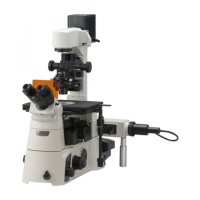
Nikon Eclipse Ti-E - User Manual

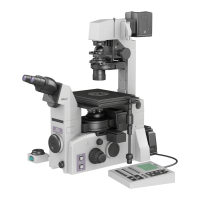
Nikon Eclipse Ti-E
133 pages
Print Icon
To Next Page IconTo Next Page
Loading...
Inverted Microscope
Instructions
M450 E 07.10.NF.1

Table of Contents

Questions and Answers

  • T
    Tony LeeSep 12, 2025
    How to merge images in binocular eyepiece of Nikon Eclipse Ti-E Microscope?
    • K
      Kyle DavisSep 12, 2025
      If, when viewing through the binocular eyepiece of your Nikon Microscope, the images do not merge into a single image, adjust the interpupillary distance.
  • M
    Melanie OlsonSep 10, 2025
    How to fix dia illuminator lamp that does not light on Nikon Eclipse Ti-E?
    • J
      Joshua MooreSep 10, 2025
      If the dia illuminator lamp does not light on your Nikon Microscope, replace it with a specified lamp.
  • D
    Dylan PriceSep 9, 2025
    Why PFS information not displayed on Nikon Eclipse Ti-E Microscope?
    • D
      David HenrySep 9, 2025
      If you are not seeing PFS information on the status display panel of your Nikon Microscope, press the DISPLAY switch to display PFS information. Also, attach and connect the PFS Motorized Nosepiece correctly.
  • S
    Sandra GonzalezSep 8, 2025
    Why can't I focus with 20x or 40x objective on Nikon Microscope?
    • K
      Kimberly BowmanSep 8, 2025
      If the image cannot be focused with a 20x or 40x objective on your Nikon Microscope, use a culture vessel with a bottom plate thickness within the objective's correction range.
  • L
    lelliottAug 23, 2025
    Why is the image too dark on my Nikon Microscope?
    • S
      steven78Aug 23, 2025
      If you're experiencing a vignetted field of view, a completely dark image, or uneven brightness with your Nikon Microscope, make sure all parts are correctly attached. Ensure movable parts like the optical path selector knob, nosepiece, filter sliders, condenser turret, and Bertrand lens in/out lever are in their click-stop positions. Also, the concentric ring on the stage might be interfering with the optical path, so adjust the specimen position. Check that the field diaphragm image is correctly focused on the specimen's focal plane by properly focusing and centering the condenser. The field diaphragm opening should be slightly larger than the field of view. Finally, inspect and clean all optical elements, including the culture vessel, for any dirt or dust.
  • P
    Peggy HayesSep 5, 2025
    What to do if Nikon Microscope image cannot be focused?
    • D
      Dr. Michael BakerSep 6, 2025
      If the image cannot be focused with your Nikon Microscope, even with the objective at the highest position, ensure that the stage is correctly attached.
  • M
    Michael DurhamSep 4, 2025
    Why does my Nikon Eclipse Ti-E Microscope lamp burn out so fast?
    • B
      Barbara WilsonSep 5, 2025
      If the lamp burns out quickly on your Nikon Microscope, replace it with a specified lamp.
  • D
    Devon HowardSep 4, 2025
    What to do if the lamp does not turn on/off on Nikon Eclipse Ti-E Microscope?
    • W
      Walter StewartSep 4, 2025
      If the lamp on your Nikon Microscope does not turn on or off when you operate the dia illumination ON/OFF switch, replace the lamp with a specified lamp. Also, check the connection of the control cable.
  • D
    David GardnerSep 2, 2025
    How to fix insufficient brightness in Nikon Microscope's field of view?
    • C
      Christina KellerSep 2, 2025
      If there is insufficient brightness in the field of view of your Nikon Microscope, set the aperture diaphragm to 70 to 80% of the numerical aperture of the objective. Ensure that the field diaphragm image is correctly focused on the specimen's focal plane by properly focusing and centering the condenser. Also, use the optical path selector switches to set the optical path to the observation port.
  • S
    Sandra RaySep 1, 2025
    Why is my Nikon Eclipse Ti-E image yellow-tinged?
    • M
      Mrs. Taylor BoyerSep 1, 2025
      If you observe a yellow-tinged image with your Nikon Microscope, move the ND filter into the optical path. You might also need to adjust the brightness control knob to match the lamp rating if the lamp voltage is too low.

Summary

Part Names

Ti-E, Ti-E;B Microscope

Illustrates the Ti-E microscope body and its key accessories for identification.

Microscope Base Components

Details the parts and features of the microscope base unit.

Operation Panels Overview

Describes the front, left, and right operation panels and their controls.

Connector Panels

Identifies and describes the right and rear connector panels.

Eyepiece Components

Details various eyepiece base units, tubes, and their features.

PFS System Components

Introduces the PFS Motorized Nosepiece and PFS Offset Controller.

Stage Options

Describes the different types of stages available for attachment.

Illumination and Condenser Systems

Details the types of dia pillar illuminators and condensers.

Power Supply and Adapter

Describes the power supply units and the AC adapter.

Microscopy

Introduction to Microscopy

Provides an overview of Ti series microscopes and microscopy procedures.

Bright-Field (BF) Microscopy

Explains the workflow and steps for bright-field microscopy.

Phase Contrast (Ph) Microscopy

Explains the workflow and steps for phase contrast microscopy.

External Phase Contrast Microscopy

Explains the workflow and steps for external phase contrast microscopy.

In-focus Observation with PFS

Details the in-focus observation method using the Perfect Focus System (PFS).

Operation

Power Management

Explains procedures for powering the microscope and illumination on and off.

Dia Illumination Operation

Covers the operation of the dia illumination system, including lamp and brightness.

Microscope Controls Overview

Describes the functions of the controls on the microscope body's panels.

Optical Path and Filter Usage

Explains optical path selection and filter operations.

Condenser and Eyepiece Tube Operation

Details operations for condensers and eyepiece tubes.

Focusing and Objective Handling

Covers focusing mechanism, objective operation, and related controls.

Pillar Illuminator and Stage Operation

Details operations specific to the pillar illuminator and mechanical stage.

PFS System Operation

Explains the operation of the Perfect Focus System (PFS).

Assembly

Preparation and Tools

Lists required tools, installation conditions, and checks for assembly.

Installing Microscope Base

Details the steps for installing the microscope body (base).

Attaching Eyepiece System

Explains attachment of eyepiece base units and tubes.

Attaching Illumination and Condenser

Details attaching the dia pillar illuminator and condensers.

Connecting Power and Control Modules

Covers connecting power supply, PFS controller, and AC adapter.

Registering Objectives

Explains how to register objective information for PFS functionality.

Troubleshooting

Image Viewing Issues

Lists problems related to image quality and viewing, with solutions.

Operational Problems

Addresses issues encountered during microscope operation and their fixes.

Electrical System Faults

Lists problems related to power and electrical components with solutions.

Perfect Focus System (PFS) Errors

Troubleshoots issues specific to the PFS function and its indicators.

Daily Maintenance

Cleaning Optical Components

Details procedures for cleaning lenses and filters to maintain image quality.

Cleaning and Disinfection

Provides instructions for cleaning the microscope body and disinfection.

Storage and Inspections

Gives guidelines for storing the microscope and recommends periodic inspections.

Specifications

Microscope Model Specifications

Lists technical specifications for TI-DH and TI-DS illuminator configurations.

PFS System Specifications

Details specifications for the PFS Motorized Nosepiece and Offset Controller.

Power and Safety Specifications

Lists specifications for AC adapter, power cords, and safety compliance.

System Diagram

Nikon Eclipse Ti-E Specifications

General IconGeneral
TypeInverted Research Microscope
Optical SystemCFI60 infinity optical system
SoftwareNIS-Elements imaging software
StageMotorized stage
Camera CompatibilityCompatible with various Nikon digital cameras and 3rd party cameras
ObjectivesCompatible with Nikon CFI60 objectives
FocusingMotorized focus
NosepieceMotorized 6-position nosepiece
ApplicationsLive-cell imaging, fluorescence
Objective TurretMotorized 6-position
CondenserMotorized condenser
Observation TubesBinocular and trinocular observation tubes available
Camera PortMultiple camera ports available
DimensionsVaries depending on configuration
WeightVaries depending on configuration

Related product manuals