EasyManua.ls Logo

Nikon Eclipse Ti-E - User Manual

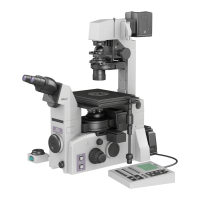
Nikon Eclipse Ti-E
133 pages
Print Icon
To Next Page IconTo Next Page
Loading...
Inverted Microscope
Instructions
M450 E 07.10.NF.1

Table of Contents

Questions and Answers

  • J
    Jennifer LewisAug 31, 2025
    How to reduce brightness of Nikon Eclipse Ti-E Microscope's field of view?
    • K
      katherinespearsAug 31, 2025
      If the field of view on your Nikon Microscope is too bright, move the ND filter into the optical path. You can also lower the lamp voltage using the brightness control knob.
  • K
    katelyn74Aug 30, 2025
    Why is the image drifting on my Nikon Eclipse Ti-E?
    • B
      Benjamin PowellAug 30, 2025
      If you are experiencing a drifting image with your Nikon Microscope, make sure the specimen is level with the stage. Ensure the nosepiece is correctly attached and rotated to a click-stop position. Also, center the annular diaphragm and raise the dia pillar illuminator upright until it reaches its limit.
  • H
    Hannah BrownAug 29, 2025
    Why brightness control knob not working on Nikon Eclipse Ti-E?
    • K
      Keith Marsh DVMAug 29, 2025
      If the brightness of the lamp on your Nikon Microscope doesn't change when you rotate the brightness control knob, verify the control cable is correctly connected and ensure the EXTERNAL (or CTRL) switch on the power supply is turned on.
  • A
    Alexandra JonesAug 28, 2025
    Why is my Nikon Microscope image unevenly focused?
    • N
      Nathan LeonardAug 28, 2025
      If you observe an uneven focus with your Nikon Microscope, make sure the nosepiece is correctly attached and rotated to a click-stop position.
  • T
    thompsonjenniferAug 27, 2025
    Why phase contrast effect cannot be obtained in Nikon Eclipse Ti-E Microscope?
    • E
      Elaine MartinezAug 27, 2025
      If you cannot obtain the phase contrast effect in phase contrast microscopy with your Nikon Microscope, ensure that you are using a phase contrast objective, not a bright-field objective. Verify that the condenser annular diaphragm is in the optical path and that an annular diaphragm with the same Ph code as the phase contrast objective is used. Center the annular diaphragm and fully open the aperture diaphragm of the system condenser.
  • M
    Michelle HawkinsAug 26, 2025
    How to prevent eyestrain with Nikon Eclipse Ti-E?
    • A
      Amanda GutierrezAug 27, 2025
      If you're experiencing eyestrain during observations with your Nikon Microscope, adjust the diopters. Also, adjust the brightness of the lamp, or use ND filters to optimize the brightness.
  • A
    amydominguezAug 25, 2025
    What to do if Nikon Eclipse Ti-E image quality is poor?
    • N
      Nancy RobertsAug 26, 2025
      If you're experiencing poor image quality, contrast, or resolution with your Nikon Microscope, start by cleaning all optical elements and ensuring you're using a clean culture vessel. Check that the objective correction ring is properly matched to the culture vessel's bottom plate thickness, and that the vessel's thickness is within the objective's correction range. Finally, make sure the field diaphragm image is correctly focused on the specimen's focal plane by properly focusing and centering the condenser.
  • P
    peterstomAug 25, 2025
    How to clean dirt or dust seen in Nikon Microscope's field of view?
    • T
      Thomas HuberAug 25, 2025
      If you're seeing dirt or dust in the field of view of your Nikon Microscope, it could be due to contaminants on the lens, other optical elements, or the culture vessel. Clean these optical elements and use a clean culture vessel. Also, ensure that the field diaphragm image is correctly focused on the specimen's focal plane by properly focusing and centering the condenser.

Summary

Part Names

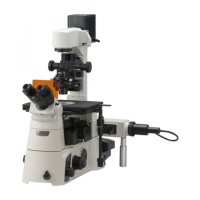
Ti-E, Ti-E;B Microscope

Illustrates the Ti-E microscope body and its key accessories for identification.

Microscope Base Components

Details the parts and features of the microscope base unit.

Operation Panels Overview

Describes the front, left, and right operation panels and their controls.

Connector Panels

Identifies and describes the right and rear connector panels.

Eyepiece Components

Details various eyepiece base units, tubes, and their features.

PFS System Components

Introduces the PFS Motorized Nosepiece and PFS Offset Controller.

Stage Options

Describes the different types of stages available for attachment.

Illumination and Condenser Systems

Details the types of dia pillar illuminators and condensers.

Power Supply and Adapter

Describes the power supply units and the AC adapter.

Microscopy

Introduction to Microscopy

Provides an overview of Ti series microscopes and microscopy procedures.

Bright-Field (BF) Microscopy

Explains the workflow and steps for bright-field microscopy.

Phase Contrast (Ph) Microscopy

Explains the workflow and steps for phase contrast microscopy.

External Phase Contrast Microscopy

Explains the workflow and steps for external phase contrast microscopy.

In-focus Observation with PFS

Details the in-focus observation method using the Perfect Focus System (PFS).

Operation

Power Management

Explains procedures for powering the microscope and illumination on and off.

Dia Illumination Operation

Covers the operation of the dia illumination system, including lamp and brightness.

Microscope Controls Overview

Describes the functions of the controls on the microscope body's panels.

Optical Path and Filter Usage

Explains optical path selection and filter operations.

Condenser and Eyepiece Tube Operation

Details operations for condensers and eyepiece tubes.

Focusing and Objective Handling

Covers focusing mechanism, objective operation, and related controls.

Pillar Illuminator and Stage Operation

Details operations specific to the pillar illuminator and mechanical stage.

PFS System Operation

Explains the operation of the Perfect Focus System (PFS).

Assembly

Preparation and Tools

Lists required tools, installation conditions, and checks for assembly.

Installing Microscope Base

Details the steps for installing the microscope body (base).

Attaching Eyepiece System

Explains attachment of eyepiece base units and tubes.

Attaching Illumination and Condenser

Details attaching the dia pillar illuminator and condensers.

Connecting Power and Control Modules

Covers connecting power supply, PFS controller, and AC adapter.

Registering Objectives

Explains how to register objective information for PFS functionality.

Troubleshooting

Image Viewing Issues

Lists problems related to image quality and viewing, with solutions.

Operational Problems

Addresses issues encountered during microscope operation and their fixes.

Electrical System Faults

Lists problems related to power and electrical components with solutions.

Perfect Focus System (PFS) Errors

Troubleshoots issues specific to the PFS function and its indicators.

Daily Maintenance

Cleaning Optical Components

Details procedures for cleaning lenses and filters to maintain image quality.

Cleaning and Disinfection

Provides instructions for cleaning the microscope body and disinfection.

Storage and Inspections

Gives guidelines for storing the microscope and recommends periodic inspections.

Specifications

Microscope Model Specifications

Lists technical specifications for TI-DH and TI-DS illuminator configurations.

PFS System Specifications

Details specifications for the PFS Motorized Nosepiece and Offset Controller.

Power and Safety Specifications

Lists specifications for AC adapter, power cords, and safety compliance.

System Diagram

Nikon Eclipse Ti-E Specifications

General IconGeneral
TypeInverted Research Microscope
Optical SystemCFI60 infinity optical system
SoftwareNIS-Elements imaging software
StageMotorized stage
Camera CompatibilityCompatible with various Nikon digital cameras and 3rd party cameras
ObjectivesCompatible with Nikon CFI60 objectives
FocusingMotorized focus
NosepieceMotorized 6-position nosepiece
ApplicationsLive-cell imaging, fluorescence
Objective TurretMotorized 6-position
CondenserMotorized condenser
Observation TubesBinocular and trinocular observation tubes available
Camera PortMultiple camera ports available
DimensionsVaries depending on configuration
WeightVaries depending on configuration

Related product manuals