Chapter 5 Laser Unit
5.5 Setting Up the LU-LR Four-laser PS Rack
1-207
5.5.3 Details on Mounting Laser Supply
Mounting laser diodes (56ICS series)
1. Turn on the key switch and the power switches of the laser diode heads located outside
the four-laser PS rack.
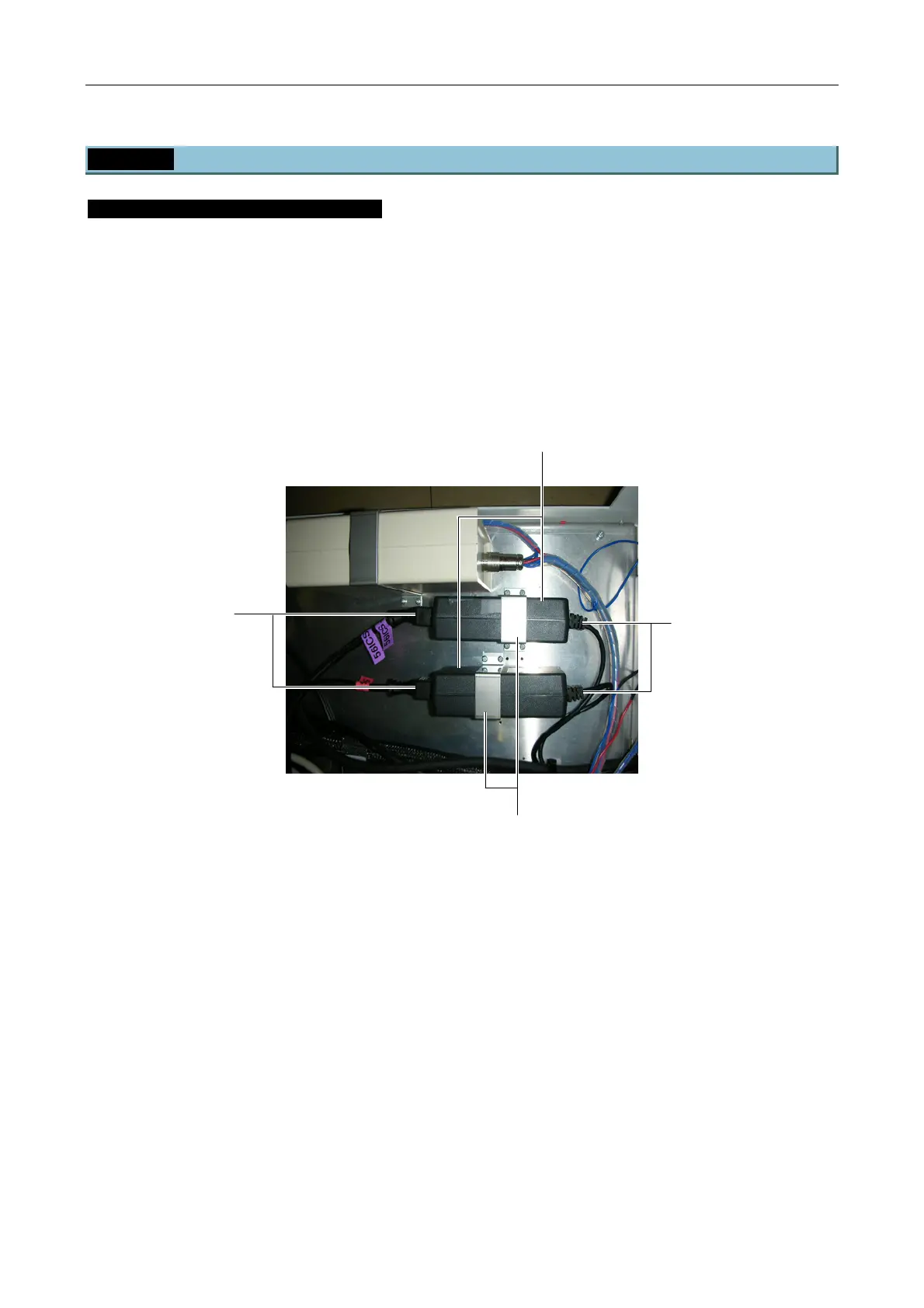
2. Secure the laser diode power supplies in the positions [2] with the provided clamps [3].
3. Connect the power cable [1] (56ICS-638nm) or [2] (56ICS-405nm, 56ICS-440nm) to each
of the laser diode power supplies.
4. Pull the cables routed from the laser diode power supplies out of the rack through the
cable port on the rear side. If any of the cables are the same series, mark them for
identification.
Figure 5.5-18
Laser diode power supplies
To the laser diode head
Clamps
Power cables
(56ICS-405nm)
(56ICS-440nm)
(56ICS-638nm)


 To Next Page